Note:
Prepare the banknotes to be counted
as shown in Fig. 15, remove the banknotes
that are torn, wet, grease or dirty.
Advice: For customer's convenience
we suggest to use a stylus, a pen-shaped
accessory designed to control the devices
with a touch interface. The stylus will facilitate your work with the sorter.
Two styluses for the resistive
touch screens are the part of delivery
set (see Figure 16).
1312
5. In case of an error, follow the advices of the «Error Messages» section.
Figure 15
Figure 16
Setup Menu
To enter the user’s settings menu, press the «MENU» key (see Figure 13).
The user’s settings menu appears on the screen. In its left part, there are
the submenu keys, in the right part there are the corresponding parameters. To
save the changes and exit the menu, press the key. After the exit, the
screen shows the selected settings. To exit the menu without saving the
changes, press the key.
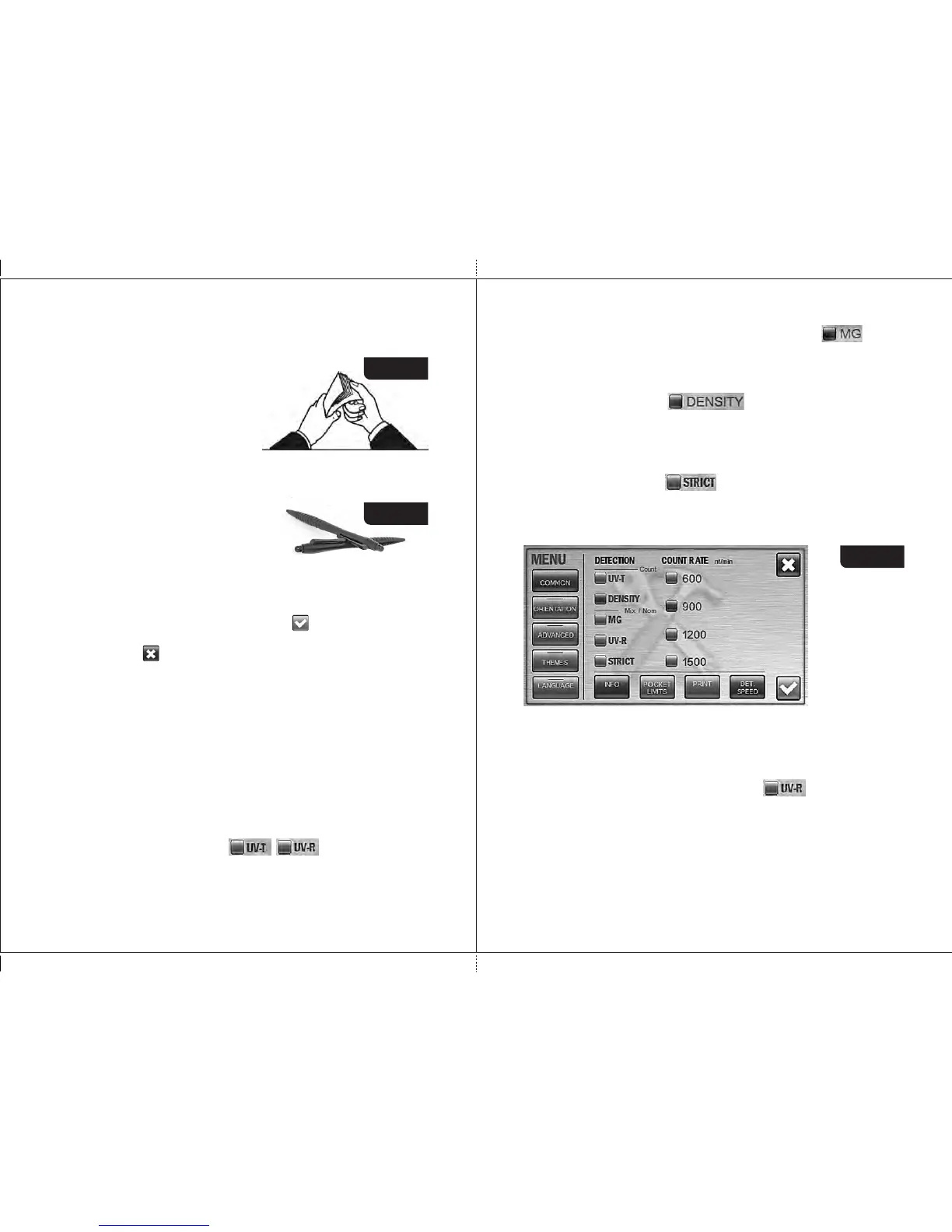
1 Submenu « COMMON » (see Fig. 17).
It includes two categories: «Detection» and «Count Rate», keys
«POCKET LIMITS», «INFO», «PRINT», and
«DET. & SPEED» are also available.
Detection
Each counting mode has own range of available detection.
In COUNT mode the transmissive UV control (UV-T) and the optical density
control of banknotes (DENSITY) are available.
In DEN and MIX modes the available kinds of detection are: the reflective
UV control (UV-R), magnetic marks control (MG), strict level of counterfeit
detection (STRICT).
UV-T and UV-R are respectively transmissive and reflective ultraviolet
detection mode. When it's activated ( , ), and a banknote with
an increased UV fluorescence has been found (for example, a counterfeit
printed on plain paper), the banknote goes to the reject pocket (the reasons of
rejection are available in the «REPORT» submenu).
DORS 800 BANKNOTE SORTERDORS 800 BANKNOTE SORTER
MG is magnetic features detection. When it's activated ( ), and a
banknote without magnetic marks has been found, the banknote goes to the
reject pocket (the reasons of rejection are available in the «REPORT»
submenu).
DENSITY is banknote density detection that available only for COUNT
mode. When it's activated ( ) and a very dark banknote has
been found (or two notes passed together) or a very transparent one, the
banknote goes to the reject pocket (the reasons of rejection are available in the
«REPORT» submenu).
STRICT means the strict level of counterfeit detection. While at common
level of detection only the key authenticity features of a banknote are
examined, at the strict level the additional authenticity features (if
any) of a banknote are examined as well as the key ones.
IMPORTANT: when the strict level of detection is activated, some genuine
notes can be rejected by a «suspect» reason.
Figure 17
Count Rate
User can choose any of four counting rates (600, 900, 1200, and 1500
banknotes per minute). The check-box opposite the selected speed is
highlighted in blue. For counting of worn notes we suggest low speed (600 or
900 notes/min).
Attention : if UV-R detection is activated ( ), only two counting
speeds (600 and 900 notes/min) are available.
Information
This screen is contained the info on the device identifier (UIN), the firmware
(FW) versions, the supported languages, the supported currencies, and the
currency database version (see Fig. 18, Fig. 19). To view the text given below,
move your finger across the screen from the bottom upwards and for the text
above - from the top downwards.



 To Next Page