4. Adjust the banknote
guides according to the
length of the longest
banknote in the batch being counted,
a l i g n t h e b a t c h e d g e s ( s e p a r a t e
banknotes shall not protrude from th e batch), and place it in the
middle of the hopper avoiding its skew. The sorter will start operation
automatically. The count is stopped when the number of the notes equal to
the stacker capacity has been counted. After the banknotes have been
removed out of the stacker, the sorter automatically resumes operation.
1110
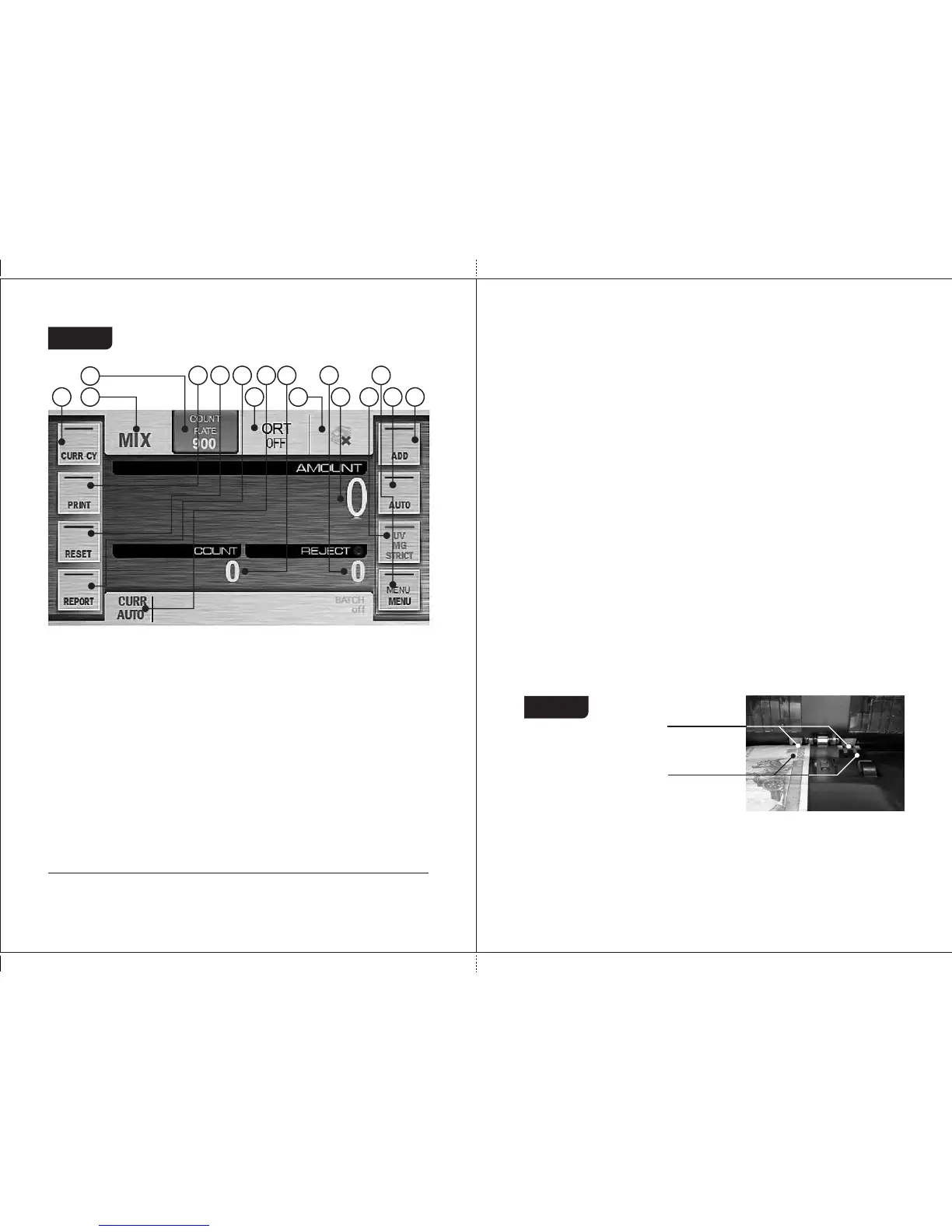
Figure 13
1
2
6
4
5
3
7
9
8
10
11
12
13
14
15
16
1. Key/indicator of counting mode;
2. Key/indicator of counting speed;
3. Key/indicator of sorting mode;
4. Key/indicator of batch mode (it's
unavailable in MIX mode);
5. Currency selection key;
6. Key for printing of counting results;
7. Counting results clear key;
8. Report key;
9. Accumulation mode key;
10. Automatic/ manual start key;
11. UV, MG, optical density, strict CF
detection ON/OFF key;
12. Settings menu key;
13. Currency indicator/ currency
selection hot key;
14. Number of counted banknotes;
15. Number of rejected banknotes;
16. Amount of counted banknotes.
1
Now the sorter is ready to work under the factory settings as follows :
— Interface language is English.
— Currency is automatic currency detection by the first banknote in a
batch.
— Counting mode is MIX.
— Start mode is automatic.
— Accumulation mode is off.
— Batch mode is off (because in MIX mode it's always disable).
— Counting speed is 900 banknotes per minute.
— Ultraviolet detection (UV) is off.
1
If required, the factory settings may be replaced by user settings.
DORS 800 BANKNOTE SORTERDORS 800 BANKNOTE SORTER
3. Adjust the feeder gap. The manufacturer presets the gap in accordance
with the currencies to be counted.
However, if the sorter often rejects the genuine banknotes and the
report (see section «Operating Keys», «Key «REPORT» , Fig. 52
and Fig. 53) indicates «Small Notes Gap», «Double Note» or
«Dimensions» as the reason of the banknotes rejection, it is necessary to
slightly turn screw 1 clockwise (toward «–») to reduce the gap (see Figure
1). If the rejection report indicates «Skew Error», «Length» or
«Dimensions», it is necessary to slightly turn screw 1 counterclockwise
(toward «+») to increase the gap (see Figure 1). The gap between
separating rollers and feeding rollers should make one note to pass free
between the rollers but to prevent two notes put together from passing (see
Figure 14).
Figure 14
— Magnetic features detection (MG) is off.
— Banknote density detection (DENSITY) is on.
— Orientation sorting (ORIENT) is off.
— Data output method is a printer (in manual mode),
connection rate is 9600.
— Extended visual mode is off.
— Sound volume is 50%.
— Screen brightness is 100%.
— Theme is by default.
— Stacker capacity is 200 banknotes.
— Reject pocket capacity is 50 banknotes.
— User profile is «I».
Separating
rollers
Feeding rollers


 To Next Page