Preparation for Use
Dräger Alcotest 9510 Washington Technical Manual V3.1 2014 15
11 Preparation for Use
Place the instrument on an open, solid surface. This surface
does not need to be level. The instrument should be free of
strong drafts during measurement. Remove dust cover and
stow away from the instrument.
Attach the AC power cable to the AC Receptacle. Apply power
to the instrument
by flipping the Power Switch adjacent to the
Fuse Compartment. Attach all accessories like the keyboard,
external printer, card reader, etc.
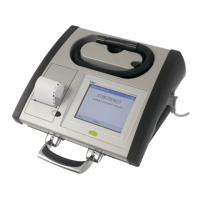
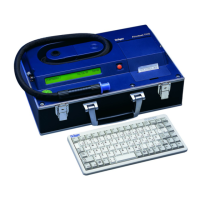
The display is on the right, and the internal printer is on the left
side
of the instrument. The storage recess for the Breath Hose
is on the top. Accessories can be connected accordingly.
11.1 Stationary Use
Plug in the supplied power cord into a grounded power
receptacle or a multi-outlet surge protector. Switch on the 9510
using the power switch located on side of the instrument.
11.2 Mobile Use
Connect the 12 Volt DC receptacle power cable to the 9510
and the vehicle’s electrical system (cigarette lighter
receptacle). The instrument will be powered up as soon as
12VDC is connected.
11.3 Disposal
At the end of the instrument’s service life, dispose of the
instrument in accordance with local and national waste
disposal regu
lations or ask a suitable disposal
contractor to dispose of the instrument. The local
environment agency can supply further details.
12 Operation
Once 110 VAC is applied to the instrument, and the power switch
is on, the display shows the desktop with a headline in the top
block, the Menu, the instrument’s serial number, peripheral
interfaces at the bottom block, and the current status in the
center of the display.
The necessary interactions of the operator and the person being
tested with the device are indicated by short messages and
instructions on the screen (touchscreen) of the device. The
device is designed for one-button operation and use of the
internal keypad. Additional accessories like an external
keyboard can be used. The microprocessor control ensures a
correct measurement sequence and safeguards against
manipulation.
Only if all steps of the breath alcohol determination are
per
fo
rmed correctly and all of the internal test criteria meet
specifications and are within the defined tolerances, the final
result of the breath alcohol analysis is displayed and a protocol
is printed on the external printer.
Each operating step carried out on the 9510 is supported
vi
sually
and acoustically. The device leads the operator through
the testing cycle with full-text messages on the screen.
12.1 Menus
“Menu” is displayed on the lower left-hand corner of the READY
screen. This Menu provides access to instrument information,
functions, and settings.
Only the About menu and the Print DUI
Packet function are available without an access key.
12.1.1 “About” Menu
To read the software version information, choose the option
“About.” Press “Cancel” to close the window.
12.1.2 “Maintenance” Menu
Maintenance functions perform diffe
rent
diagnostic,
functionality, and verification tasks to ensure the accuracy and
quality assurance of the device. These functions should only
be used by trained and authorized personnel.
12.1.3 “Settings” Menu
Settings functions allow the user to change the instrument’s
parameters. These settings can include date and time, internal/
external printing, data management, communication settings,
etc.
12.1.4 Menu Navigation
►Menu ►About
►Maintenance
►Instrument Status
►Print DUI Packet
►Supervisor Test
►ABA
►External Standard Change
►QAP +Printout
+Adjustment
+Lin Test (1-4)
+Invalid Sample
+Interference Test
+Breath Test
+Set Certification
►Show cylinder info
►Diagnostic Information
►Training Mode
►Factory Init.
►Calibration
►Alcohol
►Auto Adjust
►External Standard Parameters
►IR / EC Correction
►Internal Standard Adjust
►Calibration Dates
►EC sensor configuration
►Ambient Pressure Correction
►Update Configuration Files
►Update measurement system firmware
►Update WinCE application
►Bootloader Update
►Event logger
►Transfer records to USB
►Delete older measurement tests
►Database update
►Settings
►Service phonenumber
►Sound
►Display
►Printer
►Errorlogger
►Database management
►Reprint
►Location Database
►Change current location
►Data Entry
►Set date and time
►Network
►Modem Country Settings
►Modem Setup
►Modem Commanding
►Modem Diagnostic



 To Next Page
 Loading...