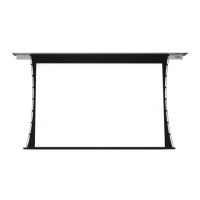
Section 6 - Tab-Tension
Adjustment Procedure
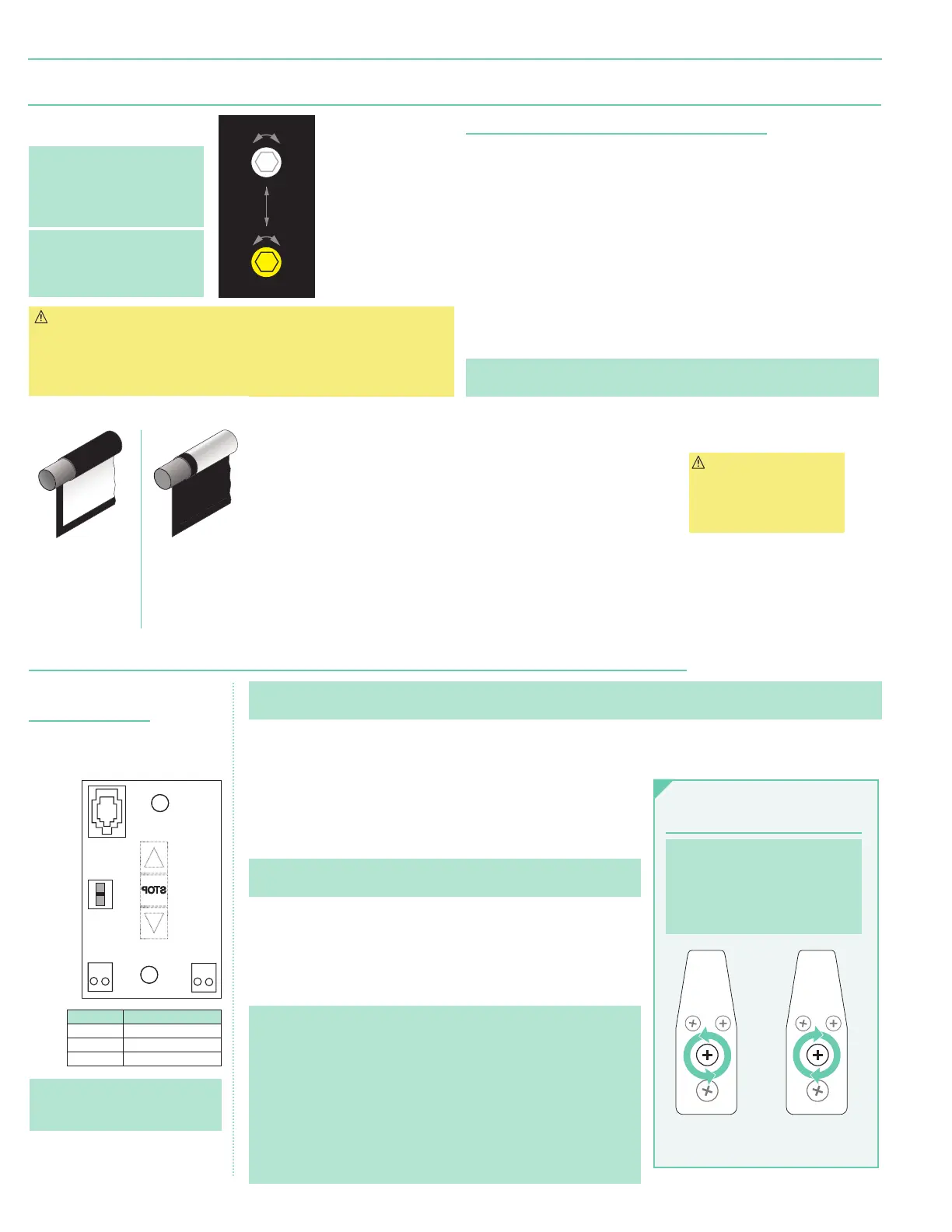
PUSH & TURN
CLOCKWISE
to INCREASE TENSION
PUSH & TURN
COUNTER-CLOCKWISE
to RELEASE TENSION
END OF
DOWEL
END OF
DOWEL
Please Note: Draper’s Tab-Tensioning
System is factory-set, and under
normal circumstances will not
require field adjustment. If wrinkles
are observed, however, follow the
adjustment procedure shown below.
Section 5 - Limit Adjustments
Section 5.2 - Motor with Internal Low-Voltage Controllers and Internal Low-Voltage Control Limit Adjustments
2. Set slide switch to lower position. Hold DOWN button to move viewing
surface to desired lower limit. If screen moves in opposite direction, release
DOWN button and hold STOP button for 4 seconds. This reverses operation
of UP and DOWN switches.
3. Move slide switch into center position. Wait several seconds.
Please Note: Do Not move slide switch from DOWN to UP in one motion. This
will set limits in same position.
4. Set slide switch to higher position. Move viewing surface to desired upper
limit by holding UP button on wall switch.
5. Return slide switch to center position to resume normal operation.
6. To set viewing surface to alternate format position, move viewing surface to
desired position and press STOP button. Hold STOP button for at least 3
seconds to record position.
Please Note: Press and release UP button on switch to move screen to upper
limit. Press and release DOWN button to move screen to lower limit.
• While motor is in motion, press STOP button for less than 2 seconds to
stop viewing surface at present position.
• Once motor is stopped, press STOP button to move viewing surface to
alternate format position.
• Hold STOP button, when motor is at rest or in motion, for 3-5 seconds to
record new alternate format position.
• Hold STOP button for 3-5 seconds while in programming mode to reverse
motor direction.
POSITION FUNCTION
DOWN Set LOWER limit
UP Set UPPER limit
CENTER Normal Operation
Please Note: 5V DC must be
connected to be able to set limits
using the wall switch.
BACK VIEW OF WALL SWITCH
U
p
D
o
w
n
C
o
m
m
o
n
+
5V
DC
To Motor
with
Internal
Slide
Switch
To Motor
with
Internal
Please Note: Hold STOP button for 3-5
seconds while in programming mode to
reverse motor direction.
Figure 10
Figure 9
Section 5.1 - Standard Motors/Quiet Motors
(Fig. 9)
Section 5.1.1 - "Down" Limit Adjustment
(requires
5/32
" (4 mm) hex key)
To Reduce Screen Drop:
1. Raise screen surface approximately 1'
(30 cm)
above desired setting
and turn off.
2. Turn DOWN
(I)
limit screw clockwise
(3 screw turns =
½
roller revolution)
.
3. Test by lowering screen. Repeat steps 1 & 2 until desired position is reached.
To Increase Screen Drop:
1. Lower screen to down limit.
2. With down switch on, turn DOWN
(I)
limit screw counterclockwise
(3 screw turns = ½ roller revolution)
to increase drop.
3. Test by raising screen approximately 1'
(30 cm)
then down to new
down limit.
4. Repeat steps 2 and 3 until desired position reached.
Please Note: For Quiet Motor with alternate limit screws:
WHITE screw = UP and RED screw = DOWN.
(Fig. 10)
.
Please Note: Screen limits are
factory set. Instructions below
for minor adjustments only.
Please check with Draper prior
to resetting screen limits.
Please Note: If screen is “Right
Hand Motor,” the WHITE/DOWN
(I)
and YELLOW/UP
(II)
limit
screws are reversed
(Fig. 10)
.
Please Note: When ordering a motor with internal low-voltage controller, if case ships separate from "guts," it includes one
25'
(7.6 m)
cable and special low-voltage switch.
1. Connect internal low-voltage switch to motor via terminal blocks, or via modular port using a four conductor modular cable.
When using modular cable, cable connectors MUST NOT be crimped in reverse, as with standard telephone cable.
(For Dry
Contacts Wiring Diagram, see Section 8.)
Figure 11
Left hand motor:
White Socket—Down
Yellow Socket—Up
Right hand motor:
White Socket—Up
Yellow Socket—Down
Left hand motor:
White Socket—Up
Yellow Socket—Down
Right hand motor:
White Socket—Down
Yellow Socket—Up
White Socket—Down
Yellow Socket—Up
White Socket—Up
Yellow Socket—Down
d Roll
Motor
End
Audience
Side
Reverse Roll
Motor
End
Back
Side
lI
I
+
+
DOWN Limit (I)
Clockwise decreases
down travel.
UP Limit (II)
Counterclockwise
increases up travel.
DOWN Limit
(I)
:
Clockwise
decreases
down travel.
UP Limit
(II)
: Counter-
clockwise
increases up
travel.
Section 5.1.2 - "Up" Limit Adjustment
If Screen Raises Too High:
1. Lower screen surface approx.
1'
(30 cm)
below desired
setting and turn off.
2. Turn UP
(II)
limit screw
clockwise
(3 screw turns = ½
roller revolution).
3. Test by advancing screen up.
4. Repeat steps 1 through 3 until
desired position is reached.
If Screen Needs to Raise Higher:
1. Lower screen surface approx.
1'
(30 cm)
below desired
setting and turn off.
2. With UP switch on, turn UP
(II)
limit screw counterclockwise
(3 screw turns =
½
roller
revolution)
.
3. Repeat steps 1 and 2 until
desired position is reached.
CAUTION: DO NOT allow
dowel to wrap over roller
when operating screen!
This could damage
screen.
CAUTION:
- Be sure all switches are in “off” position
before adjusting limit switches.
- Be prepared to shut off manually while
testing.
- Screen may be damaged by lowering
it too far and exposing roller.
- Motor must be installed so that limit
switches are pointed down.
page 4 of 7
Premier


 To Next Page