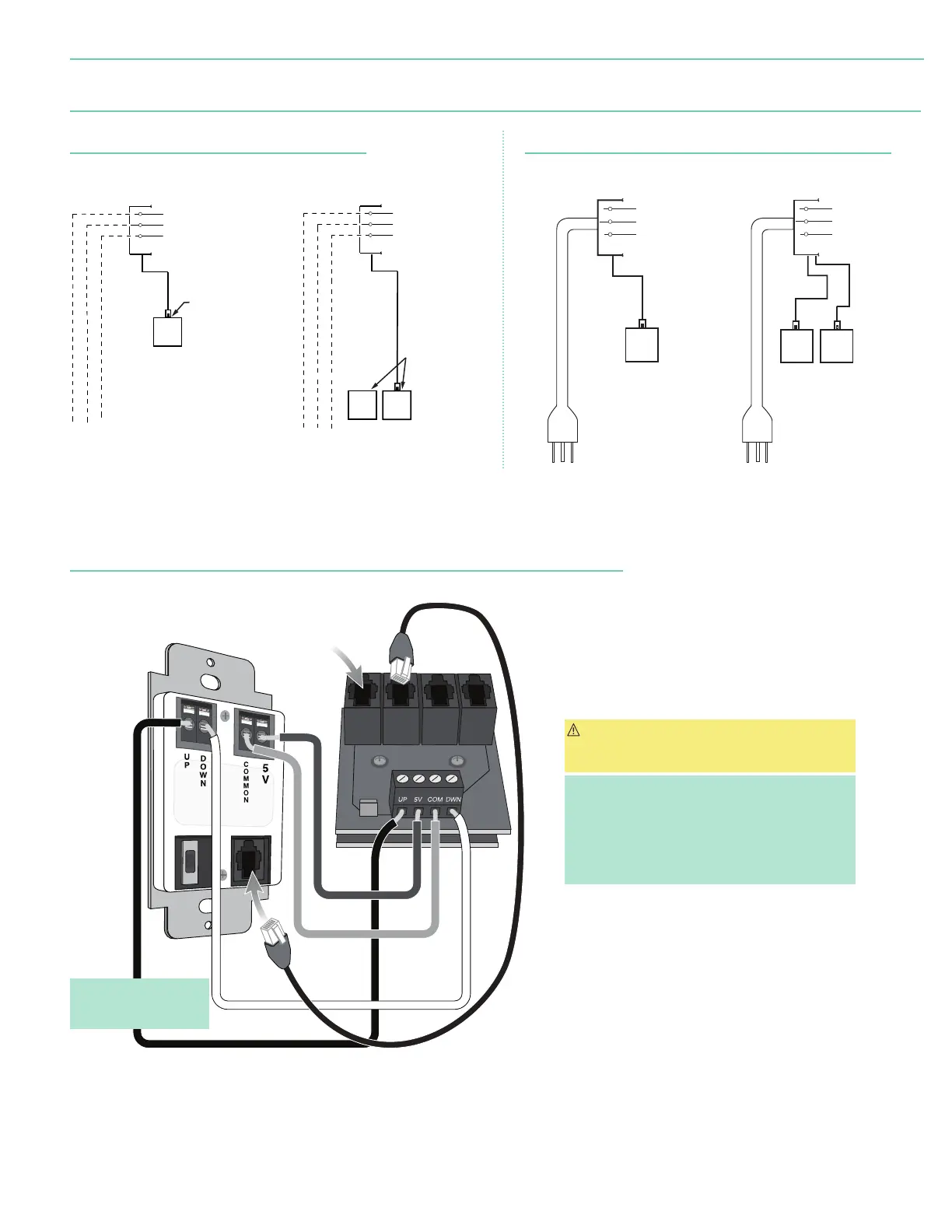
Section 10 - Wiring Diagrams: Motor with internal low-voltage controller
INSERT MOTOR DATA
CABLE HERE
Single Low-Voltage Control
Internal Screen Wiring
White (Neutral)
Black
Green (Ground)
Multiple Low-Voltage Controls
White (Neutral)
Black
Green (Ground)
Wall Switch,
RF or IR
Receiver,
or integrated
control system.
Wall Switches,
RF or IR
Receivers,
or integrated
control systems.
Data
Cable
Data
Cables
110-120V
Plug
110-120V
Plug
Multiple Station Control
White (Neutral)
Green/Yellow (Ground)
Internal Screen Wiring
Black
Dashed wiring
by electrician.
To 110-120V Line
Wall Switch,
RF or IR
Receiver,
or integrated
control system.
RJ-9
connector
Data Cables
Single Station Control
White (Neutral)
Green/Yellow (Ground)
Black
Internal Screen Wiring
Dashed wiring
by electrician.
Wall Switch,
RF or IR
Receiver,
or integrated
control system.
RJ-9
connector
Data Cable
To 110-120V Line
110-120V MOTOR AND QUIET MOTOR
(Internal Low-Voltage Controller for ILT motor)
Plug & Play 110-120V Motor
(Motor with internal low-voltage controller)
110-120V Motor
(Motor with internal low-voltage controller)
Motor with Internal Low-Voltage Controller: Switch-to-Motor
(Dry Contacts or Data Cable connection)
Back of
wall switch.
CAUTION: Although both Dry Contact and Data Cable
connections are shown, only one connection type
per motor should be used.
Please Note:
• This Splitter/Jack is located inside the motor-end
endcap of screen. To access, remove access panel
from endcap.
• Data Cables to switches or to additional motors can be
plugged into any of the three open jacks.
Please Note: 5V DC must be
connected to be able to set
limits using the wall switch.
page 7 of 7
Premier


 To Previous Page