VigorFly 200 Series User’s Guide
117
When you click OK, the login window will appear. Please use the new password to access
into the web configurator for user operation again.
4
4
.
.
7
7
.
.
4
4
C
C
o
o
n
n
f
f
i
i
g
g
u
u
r
r
a
a
t
t
i
i
o
o
n
n
B
B
a
a
c
c
k
k
u
u
p
p
B
B
a
a
c
c
k
k
u
u
p
p
t
t
h
h
e
e
C
C
o
o
n
n
f
f
i
i
g
g
u
u
r
r
a
a
t
t
i
i
o
o
n
n
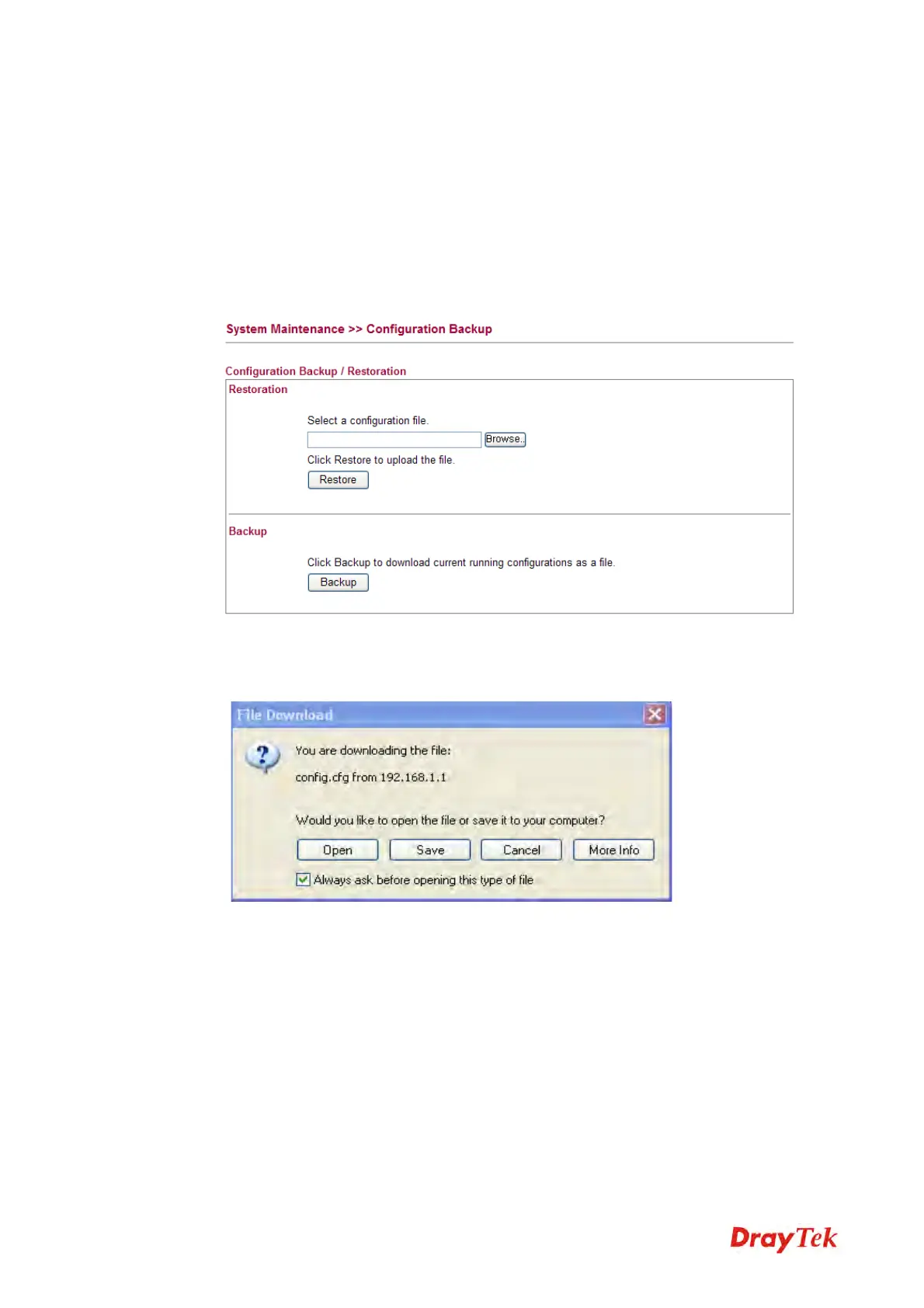
Follow the steps below to backup your configuration.
1. Go to System Maintenance >> Configuration Backup. The following windows will be
popped-up, as shown below.
2. Type a key arbitrarily for encrypting the file. Keep the key in mind. You will need it
whenever you want to restore such file. Click Backup button to get into the following
dialog. Click Save button to open another dialog for saving configuration as a file.
3. In Save As dialog, the default filename is config.cfg. You could give it another name by
yourself.



 To Next Page