VigorFly 200 Series User’s Guide
13
2
2
.
.
4
4
.
.
2
2
S
S
e
e
t
t
t
t
i
i
n
n
g
g
u
u
p
p
t
t
h
h
e
e
T
T
i
i
m
m
e
e
a
a
n
n
d
d
D
D
a
a
t
t
e
e
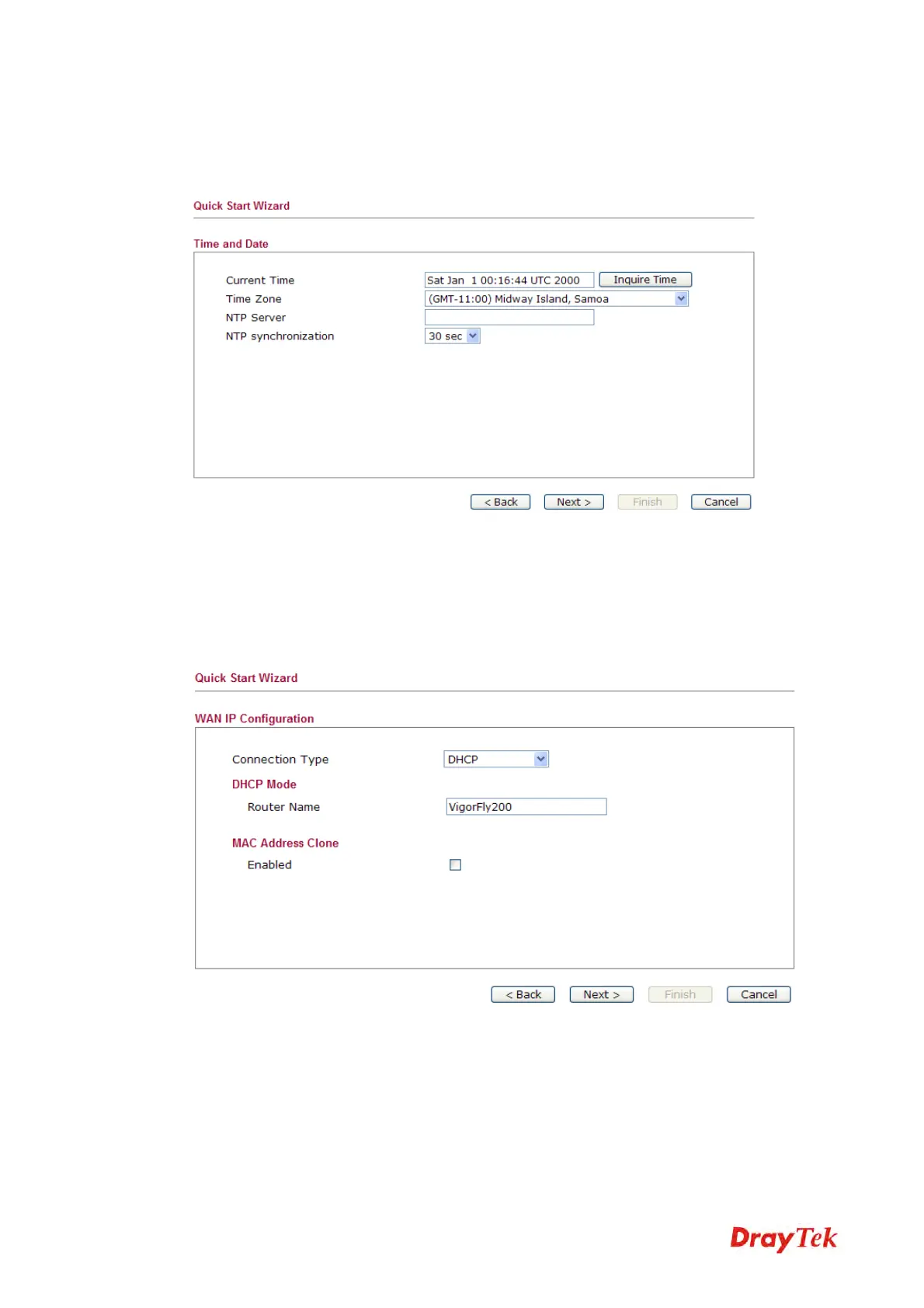
On the next page as shown below, please select the Time Zone for the router installed and
specify the NTP server(s). Then click Next for next step.
2
2
.
.
4
4
.
.
3
3
S
S
e
e
t
t
t
t
i
i
n
n
g
g
u
u
p
p
t
t
h
h
e
e
I
I
n
n
t
t
e
e
r
r
n
n
e
e
t
t
C
C
o
o
n
n
n
n
e
e
c
c
t
t
i
i
o
o
n
n
On the next page as shown below, please select the appropriate connection type according to
the information from your ISP. There are five types offered in this page. Each connection type
will bring out different web page.



 To Next Page