7
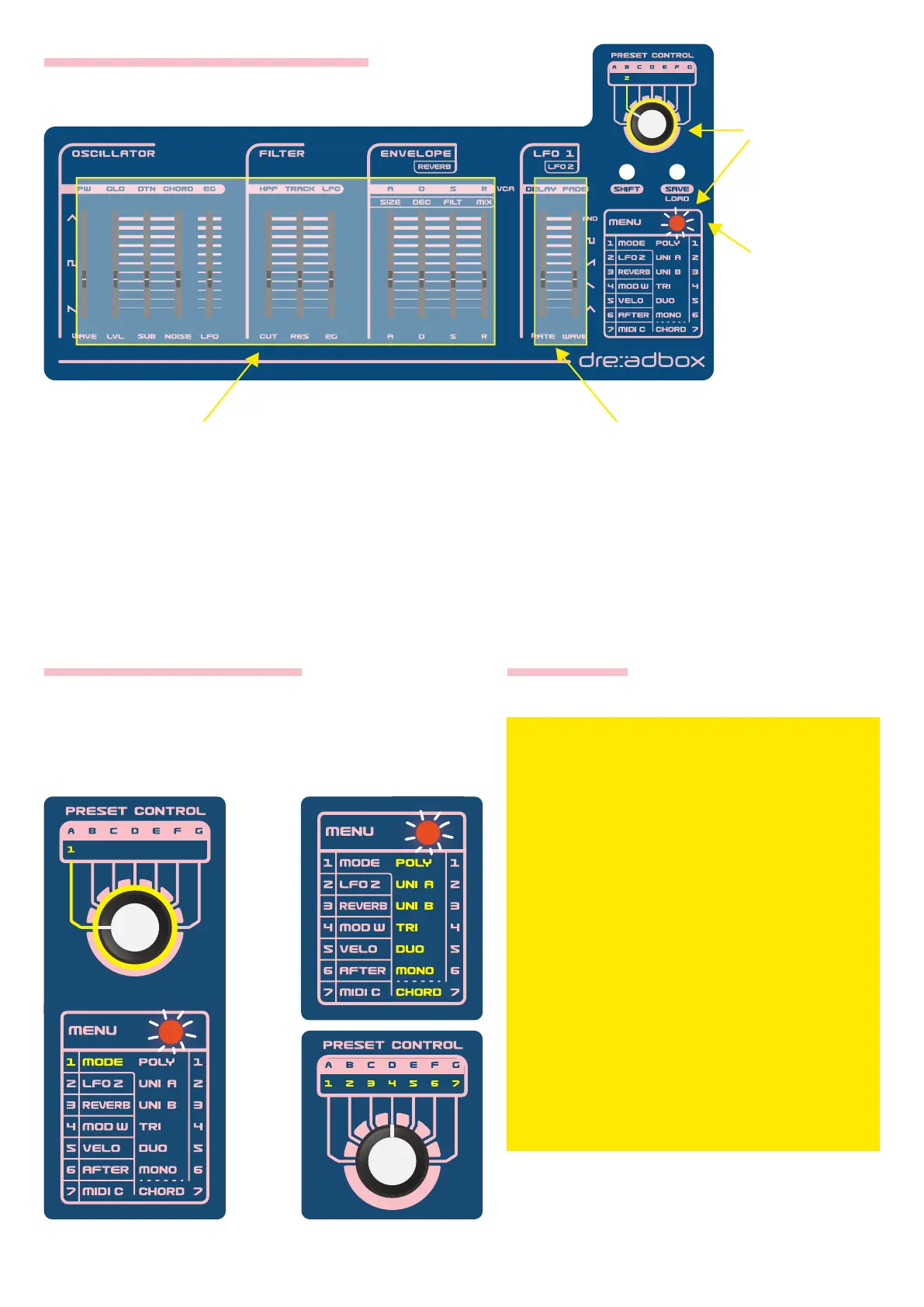
1. Press
MENU and
select LFO 2.
1. Press MENU and
select MODE.
2. Press MENU
again. Its LED will
start blinking.
3. Select a Play Mode. Press MENU again
to conrm your selection.
4. Press
MENU to exit.
2. These sliders set the LFO 2
modulation destinations and
amounts, corresponding to either
SHIFT ON or SHIFT OFF
parameter.
3. These sliders set the LFO 2
controls, corresponding to either
SHIFT ON or SHIFT OFF
parameter.
HOW TO CONTROL THE MENU
CHANGING PLAY MODE MODE LIST
1. POLY: 6 Voices to 6 keys
2. UNI A: 6 Voices to 1 key
3. UNI B: 4 Voices to 1 key
4. TRI: 2 Voices to 3 keys
5. DUO: 3 Voices to 2 keys
6. MONO: 1 Voice to 1key
7. CHORD: This is not a Play Mode.
When selecting it, you are accessing
the Chord editing page. Chords are
active only on modes 2, 3, 4, 5 and can
be accessed via the dedicated slider.


 To Next Page