49-130B MANUAL, DRITEC 4000i 230V AU 3 Legend Brands, Inc.
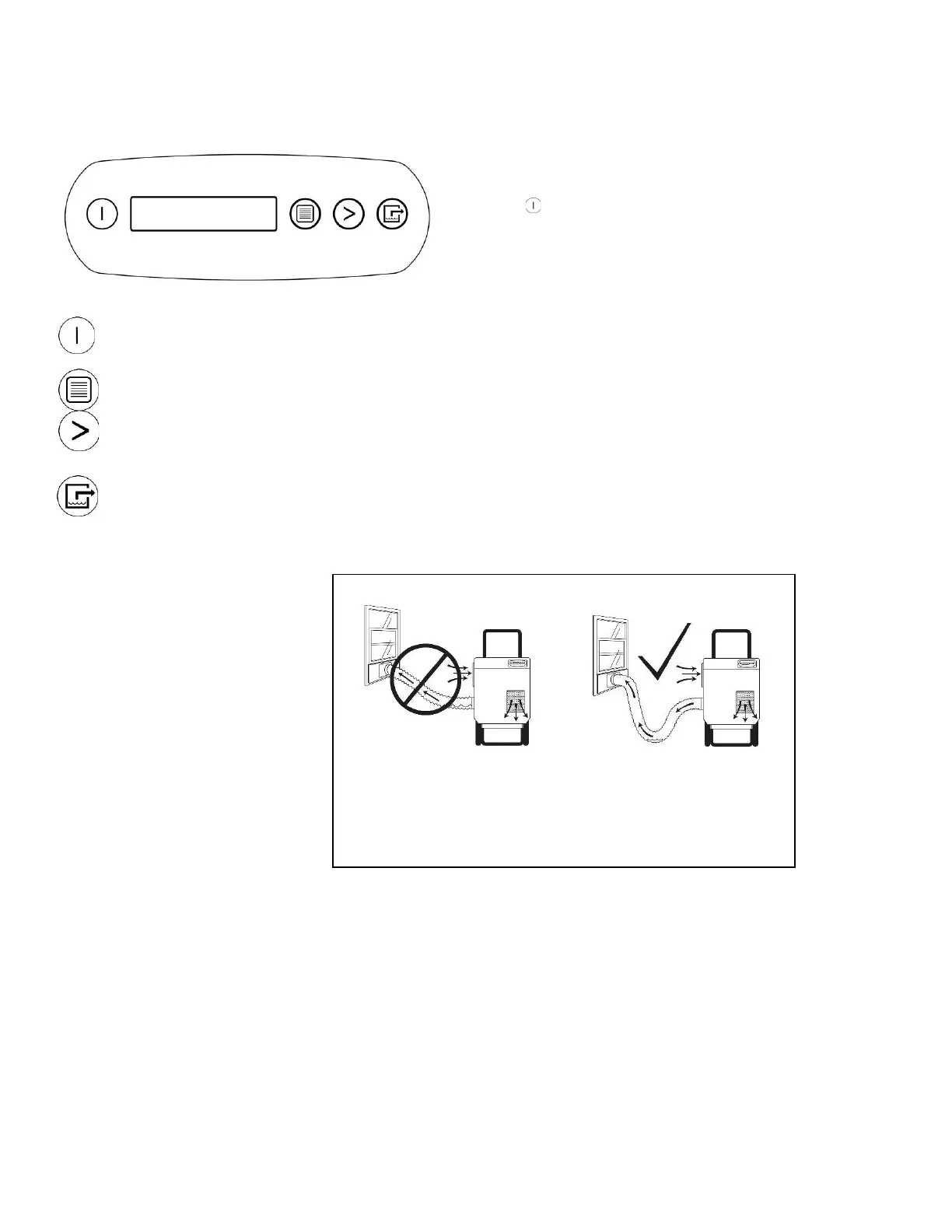
Press the ON/OFF to turn the unit on.
When the machine is turned on, the display normally reads PLEASE WAIT
WARMING UP. Once the unit completes the warm-up procedure, the display
shows UNIT ON XXX HRS and cycles between INLET XXX°C and IN-
LET XX%.
Cycles through the display of additional dehumidifier conditions and User Set-
tings. To return to the main menu, press the ON/OFF key once.
Change system settings. The MENU SELECTION key acts as the “UP” key for
cycling through the setpoints.
Press and release to show a calculated amount of water removal in pints/day.
The unit will display PLEASE WAIT CALCULATING for a moment and then
WATER REMOVAL XXX PINTS/24H. The display will automatically return to
the “Unit On” display after a few seconds. NOTE: For greatest accuracy, allow
the unit to operate for at least 5 minutes before performing this operation.
Condensation may collect in the reactivation duct during opera-
tion. Do not allow water to run back into the unit. This could cause
a shock hazard or damage to the unit.




 To Next Page