07-01480F F292-A 5 Dri-Eaz Products, Inc.
CAUTION: Dust can cause the unit to overheat and
shut down. Do not operate when excessive dust or
airborne particles are present, such as during
sanding or spray-painting. Inspect and clean air filter
elements and coils frequently.
IMPORTANT: Replace the 4-PRO filter whenever
it has been used on a mold remediation job or
otherwise exposed to potentially dangerous
contaminants.
Monthly
Check coils. Dirty coils can cause the unit to overheat.
Clean when visibly dirty. See Fig. E.
1. Unplug unit
2. Remove housing, locate coils and allow coils to dry if
wet.
3. Vacuum coils surfaces until clean, being careful not to
let the nozzle touch the fins, as that may cause damage
by bending them.
Check catch basin tray, and clean when dirt and
debris are present.
1. Wipe clean with a rag.
Check drain hose.
1. Look for obstructions. Disconnect and clear any debris
present.
2. Reattach gravity drain hose.
Inspect filter cover
1. Remove the filter cover (this can be done without
removing the housing).
2. Vacuum off any visible dirt, or wash with mild soap
and water.
3. Allow to dry thoroughly before replacing.
Annually
Have the pump system inspected by the Dri-Eaz Service
Department (800-932-3030) or by a qualified service
center.
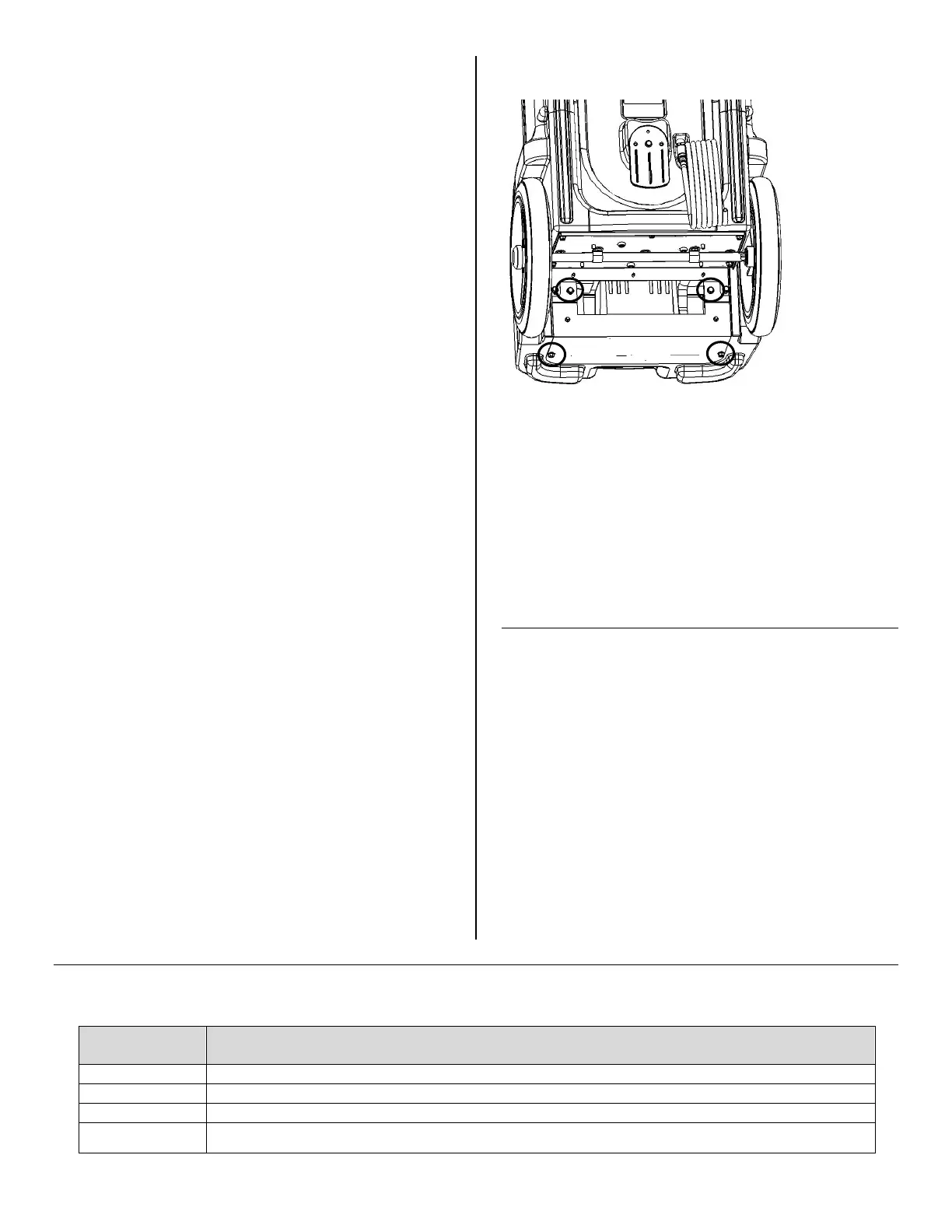
To access the Evolution LGR pump, remove the four
bolts located at the bottom of the unit (Fig. F). Use a ⅜-
in. nut driver or socket.
TRANSPORT AND STORAGE
NOTICE: Handle the unit carefully. Do not drop, throw,
or place the unit where it could fall. Rough treatment can
damage this equipment and may create a hazardous
condition or void warranty.
IMPORTANT: Be sure to purge the water from the pump
reservoir before moving the unit. See the PURGE
function under “How to use the control panel” on page 4.
Note that the unit must be plugged in for the Purge
function to operate.
1. Do not expose the control panel to moisture, snow or
rain when transporting in uncovered vehicles.
2. Store and transport securely to avoid any damaging
impact to internal parts.
READ AND SAVE
THESE INSTR
ERROR MESSAGES
The table below shows error message that the system may detect. If the display shows an “ER” message, first unplug the
unit and then plug it back in. This may re-set the electronics, and if so, no further action is required. If the error message
reappears, try the solution under “Explanation.”
ERROR
EXPLANATION
Problem with electronic control panel. Contact Dri-Eaz Service.
Check the temperature or sensor cable. Contact Dri-Eaz Service for instructions.
Check the touchpad key. Press and release each key several times.
Check for obstructions or kinks in the drain hose.
FIG. F: PUMP ACCESS PANEL
To access the
pump, remove
the four bolts
(circled) on the
lower panel.


 To Next Page