-2-
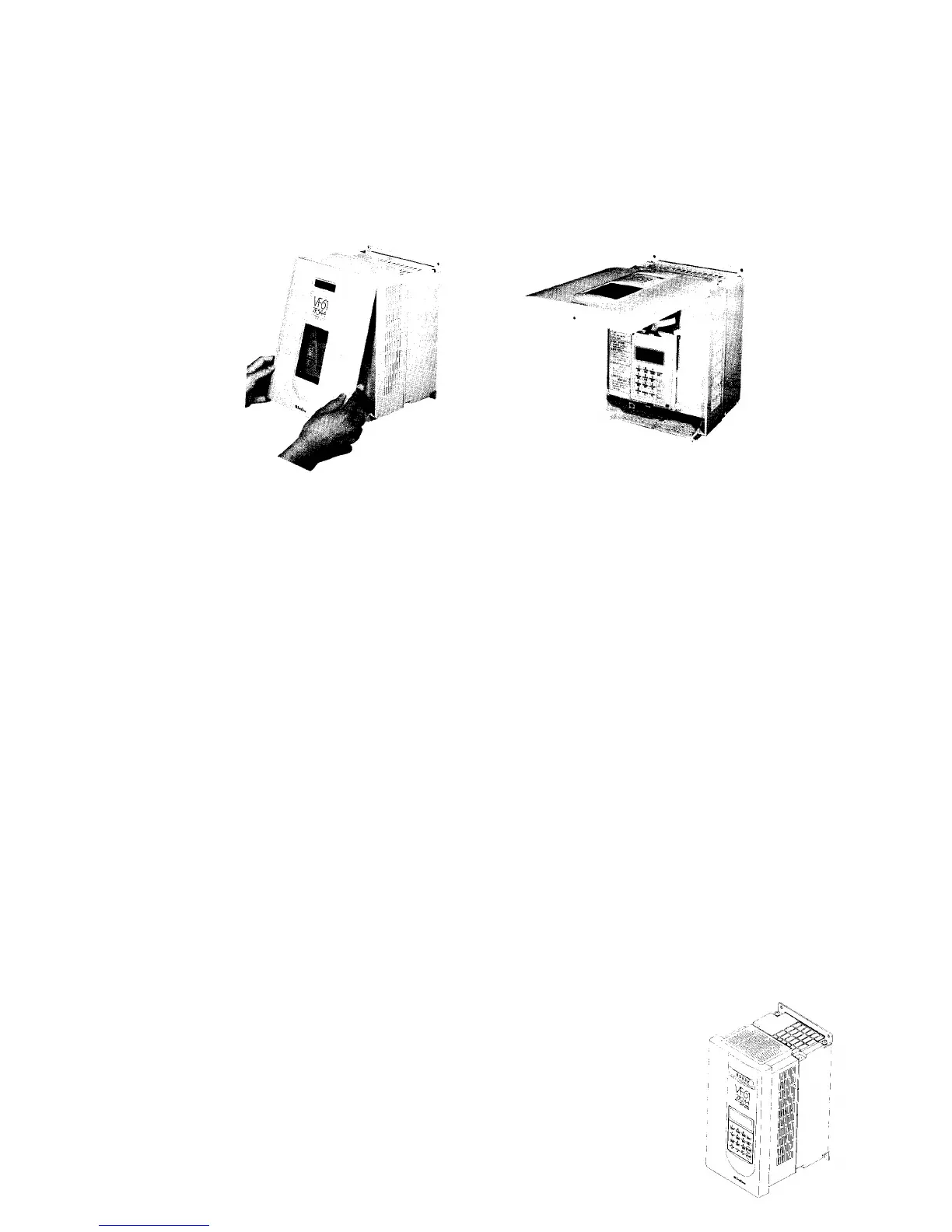
1.2.2 Opening of front cover
If you are going to inspect the VF61 or carry out automatic measuring (described in section 3
below), open the front cover as shown below.
(1) Remove the fixing screws from the bottom of the front cover.
(2) Draw the front cover to the front.
(3) When the front cover is fully opened, push it. The cover is fixed in the Up position.
1.3 Installation
1.3.1 The installation condition has great influences upon the service life and reliability of the
inverter. Do not use the inverter in the places shown below. Be sure to run the inverter in the op-
erating conditions shown in the catalog.
(1) A moist or dusty place. A place exposed to water or oil drips.
If the inverter is used in such a place, the circuit insulation is deteriorated, resulting in shorter
service life of the parts.
(2) Extreme heat or cold out of the specified temperature range.
If the service temperature is too high, bad influences are caused upon capacitors, and parts of
cooling fan or motor, etc.
(3) A place exposed to corrosive gas
Corrosive gas deteriorates the reliability of the parts and/or connecting part.
(4) A place with much vibrations.
Vibrations cause poor contact of the connectors, disconnection of wires, damage to parts,
etc.
1.3.2 Installation direction
If the VF61 is used separately or built into a control panel, follow the instructions below.
(1) Installation direction
Install the VF61 vertically with its marking "VF61" upward as shown below.



 To Next Page