-7-
Display on LCD Items Units Remarked
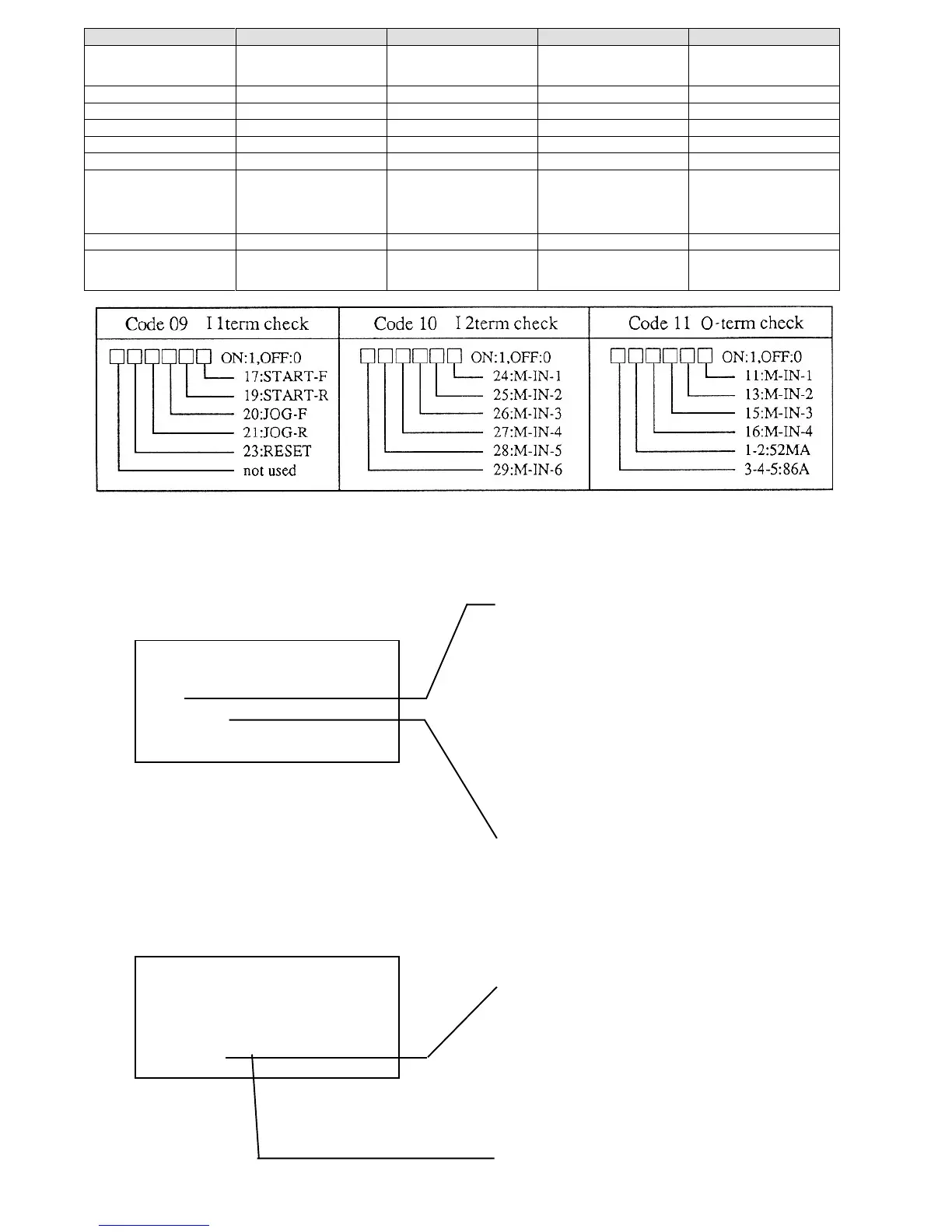
09 11term check Input terminal check 1 bit
1 is displayed when terminal block is
turned on. For meaning of each bit, se
table below.
10 12term check Input terminal check 2 bit Ditto
11 0-term check Output terminal bit Ditto
12
13
14
15 ROM Version ROM Version
"XX-XX" of ROM software version
VF61-XX-XX is displayed through
conversion of alphabetic characters
into numeric characters like A=0, B=1
and so forth.
16 Special moni For manufacturer’s adjustment
17 Trouble moni Reading error records.
Contents of latest five errors and
current, voltage, etc. of these errors are
displayed.
2.3.2 Changing set data
(1) Before changing data
* FUNCTION SET *
(00)Ref(Set).F
45.0[Hz]
* .0 [Hz]
The lowest line is displayed when the SET
key is pressed.
Display when numeric entry is selected.
Press the SET key, the numeric entry key is
automatically established. Change data with
the numeric entry key.
Flicker
The numeric keys may be used.
To change the set data, press the SET key.
2.3 Function mode
Press the FUNC key, and current data is displayed as shown below.
2.3.1 The internal data of the setting functions may be checked and changed. (See 2.3.3 below.)
* FUNCTION SET *
(00)Ref(Set).F
45.0[Hz]
Set data is displayed.
Code number of setting function and contents
are displayed.
To change a displayed code number of the
setting function, press a numeric key (0-9),
function entry key, and up or down arrow key.
SP set-1, SP set-2 and option of sixteen basic
data codes 0 to 15 and expanded items of code
16 may be selected with the SET, up and down
arrow keys.



 To Next Page