Trouble
Indication
Trouble
Indicator
Digit
Possible
Causes
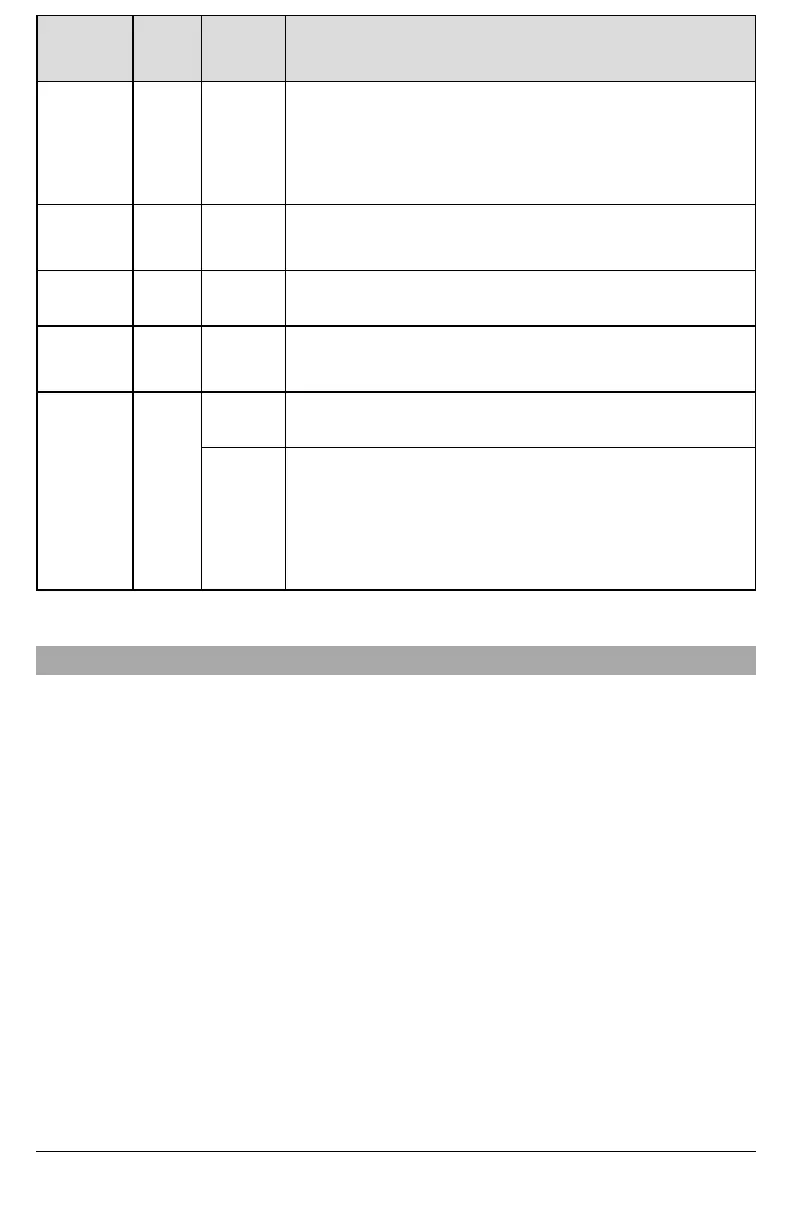
Trouble Possible Solution
Yellow LED –
7 Flashes
07
Receiver Not
Available
l Ensure that the Ethernet path has Internet connectivity.
l If using a static IP address, confirm that the gateway and subnet mask are
entered correctly.
l If the network has a firewall, ensure the network has the programmed
l outgoing ports open (default UDP port 3060 and port 3065).
l Ensure that all the receivers are programmed for DHCP or have the proper IP
address and port number.
Yellow LED –
8 Flashes
08
Receiver
Supervision
Trouble
l This trouble is indicated when supervision is enabled and the unit is not able
to successfully communicate with the receiver.
l If this trouble persists, contact the central station.
Yellow LED -
9 Flashes
09 FTC Trouble
l The unit has exhausted all communications attempts to all programmed
receivers for events generated by the communicator.
l Restart the system, if trouble persists, contactthe dealer.
Yellow LED –
12 Flashes
0C
Module
Configuration
Trouble
l This indication appears when section [021] system account code or sections
[101] or [111] receiver account code have not been programmed. Ensure that
a valid account code has been entered in these sections.
Red and Yellow
LEDs flashing
together
N/A
Initialization
Sequence
l The unit is still initializing please wait while the unit gets its programming and
establishes a connection to all programmed receivers.
NOTE: This process may take several minutes to complete.
Boot Loader
Failed
l If the initialization sequence is taking more than several minutes, the boot
loader might have failed.
l Confirm that the boot loader has failed by entering communicator
programming [*][8][installer code][851].
l If access is granted, continue waiting for the initialization sequence to
complete.
l If access is denied (long error tone), disconnect power from, then reconnect
power to the communicator module.
.
Ethernet Programming Options
The programming sections described in this document can be viewed at the keypad LCD. To start programming enter: [*][8]
[installer code][851][section number], where section number is the 3-digit section number referenced in this section. The pro-
gramming worksheets at the end of this document can be used to record the new values when programming changes have
been made from the default values.
Programming sections are accessed through the panel keypad. Installers may set/review/record programming options at the
panel keypad.
System Options
[001] Ethernet IP Address
Default (000.000.000.000)
Enter the IP address of the communicator. Ensure that the IP address is unique to the communicator on the local network.
Format is 4 fields, each field is a 3 digit decimal number. Valid range: 000-255. Ifan IP address is programmed in this section,
the unit will operate with static IP (DHCP disabled). Sections [002] and [003] must also be programmed when using static IP
addresses.
NOTE: Default for this section is Dynamic Host Configuration Protocol (DHCP) enabled. When enabled, the DHCP server will
set values for: IP address [001], subnet mask [002], and gateway [003]. Programming an IP address in this section will
disable DHCP (Static IP).
[002] Ethernet IP Subnet Mask
Default (255.255.255.000)
Enter the Ethernet IP subnet mask of the communicator. Format is 4 fields, each field is 3 digits. Valid range: 000-255.
NOTE: If DHCP is enabled, the DHCP server will assign the subnet mask for this section and the programmed value will be
ignored.
11



 To Next Page