EasyManua.ls Logo

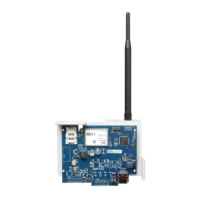
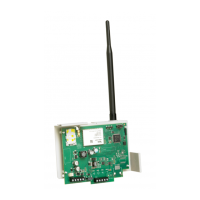
DSC TL2803GR - User Manual

DSC TL2803GR
52 pages
Print Icon
To Next Page IconTo Next Page
Loading...
3G2080(R)
Cellular Alarm Communicator – International
TL2803G(R)
Internet and HSPA Dual-Path Alarm Communicator -
International
INSTALLATION MANUAL V4.0
Warning: This manual contains information on limitations regarding product use
and function and information on the limitations as to liability of the manufacturer.

Questions and Answers

  • A
    Alex WallaceAug 18, 2025
    What to do if the yellow LED flashes 6 times on my DSC Cell Phone?
    • A
      Adam FernandezAug 19, 2025
      If the yellow LED flashes 6 times on your DSC Cell Phone, this indicates an Ethernet trouble. First, check with your ISP to confirm that Internet service is active in your area. Ensure your Ethernet cable is securely inserted into the RJ45 jack of the communicator and the hub/router/switch. Also, check the link light on the hub/router/switch is ON. If the link light is OFF, restart the hub/router/switch. If DHCP is used, ensure that the unit has an assigned IP address from the server. In Section [851] [992] verify a valid IP address is programmed. If not, contact the network administrator. If the problem persists, replace the Ethernet cable and RJ45 connector.
  • V
    Vicki JohnsonAug 21, 2025
    What to do if the yellow LED flashes 5 times on DSC Cell Phone?
    • R
      Ryan Brock Jr.Aug 21, 2025
      If the yellow LED flashes 5 times on your DSC Cell Phone, this indicates a cellular trouble. To resolve this: * Confirm that cellular service is available and active in your area. * Check all antenna connections. * Ensure average radio signal strength is CSQ 5 or higher. * Ensure the SIM card is properly inserted into the SIM card holder. * Ensure the SIM card has been activated (it could take up to 24 hrs after install). If this trouble persists, you might need to relocate the panel (and communicator) or install an external antenna extension kit.
  • L
    Lydia VasquezAug 23, 2025
    How to troubleshoot 'no indication' on DSC Cell Phone?
    • J
      jessicawilliamsAug 23, 2025
      If your DSC Cell Phone shows no indication, the cause might be no power. You should check the power connections between the panel and the communicator. Also, confirm the PC-LINK cable is properly installed between the communicator and the panel.
  • N
    Nathan FergusonAug 27, 2025
    Why is the yellow LED solid on my DSC Cell Phone?
    • K
      Karen ClarkAug 27, 2025
      If the yellow LED is on solid on your DSC Cell Phone, it usually means there's no signal. To fix this: * Confirm that cellular network service is active in your area. * Ensure the antenna is securely connected to the radio. Check antenna stub cable is securely connected to the radio. * If an external antenna is used, ensure the antenna is securely screwed on to the antenna cable connector. Check external antenna for damage or open/short.
  • J
    Jessica KnoxAug 30, 2025
    What does it mean when the Trouble LED flashes 2 times on DSC Cell Phone?
    • R
      randy87Aug 30, 2025
      If the Trouble LED flashes twice on your DSC Cell Phone, it indicates a panel supervision trouble. Check that section [382] toggle option [5] is ON (Alternate Communicator Enabled). Also, ensure the PC-LINK cable between the panel and communicator is connected properly (not reversed) and is securely in place.
  • S
    Sierra FergusonSep 1, 2025
    What does yellow LED 12 flashes mean on DSC Cell Phone?
    • C
      colemanjasonSep 1, 2025
      If the yellow LED flashes 12 times on your DSC Cell Phone, it means there is a module configuration trouble. Ensure that a valid account code has been entered in section [021] system account code or sections [101]; [111]; [201]; and [211] receiver account code.
  • S
    Sandra WoodSep 3, 2025
    What does it mean when red and yellow LEDs are flashing together on DSC Cell Phone?
    • J
      Jennifer KingSep 4, 2025
      When the red and yellow LEDs are flashing together on your DSC Cell Phone, the unit is still initializing. Please wait while the unit gets its programming and establishes a connection to all programmed receivers. Note: This process may take several minutes to complete.
  • R
    Robert LloydSep 6, 2025
    What does yellow LED 8 flashes mean on DSC Cell Phone?
    • J
      johnsoncindySep 6, 2025
      This trouble is indicated when supervision is enabled and the unit is not able to successfully communicate with the receiver. If this trouble persists, contact your central station.
  • B
    Brian RamirezSep 8, 2025
    What does yellow LED 9 flashes mean on DSC Cell Phone?
    • P
      patricktrevinoSep 8, 2025
      The unit has exhausted all communications attempts to all programmed receivers for events generated by the communicator. Restart the system, if trouble persists, contact your dealer.
  • B
    bpierceSep 12, 2025
    What to do if all LEDs are flashing together on DSC Cell Phone?
    • L
      lharperSep 12, 2025
      If all LEDs are flashing together on your DSC Cell Phone, it indicates a boot loader failure. Disconnect power, then reconnect power to the communicator module.

DSC TL2803GR Specifications

General IconGeneral
Network TechnologyGSM / HSPA
2G bandsGSM 850 / 900 / 1800 / 1900
GPRSYes
EDGEYes
SIMMini-SIM
VideoYes
SecondaryNo
Alert typesVibration; MP3, WAV ringtones
LoudspeakerYes
3.5mm jackYes
SpeedHSPA
TypeTFT touchscreen
Resolution240 x 400 pixels
Card slotmicroSD
Bluetoothv2.1, A2DP
RadioFM radio
USBmicroUSB v2.0
MessagingSMS, MMS, Email
BrowserWAP 2.0/xHTML
BatteryLi-Ion battery
ColorsBlack, White

Related product manuals