10
X2DMA400 OPERATION
Seek Tuning
Manual Tuning
Tuning - Remote Control
Band
Storing and Recalling
Station Presets
Press TUNE
nn
or TUNE
ll
toseekthenextstrong
station.
Rotatethetuning knob tomoveradiofrequencyupordown
onestepatatime.
Usingtheremotecontrol:
• Press TUNE
nn
or TUNE
ll
momentarilytoperform
ManualTuning.
• PressandholdTUNE
nn
or TUNE
ll
for1second,
thenreleasethenrelease,toperformSeekTuning.
Press BANDtoselectbetweenFM1,FM2,FM3,AM1and
AM2bands.Uptosixpresetscanbeprogrammedforeach
band.
Upto18FMstationsand12AMstationscanbestoredin
memory.
Tostoreastation,selectthedesiredbandandstation.Press
andholdthedesiredpresetbutton(1-6)formorethantwo
seconds.Whenstored,thepresetnumberwillappearinthe
display.
Thestationcanberecalledbypressingthecorresponding
presetbutton.
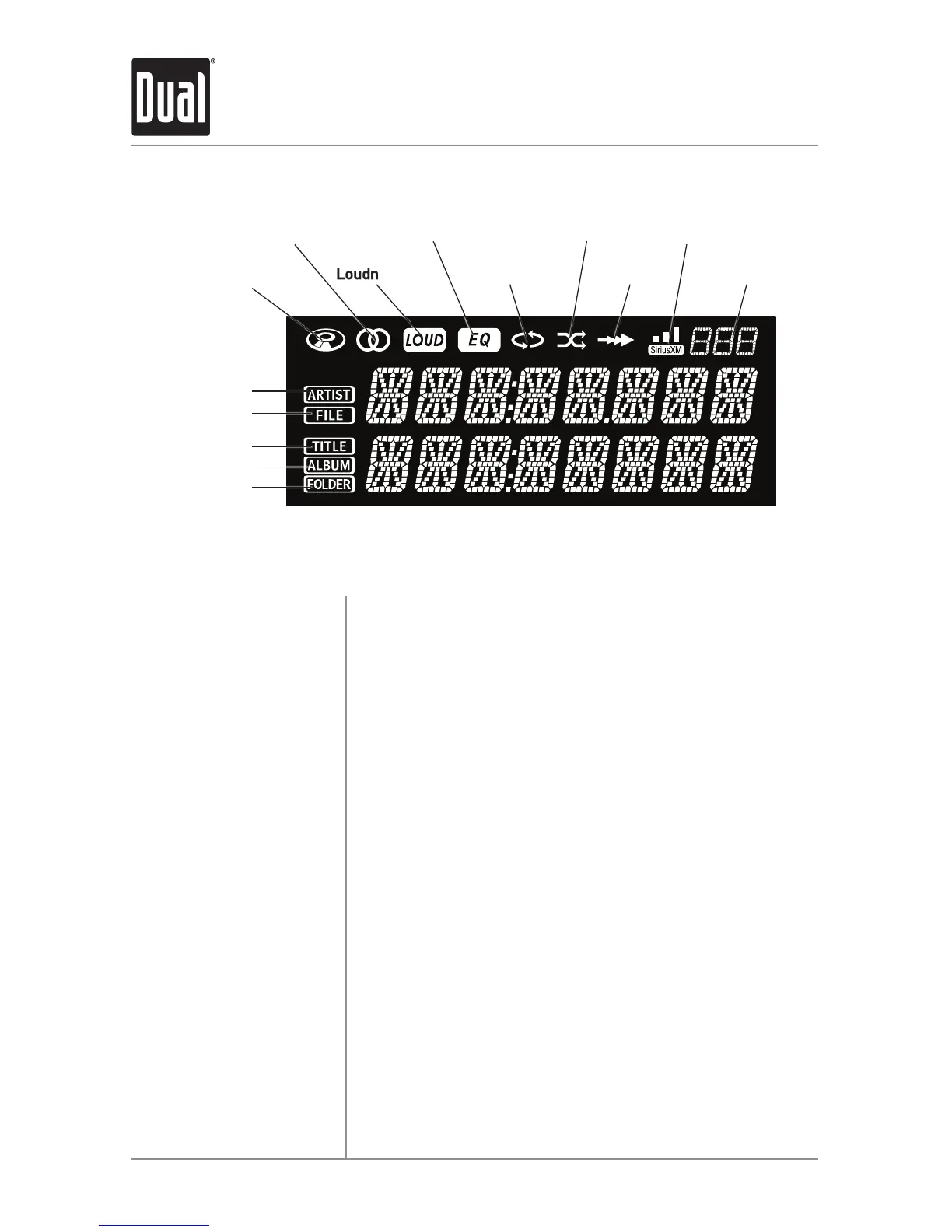
LCD Icon Layout
Stereo FM
Reception
Repeat
EQ
Loudness
Song Title
Artist Name
File Name
Album Name
Folder Name
SiriusXM
Signal Indicator
CD-in
Random
AM/FM Tuner Operation
Intro
SiriusXM
Channel Number


 To Next Page