8
X2DMA400 OPERATION
PressandholdAUDIO/MENUformorethan3secondstoaccessthesetupmenu,then
pressAUDIO/MENUtocyclethroughmenuoptions.Whendesiredoptionappearsinthe
display,rotatethetuning knobleft/righttoadjustoractivatedesiredfunction.PressBACK
toexitanymenuorsubmenu.
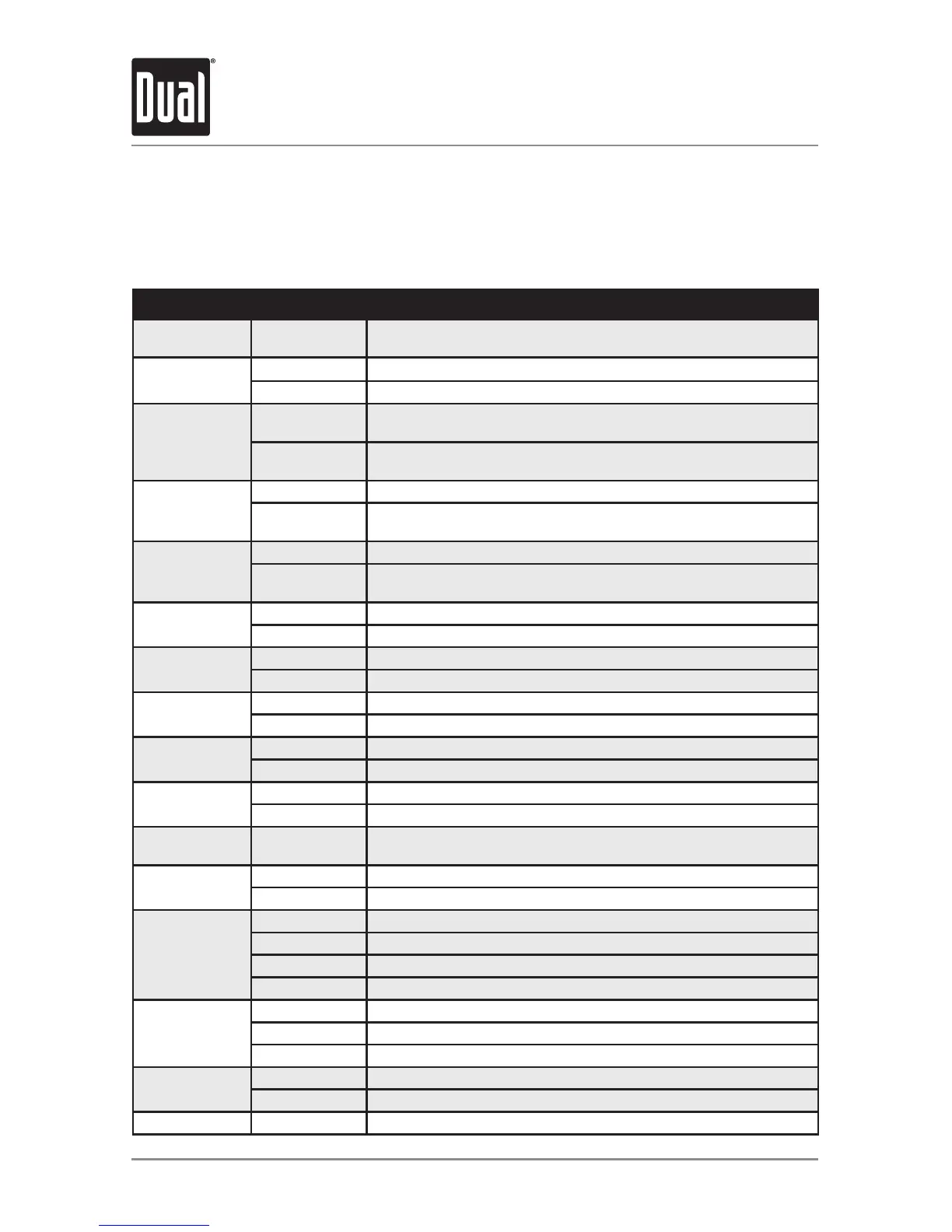
Setup Menu
Function Options Action
AutoStationStore
AUTOPGM
STATIONS
PressSELECTtobeginautomaticallyprogrammingstrongradiostations
tothe6presetbuttonsinthecurrentband.(Tuner mode only)
Local/Distance
Tuning
LOCALOFF Activatesdistancetuning.(Tuner mode only)
LOCALON Activateslocaltuningforstrongstationreceptiononly.(Tuner mode only)
Tuner
Frequency
Spacing
FREQUSA
ProgramstheunittoUSAtunerspacing.
(200kHzforFMand10kHzforAM).(Tuner mode only)
FREQEUR
ProgramstheunittoEuropeantunerspacing.
(50kHzforFMand9kHzforAM).(Tuner mode only)
SelectableiPod
Control
IPODCNTFULL ProgramstheheadunittoadvancedcontroloftheiPod/iPhonedevice.
IPODCNT
MANUAL
ProgramstheheadunittobasiccontroloftheiPod/iPhonedeviceand
allowsmusictobecontrolledfromtheiPod/iPhonedevice.
Loudness
Curve
LOUDOFF Disablestheloudnessfunction.
LOUDON
Enablestheloudnessfunction.Activatingthisfeaturewillenhancethe
bassandtreblefrequencieswhenlisteningtomusicatlowvolumes.
Clock
Display
CLOCKOFF Programsunittonotdisplaytheclockwhenthepowerisoff.
CLOCKON Programsunittodisplaytheclockwhenthepowerisoff.
FrontAuxiliary
Input
AUXFRNTON Enablesthefrontpanel3.5mmauxiliaryinput.
AUXFRNTOFF Disablesthefrontpanel3.5mmauxiliaryinput.
RearAuxiliary
Input
AUXREARON EnablestherearRCAauxiliaryinput.
AUXREAROFF DisablestherearRCAauxiliaryinput.
Subwoofer
SUBWFRSUB SetstheRear/SubRCAoutputtoSubwoofer.
SUBWFRREAR SetstheRear/SubRCAoutputtoRearSpeakers.
Beep
Confirmation
BEEPOFF Disablestheconfirmationbeep.
BEEPON Enablestheconfirmationbeep.
Programmable
TurnOnVolume
PROG-VOL#
Programsunittoalwaysturnonataspecificvolume
(defaultisOFF).Anyvolumelevel1-46canbeselected.
Poweron
Message
MESSAGEOFF Disablespoweronmessage.(example:GOODMORNING)
MESSAGEON Enablespoweronmessagetobedisplayed.
Scrolling
Option
SCROLL15SEC Programsunittoscrollinformationonceevery15seconds.
SCROLLONCE Programsunittoscrollonce,thenshowfirst8charactersondisplay.
SCROLLON Programsunittoscrollcontinuously.
SCROLLOFF Programsunittoshowthefirst8charactersonthedisplay.
Illumination
Dimmer
DIMMERHIGH Programsunittothebrightestilluminationlevel.
DIMMERMEDIUM Programsunittothemiddleilluminationlevel.
DIMMERLOW Programsunittothedimmestilluminationlevel.
Demonstration
Mode
DEMOOFF Disablesthedemonstrationmode.
DEMOON Enablesthedemonstrationmessage.
SiriusXMSetup (PressSELECT) Seepage23formenuoptions.


 To Next Page