19
X2DMA400 OPERATION
USB / SD Card Operation
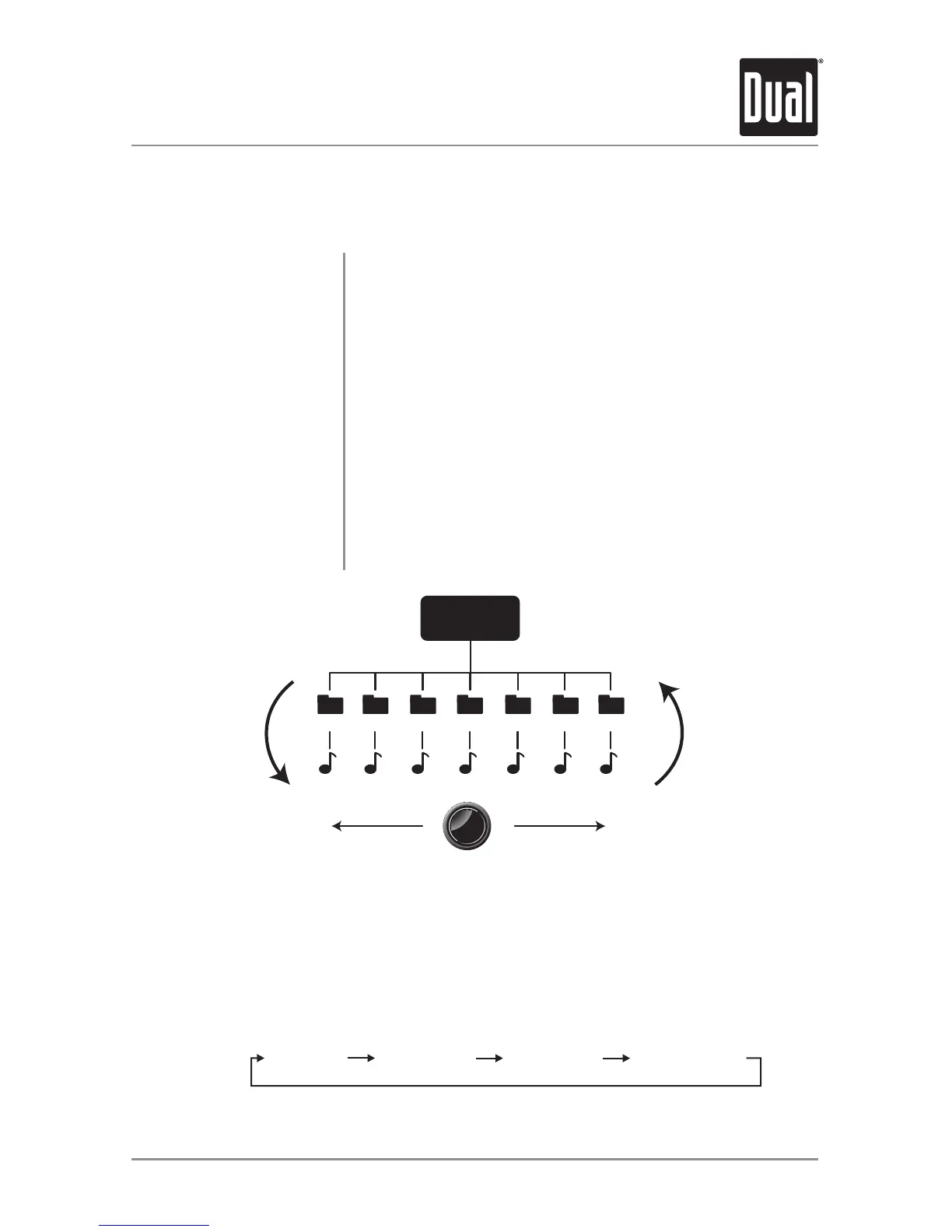
File and Folder Search
Press
SELECT
Press
BACK
SELECT
Turn the
Tuning Knob
Folder 1 Folder 2 Folder 3 Folder 4 Folder 5 Folder 6 Folder 7
FilesFiles Files Files FilesFilesFiles
Press SELECT
to begin
Press SELECTtoenterthefile/foldersearchmode.Alistof
allthefoldersfromtheUSB/SDdevicewillbedisplayed.
Note:Anyfileslocatedintherootdirectorywillbelocatedin
thefoldernamed"ROOT".
Turnthetuning knobtocyclethroughallthefoldersonthe
device,andpressSELECTtochoosethedesiredfolder.The
listoffilesintheselectedfolderwillbedisplayed.Turnthe
tuning knobtocyclethroughthelistoffiles.
PressingBACKwhenviewingthecontentsofafolderwill
returntothelistoffoldersontheUSBdevice.PressBACK
againtoexitthesearchmenu.
Oncethedesiredsongisdisplayed,pressSELECTtobegin
playbackofthedesiredsong.
Begin Searching
Choose a Folder
Menu Navigation
Playing a Song
Displayed Information
Press DISPmomentarilytoselectbetweenartist/songtitle(default),file/foldernametrack
number/clock&elapsedtime.


 To Next Page