14
Bluetooth Operation
Press icon to return to Main Menu screen.
Displays current mode of operation.
When Bluetooth is On and a Bluetooth device is being paired,
the indicator will flash. When Bluetooth is On and a phone is
connected to the unit, the indicator will illuminate steady.
Use the keypad to dial a phone number.
Press to connect a call after dialing a phone number.
Before using Bluetooth
Pairing a New Device
Connect
Bluetooth Phone
Main Menu
1
Current Mode Indicator
2
Bluetooth Status
Indicator
3
Phone Keypad
4
Call
5
1
2 3
4
8
9 10
Before you
can use a Bluetooth device to make hands-free calls
or stream audio, it must be authenticated. This is also referred to
as "pairing" a device.
The unit broadcasts the pairing signal constantly when no devices
are currently connected. Complete the pairing sequence from
your Bluetooth device. Refer to the owner's manual for your
device for more details. The device name is "XDCPA73W". The
unit can be in any mode of operation when pairing is performed.
On certain phones, pairing may need to be done more than once.
The head unit will automatically connect to the last connected
device when the connect feature is set to Auto connect On. If the
connect feature is set to Auto Connect Off, the head unit will not
automatically connect to any device.
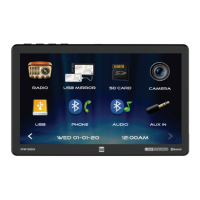
From the main menu, touch the Bluetooth on the screen.
Bluetooth icon will appear anytime a Bluetooth device is connected.
5
6
7



 To Next Page
 Loading...