8
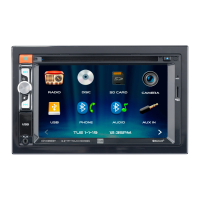
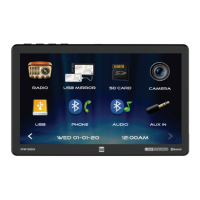
From the Main Menu screen, select Setup to access the Settings menu and select from eight
categories represented by the icons on the left of the screen: General, Audio, Display, Wifi,
Bluetooth, Camera, Region and Version. Select the category, and adjust any of the available
options using the touch screen.
General:
• Language: Select between English and Spanish.
• Time Zone: Select desired time zone.
• Date & Time: Adjust the day, month, year, hour, minute and format.
• Daylight Savings Time: Turn On or Off.
• Beep Tone: Turn On or Off.
• Power Off Delay: Select 1 second, 2 second, 3 seconds or Off.
• Factory Default: Reset the unit to factory default settings.
• Right Hand Drive: Turn On or Off. When the item is off, it is left hand drive mode, and when
the item is On, it is right hand drive mode. Default setting is Off (left hand drive mode).
Audio:
• Balance/Fader - Select to adjust balance/fader settings.
• Subwoofer - Turn the Subwoofer Control On/Off.
• Subwoofer Frequency- Select subwoofer frequency.
• Subwoofer Level - Select subwoofer 0-14 (7 is default).
• EQ - Select to adjust EQ settings.
• Loudness - Select to turn Loudness feature On or Off.
• Internal Amp - Select to turn Internal Amp On or Off.
• Default Volume - Select adjust default volume settings.
• Source Level - Select to adjust source level settings.
Display:
• Illumination Control - Select to turn Illumination Control On or Off.
• Gray Level & Brightness - Adjust Gray Level & Brightness settings for Day and Night.
• LED - Select a color for the LED button lights.
• LED Animation - Select to turn LED Animation On or Off.
• Wallpaper - Select from three wallpaper options.
• Background Brightness - Adjust Background Brightness.
WiFi: Turn WiFi On/Off, Reset Password or view Device List.
Bluetooth: Turn Bluetooth, Auto Connect and Auto Answer On/Off, view Device Name and clear
Phone Book Names and Numbers.
Camera: Turn Front and Rear Camera On/Off, reverse Camera Views, turn Parking Assistance
On/Off, adjust Parking Assistance settings and adjust the Rear View Delay.
Radio: Adjust the Region, and turn TA and AF On/Off.
Version: View version information.
General Operation


 To Next Page
 Loading...