23
Section 200 User Manual
201. User Interface Panel Basics
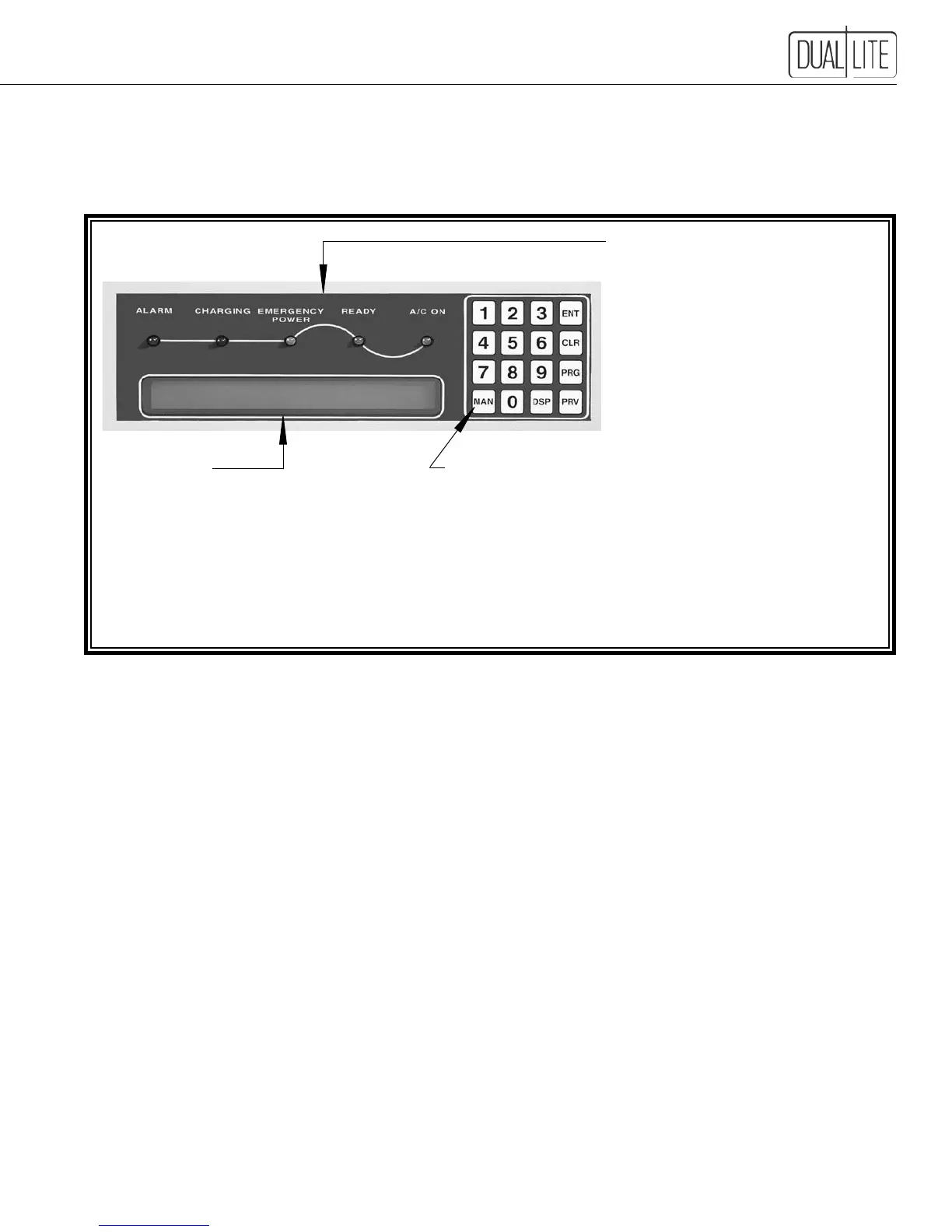
LED Status Indicators
AC-On - AC is present at output terminals
Ready - Unit is ready for emergency operation
Emergency Power - Unit is operating on battery
power
Charging - Unit battery is being charged
Alarm - Operation outside of pre-programmed
parameters detected
Display Readout
•Large,easy-to-readcharacters
•2-linex40-characterLCDdisplay
•Providescontinuousscrollingof
20 metered functions
Control Keys
Main Menu Key (MAN)
•Displaysthemainsystemmenu
Display Key (DSP)
•Usedtodisplaysystemparameters
•Insertsdecimalpointwhenentering
data
Previous Key (PRV)
•Returnsthedisplaytotheprevious
menu screen
Locatedontheinvertercabinet’sfrontdoor,theuserinterfacepanelallowstheusertomonitorandcontrolthe
LSN system. The microprocessor-controlled display includes an array of LED indicator lights, a
2-line x 40-character digital display and a coded keypad to display over 250 system parameters, operating modes,
alarms and stored logs.
Menu-Driven Display
The LSN user interface provides a menu-driven display that allows access to all system information through the fol-
lowingfourprimarysub-menus:
• Meters
• User Programming
• Logs
• Factory Programming
The menu-driven display provides users with a structured, intuitive method of accessing system information. The
display is a user-friendly interface allowing easy access to all system programming, operating parameters, meters and
logs.Theinterfacedesignutilizesnumeric“HotKeys”foreachparametertoaccessdata.
Password Protection
Toensurethatonlyauthorizedpersonneloperatetheunit,everyLSNsystemispasswordprotected.Nocontrolfunc-
tions can be accessed or operating parameter changes made without a valid six-digit password authentication.
LSN Inverter systems provide multi-level password protection. Each progressive level allows changes to increasingly
The User Password is factory set at 944944 and is user programmable.
See section 201.3 for procedure for clearing a User Password.
Enter Key (ENT)
•Usedtoenterdata
Clear Key (CLR)
•Clearsthelastenteredcharacter
and cancels or resumes scrolling
display feature
Program Key (PRG)
•Usedtochangesystem
programming
•Insertsnegativesymbolwhen
entering data


 To Next Page