E
12
LCD unit functions
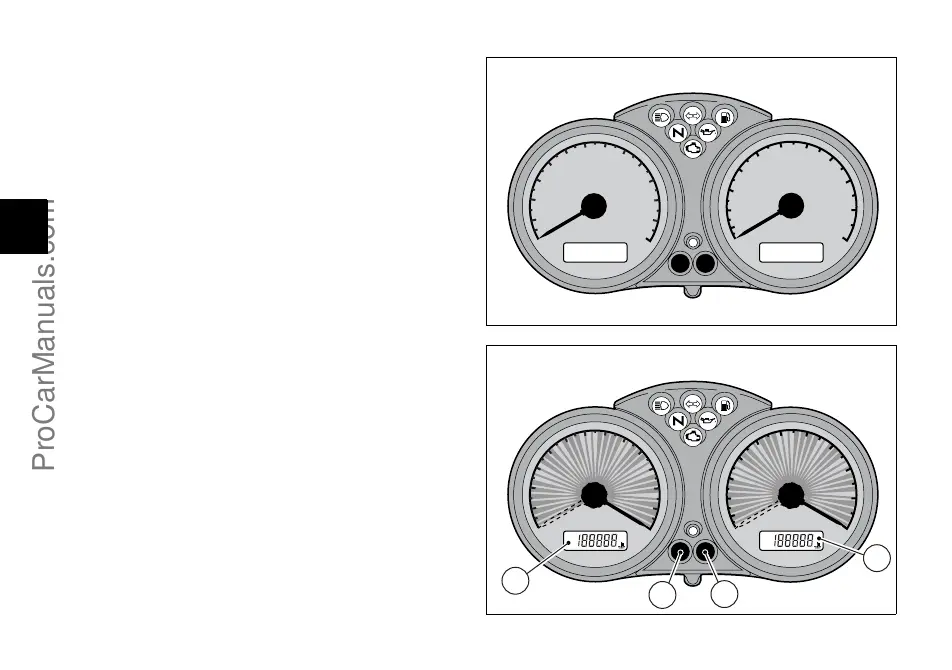
When turning the key from OFF to ON (Key-ON) the
instrument panel carries out a Check of the whole
instruments: indexes, displays and pilot lights (fig. 5 and
fig. 6).
LCD (1)
Turn the key to ON and press (A, fig. 6) to display trip
meter and odometer alternatively.
Resetting the trip meter
Keep (A, fig. 6) pressed for more than 2 seconds. When
the TRIP function is enabled (trip meter), display (LCD 1)
will reset.
LCD (2)
Turn the key to ON and press (B, fig. 6) to display clock and
oil temperature.
Setting the clock
Press (B, fig. 6) for at least 2 seconds.
Press (A, fig. 6) to set AM/PM. Press (B) to set hours. Use
button (A) to change hour value. Press (B) to set minutes.
Press (A) to increase the value. Keep the button pressed
for more than 5 seconds to proceed faster. Press (B) to
quit this function.
260
240
220
200
180
160
140
120
100
80
60
40
20
0
km/h
min
-1
X1000
11
10
9
8
7
6
5
4
3
2
1
0
OFF
fig. 5
TOT
TRIP
¡C
¡F
AMPM
260
240
220
200
180
160
140
120
100
80
60
40
20
0
km/h
TOT
TRIP
¡C
¡F
AMPM
min
-1
X1000
11
10
9
8
7
6
5
4
3
2
1
0
1
2
A
B
CHECK
fig. 6
ProCarManuals.com






 To Next Page