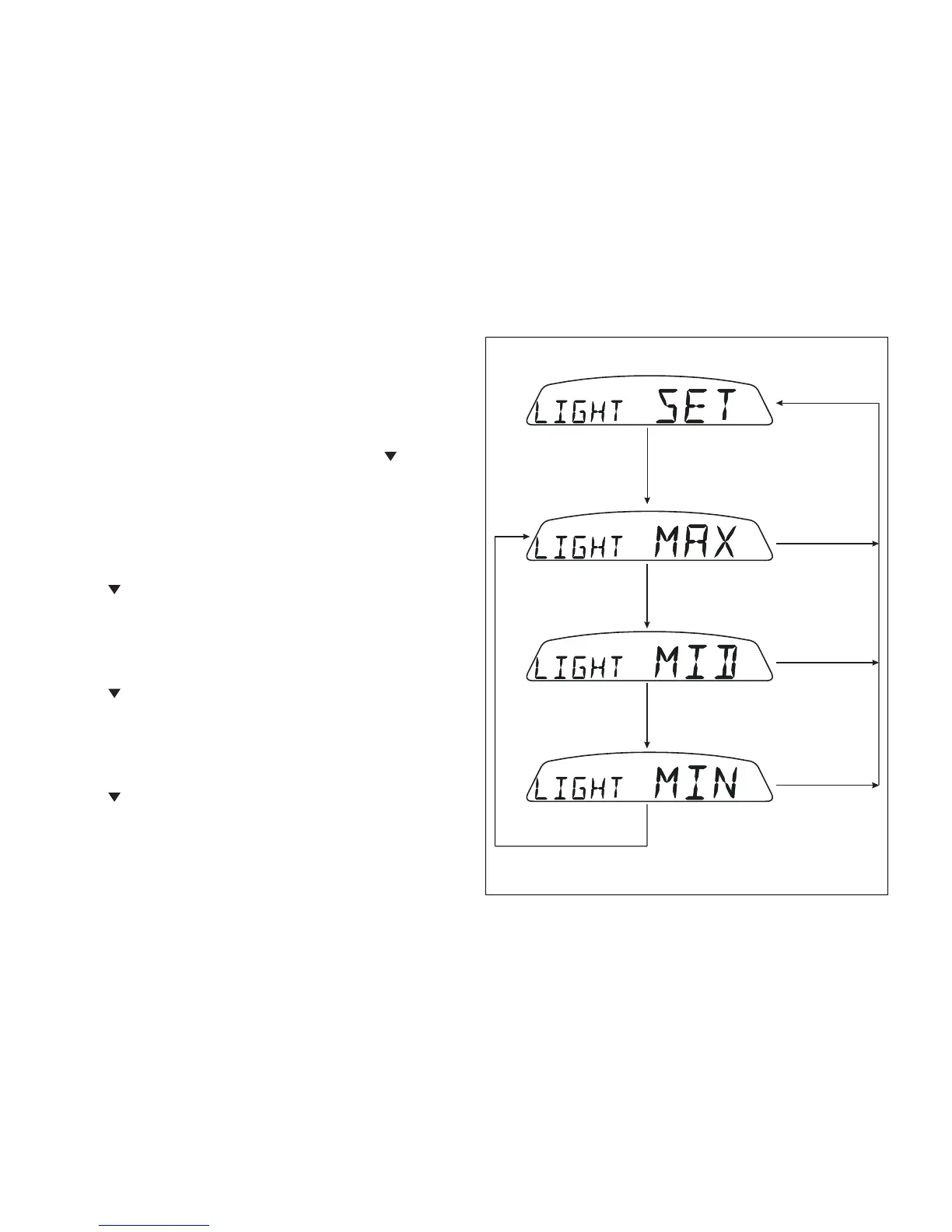
Back-lighting setting
This function allows dashboard backlighting power
setting.
To set the backlighting, access the "LIGHT SET" page
of the menu.
Press the button (1, Fig. 9) in position B " " for 3
seconds in this page to access the setup mode and
the following pages will be displayed in sequence:
- page 1 - "LIGHT MAX" setting:
This page sets backlighting to maximum
brightness; press button (1,Fig. 9) in position B
"
" to go to page 2.
- page 2 - "LIGHT MID" setting:
This page reduces the backlighting by
approximately 30% relative to maximum
brightness; press button (1,Fig. 9) in position B
"
" to go to page 3.
- page 3 - "LIGHT MIN" setting:
This page reduces the backlighting by
approximately 70% relative to maximum
brightness; press button (1,Fig. 9) in position B
"
" to go to page 1.











 To Next Page