Bluetooth device setting (Bluetooth)
This function allows pairing and/or deleting any paired
Bluetooth devices.
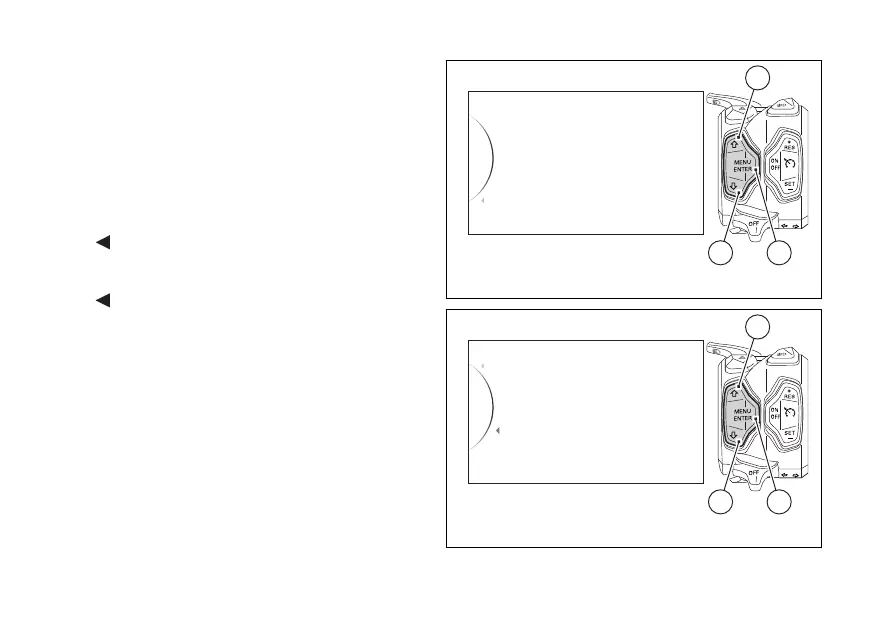
Enter the SETTING MENU.
Use buttons (1) and (2) to select "Bluetooth" and
press button (4).
As you enter this function, the instrument panel
displays the following indications:
-
Back
- Associated Devices
- Pairing
-
Back
Use buttons (1) and (2) to select the desired function:
- if “Associated Devices” is highlighted, press
button (4) to view the list of associated Bluetooth
devices, as described in paragraph “Associated
devices display”;
- if “Pairing” is highlighted, press button (4) to pair
new devices, as described in paragraph “Search
and paring of a new device”.
Search and pairing of a new device (Pairing)
Bluetooth
Info
Back
Tyre Calibration
Load Mode
42
1
Fig. 133
Pairing
Back
Associated Devices
Back
42
1
Fig. 134
188





 To Next Page