10 | 3.2 Loading Label Stock
GraphicProducts.com | 800.788.557210 | 3.2 Loading Label Stock
GraphicProducts.com | 800.788.5572
SETUP INSTRUCTIONS
3.2 Loading Label Stock
Fresh label stock comes in a roll with plastic end caps on each side. The material
typically has a glossy print surface on one side, and a disposable paper backing on the
other side. When printing, Bronco will feed some of the label stock from its roll and cut
off the printed label.
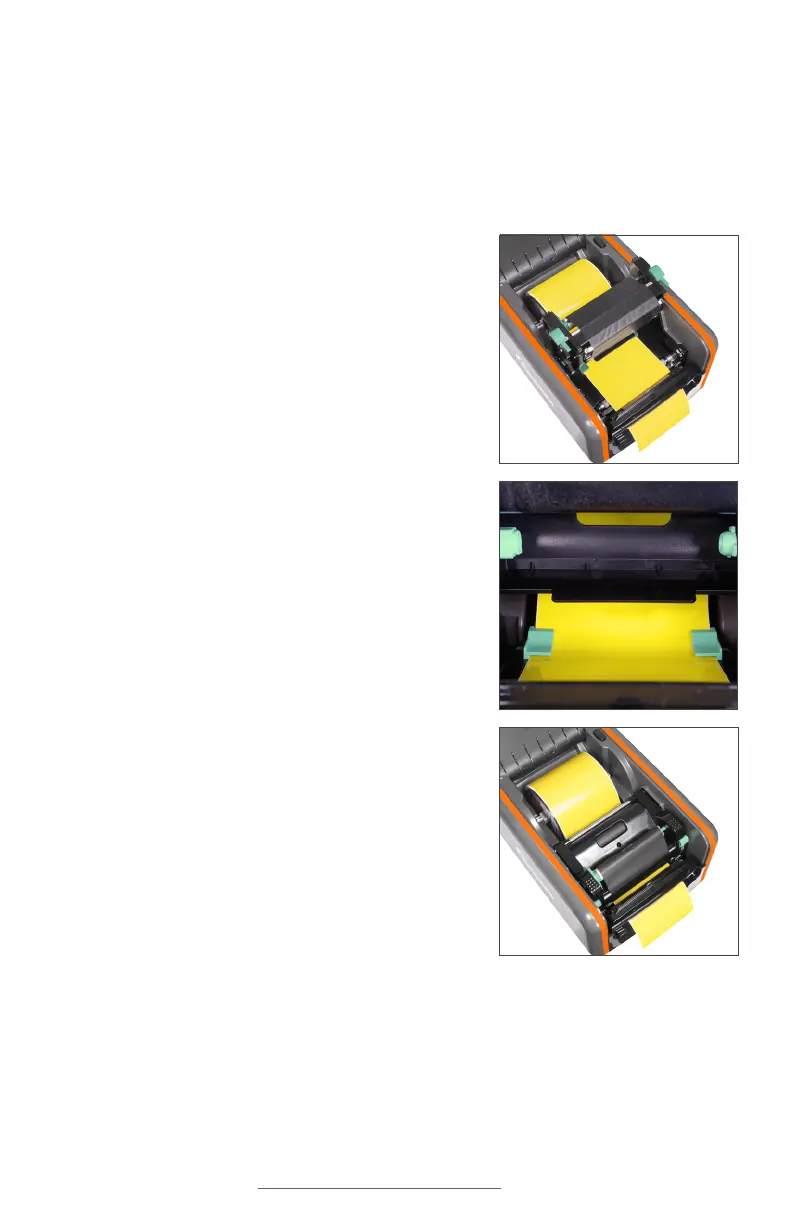
1. If you haven’t already done so, raise the print
head carriage by pressing the two green carriage
release tabs.
2. Place the roll of label stock onto the supply
spindle. For narrow rolls of label stock, use
the two fixing tabs to keep the supply roughly
centered.
3. With the label stock unrolling from the top of the
roll and feeding toward the print head carriage,
rest the supply spindle into its slots in your
Bronco.
4. Feed the end of the label supply under the print
carriage, threading it between and beneath the
green adjustable label guides, and over the top of
the rubber roller near the cutter module.
5. Slide the green adjustable label guides together
to keep the label stock centered, but not so tight
as to bend or wrinkle the label stock.
6. Close the print head carriage by pressing it down
into place, and then close Bronco’s lid.



 To Next Page