14 | 5.3 Stock
GraphicProducts.com | 800.788.5572
CHOOSING DRIVER SETTINGS
14 | 5.3 Stock
GraphicProducts.com | 800.788.5572
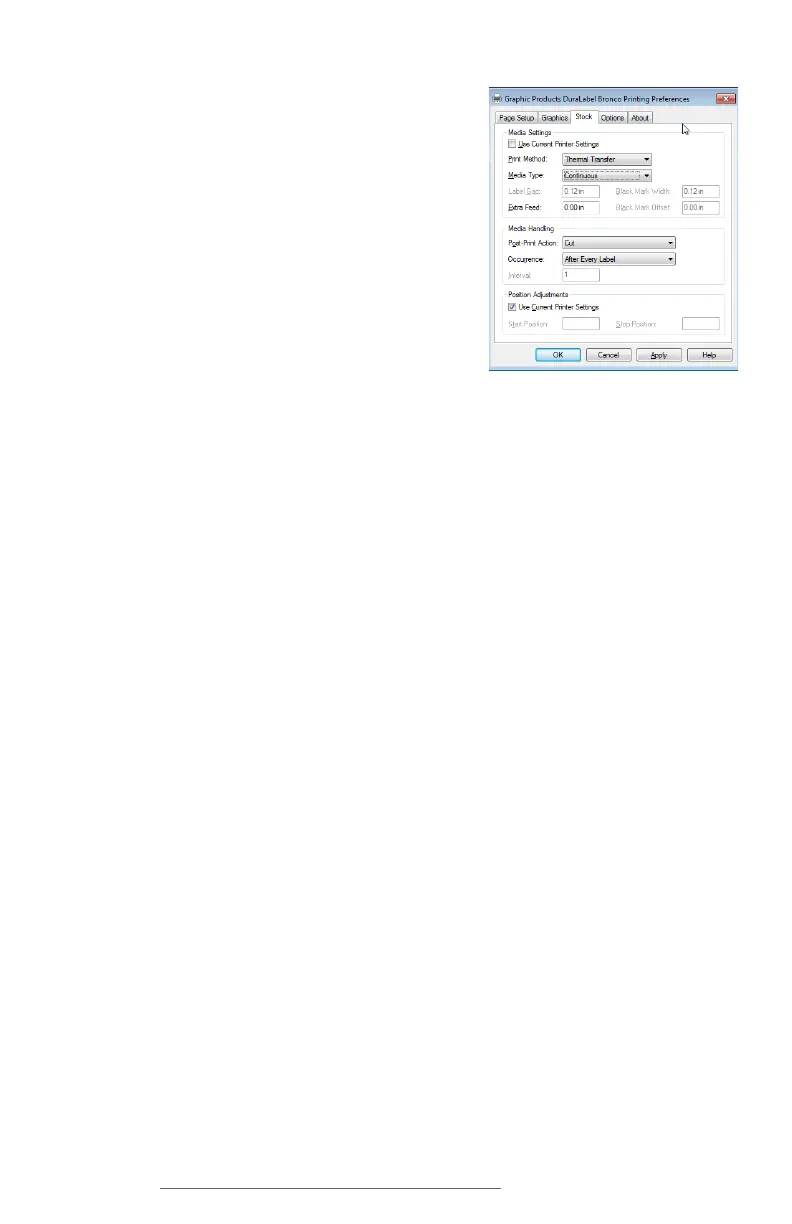
5.3 Stock
This tab includes options for different types of label
stock and how your Bronco will handle them.
5.3.1 PRINT METHOD
For nearly all label materials, the Print Method
should be set to Thermal Transfer. Some unusual
materials do not require a printing ribbon, and can
be used with the Direct Thermal printing method.
5.3.2 MEDIA TYPE
This option describes the type of label stock that you have loaded:
• Continuous: an uninterrupted, continuous roll of label stock (the most common
supply type)
• Label With Gaps: a roll of pre-cut labels, usually pre-printed with some elements,
with small gaps between labels
• Labels With Marks: a roll of partially pre-printed labels, with black marks on the
backing to distinguish one label from the next
If the wrong Media Type has been selected, Bronco may print and cut in the wrong place
on your roll of label stock, or it may give an error.
5.3.3 POST-PRINT ACTION
This option decides whether Bronco will cut your labels from the roll of supply, or take no
action after printing, and leave your labels connected to each other.
5.3.4 OCCURRENCE
If you want Bronco to cut your labels, you can also set when the cutter runs: after every
label, after identical copies, after a set number of labels, or after each complete print
job.



 To Next Page