6 | 3.2 Loading Vinyl Supply
DuraLabel.com | 800.788.5572
Loading the printer
3.2 Loading Vinyl Supply
IMPORTANT! Always turn the power OFF when loading supplies. Always wait at least 5
seconds before turning power back ON.
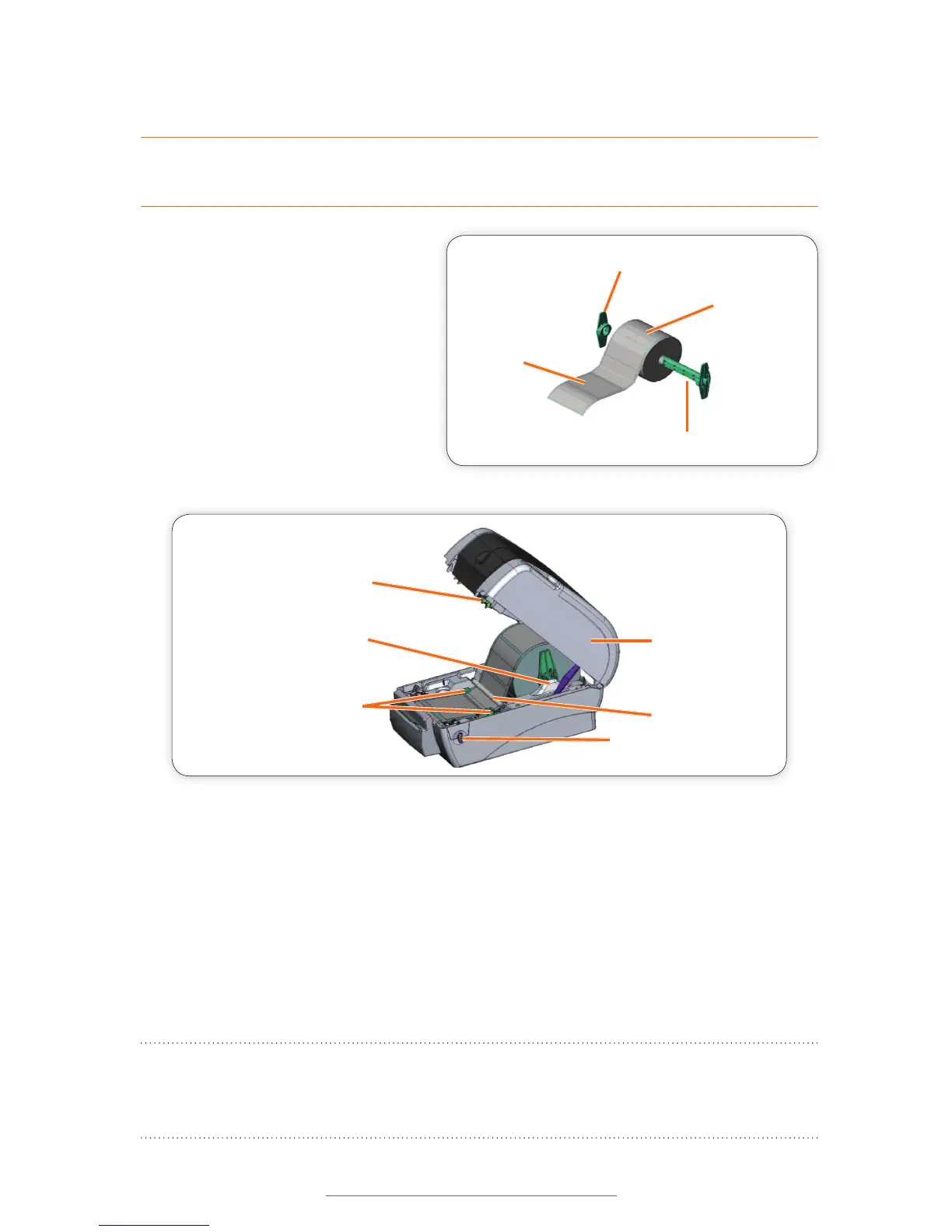
A. Load the vinyl supply onto the
label supply spindle, centering
and securing it with the fixing
tabs located on each end.
B. Place loaded label supply
spindle into the label roll mount
slots, with the label supply
extending over the top of the
roll and toward the front of the
printer.
Printer Cover
Adjustable Label
Guides
Printer Cover
Release Lever
White Teon Bar
Label Roll Mount
Print Head
FIGURE 5
Printing Side Up
Label Supply Spindle
Fixing Tab
Vinyl Supply
FIGURE 4
C. Guide label supply under the white Teflon bar, over the platen roller and through the
printed label opening.
D. Move the label guides to hold the label supply in place.
E. Close the printer cover by lifting up, then pressing down until it latches shut.
F. Close the ribbon mechanism cover by pressing down and in until it latches shut.
Your printer is now loaded and ready to print.
NOTE: Tape guides are required for ½" label supply and shrink tube sizes ½" and
smaller. See Section 2.5, Installing Tape Guides, in the DuraLabel PRO/PRO 300 User
Guide for details.



 To Next Page