R
DURASTAR.COM10
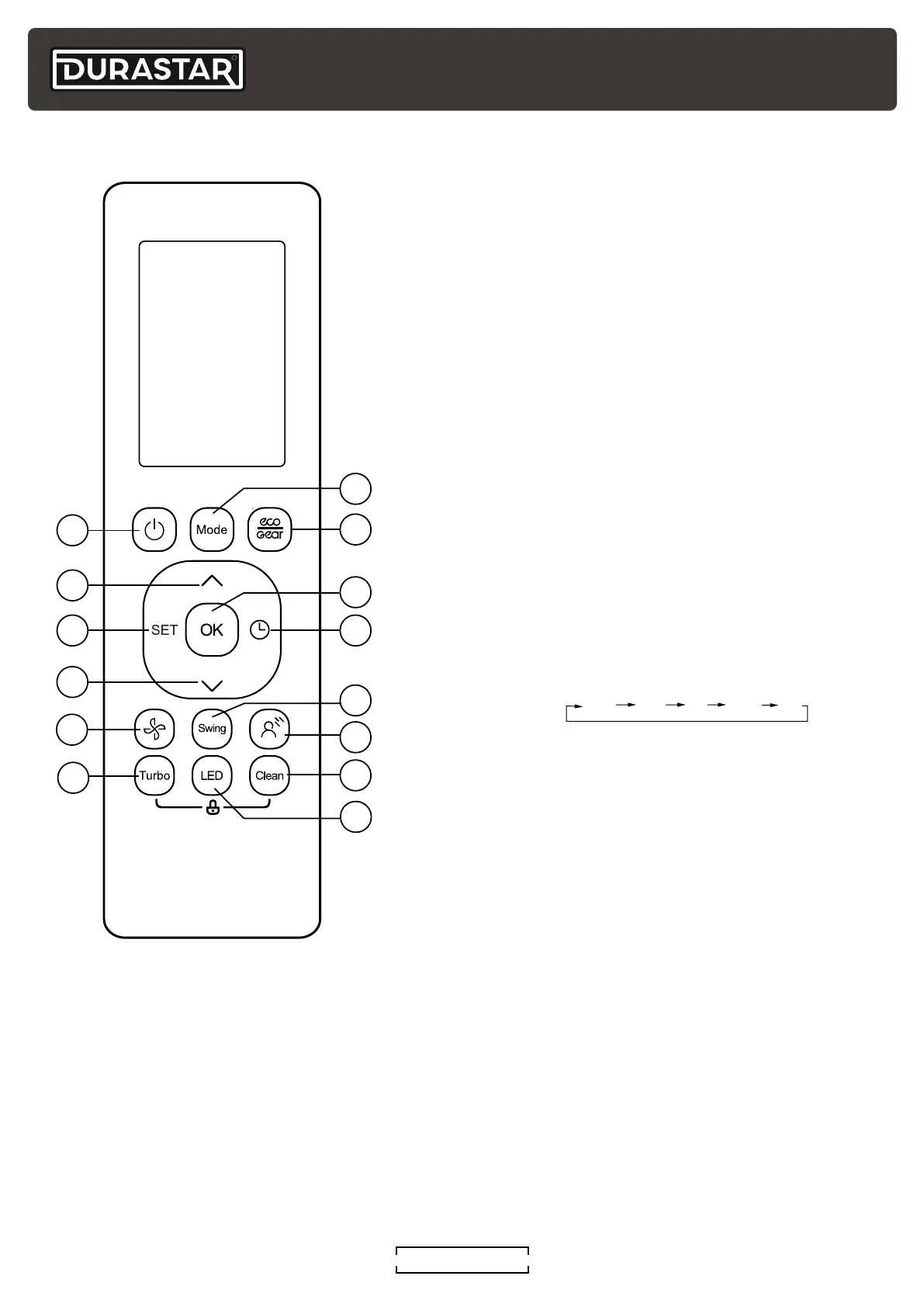
REMOTE CONTROL
1
2
4
3
5
6
8
9
7
10
12
11
13
14
1. ON/OFF Button
Turns the air conditioner ON and OFF.
2. UP Button (
^
)
Press to increase the set temperature in 1°F / 1C
increments .
3. SET Button
Press to access the SET features menu. See
"Advanced Buttons and Features" section.
4. DOWN Button (
V
)
Press to decrease the set temperature in 1°F / 1C
increments. Press (
^
) and (
V
) at the same time for 3
seconds to switch between °F and °C.
5. FAN Button
Press to select FAN speed.
6. TURBO Button
Press to turn on and off the TURBO feature. See
"Advanced Buttons and Features" section.
7. MODE Button
Press to adjust the air conditioner MODE in the
following sequence:
AUTO
COOL
DRY
HEAT
FAN
8. ECO/GEAR Button
Press to enter one of three energy efficiency modes.
See "Advanced Buttons and Features" section.
9. OK Button
Press to confirm selected functions.
10. TIMER Button
Press to initiate the TIMER feature. See "Advanced
Buttons and Features" section.
11. SWING Button
Press to start and stop the automatic horizontal louver movement or set a fixed louver angle.
12. GENTLE Button
Press to stop the air flow from blowing directly on you if it becomes uncomfortable. See
"Advanced Buttons and Features" section.
13. CLEAN Button
Turns on and off the CLEAN feature. See "Advanced Buttons and Features" section.
14. LED Button
Press to turn on and off the indoor unit's display screen.



 To Next Page