R
DURASTAR.COM14
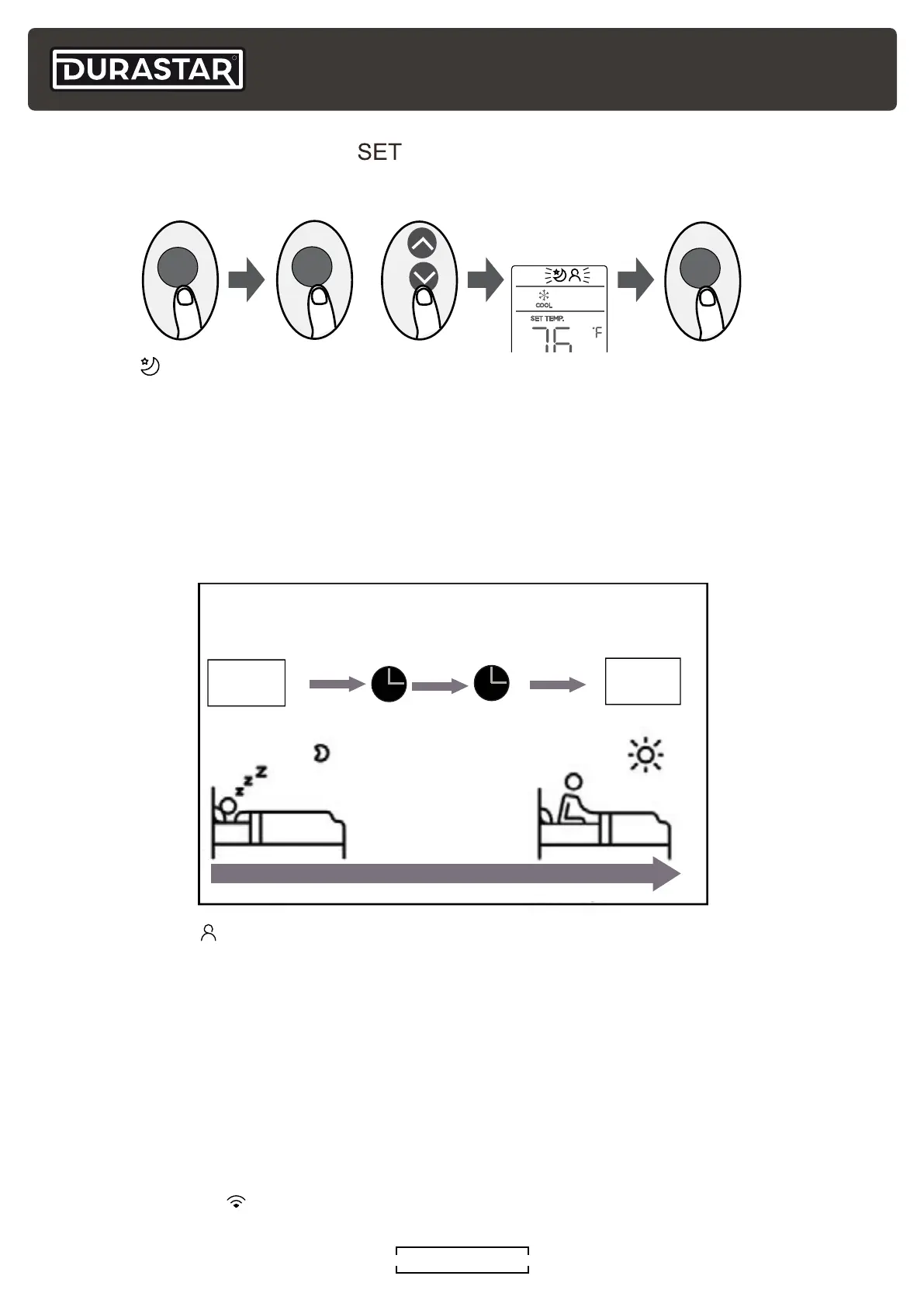
Set
Temperature
1hr
1hr
Keep
Running
SLEEP Operation
Saves energy during sleep
In HEAT mode, temperature adjusts
(-1°C/2°F) per hour for the first two hours
In COOL mode, temperature adjusts
(+1°C/2°F) per hour for the first two hours
SET BUTTON FEATURES ( )
Press the SET button to open the feature menu at the top of the display. Next, press SET or UP
(
^
) and DOWN (
V
) to highlight the desired feature's icon. Finally, press OK to activate it.
FOLLOW ME ( )
This feature uses the temperature at the remote's location, instead of the indoor unit's location, to
optimize the temperature around you and ensure maximum comfort. To activate the FOLLOW ME
feature, press the SET button, select the FOLLOW ME icon and press OK. To deactivate FOLLOW
ME press ON/OFF or change the MODE.
To lock the FOLLOW ME feature, press and hold the TURBO button for seven (7) seconds. The
remote will display "ON" for three (3) seconds and the temperature at its location. When using
AUTO, COOL, and HEAT modes the air conditioner will continue running until the temperature
at the remote’s location is satisfied. Power failures, pressing ON/OFF or changing MODES will no
longer cancel the feature. Press and hold the TURBO button again for seven (7) seconds to unlock
and turn off this feature. The remote will display "OF" for three (3) seconds.
NETWORK SETUP (
)
This feature is not available on this unit.
SLEEP ( )
The SLEEP feature is designed to decrease energy use while you sleep. The SLEEP feature is not
available in FAN or DRY mode.
When you are ready to go to sleep, press the SET button, select the SLEEP icon and press OK.
When in COOL mode, the unit will increase the temperature by 2°F (1°C) after one hour, and will
increase an additional 2°F (1°C) after another hour. When in HEAT mode, the unit will decrease the
temperature by 2°F (1°C) after one hour, and will decrease an additional 2°F (1°C) after another
hour.
The SLEEP feature will turn off after eight hours and the system will return to normal functioning.
or
SET
SET
OK



 To Next Page