Owner’s Guide
9
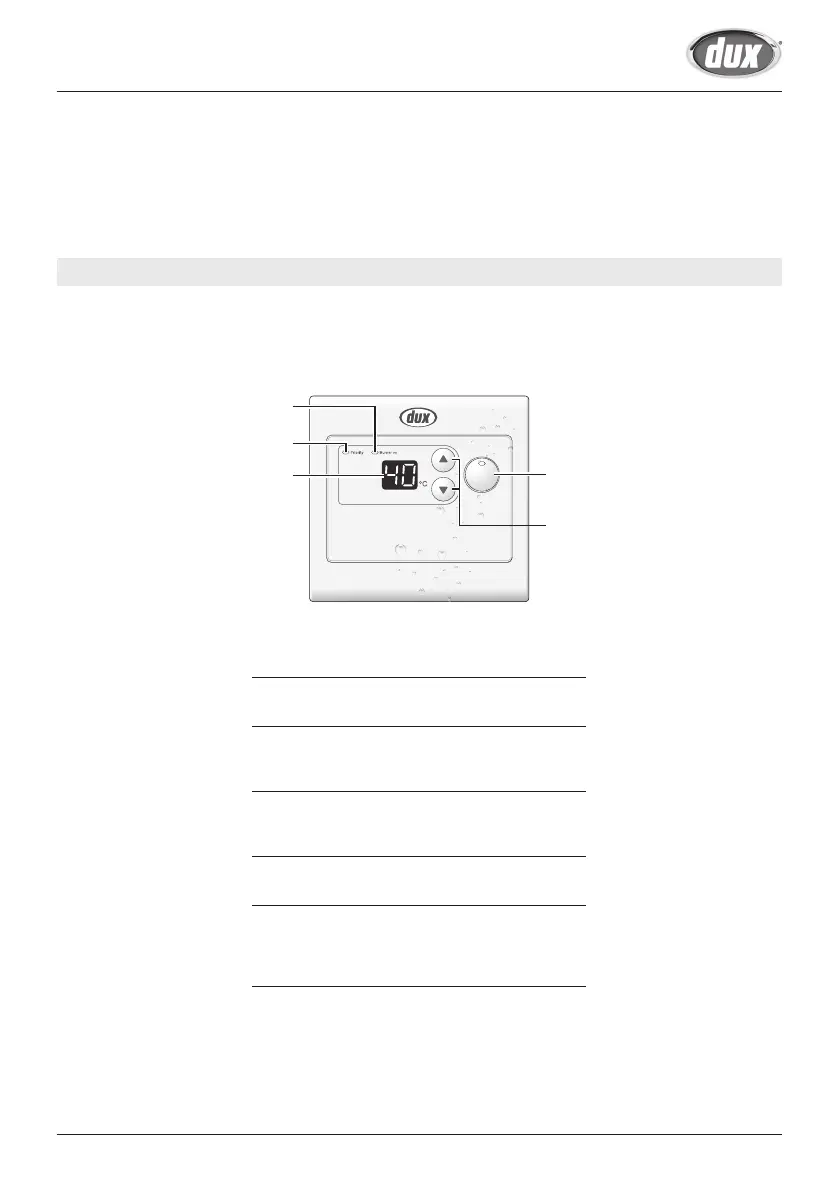
Bathroom 2 Controller (ECB2D) <Optional>
• What is actually displayed depends on how the Water Heater is set.
• Before use, remove the protective sheet from the Remote Controller surface.
1. Operation Button / Indicator
For turning the Water Heater ON/OFF.
2. Setting Buttons
For setting the hot water temperature. (See page
13)
3. Priority Indicator
When this indicator is displayed, the hot water
temperature can be set. (See page 14)
4. Burner on Indicator
When burning, the indicator is displayed.
5. • Temperature setting (e.g. 40°C)
• Error Code
A number will flash if a failure occurs. (See
page 24)
ON/OFF
1
2
3
4
5
SBB816U取説GQ-C2434WS DU#B.indd 9 2019/11/12 11:53:46


 To Next Page