- 21 -
Assembling the DXE-UN-BRKT UNUN Mounting Bracket & UNUN
(US Patent No. D597,086)
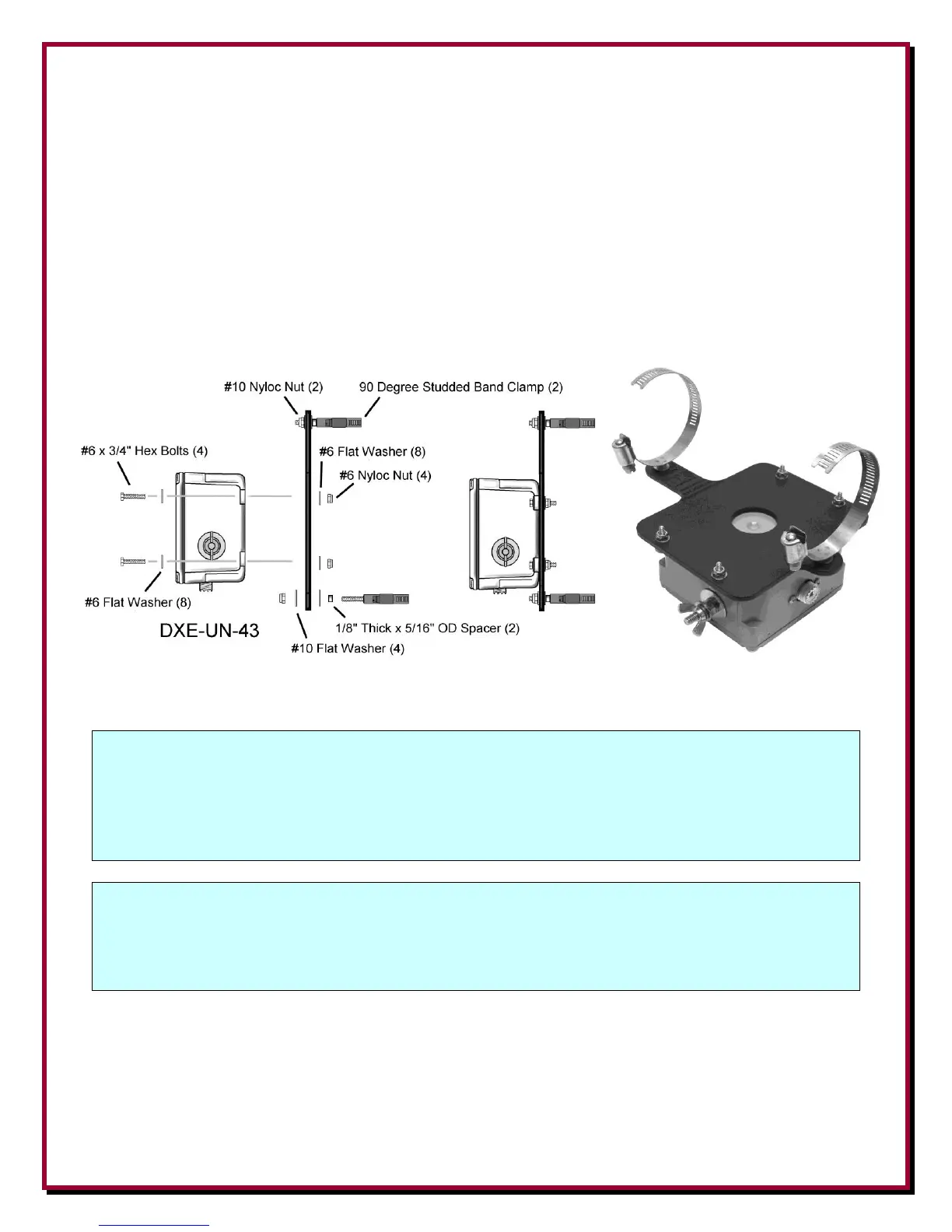
Using the #6 hex head bolts, #6 flat washers, and #6 Nyloc nuts, attach the DXE-UN-43 UNUN to
the patented DXE-UN-BRKT UNUN Bracket with the SO-239 connector facing as shown below.
Tighten the Nyloc Nuts so they are snug. Do not over tighten since the mounting tabs on the UNUN
are plastic.
Attach the stainless steel studded element clamps to the UNUN Bracket using the Aluminum
Spacers and #10 Nyloc nuts as shown in Figure 15. Snug the #10 Nyloc nuts just to the point that
you can still rotate the custom studded element clamps. The Nyloc nuts will be tightened later.
Figure 15
NOTE: If you are installing the optional DXE-MBV-ATU-1 Multi-Band Vertical Remote
Antenna Tuner Add-on Kit for 43 Foot Multi-band Vertical Antennas, you do not
need to install the DXE-UN-43 UNUN. Please refer to Appendix 2 the DXE-MBV-
ATU-1 section of this manual for details.
NOTE: If you are installing the optional DXE-MBVE-5A60MCK 60 Meter Mono-Band
Conversion Kit - you will NOT be using an UNUN. You would use a COMTEK 1:1
Balun. Refer to the DXE-MBVE-5A60MCK Instruction Manual


 To Next Page