Paging Console
Owner‘s Manual 23
LINE interface
LINE interface used as audio input
External audio devices (e.g. CD player) can be connected to the LINE interface. If configured in IRIS-Net
this signal can be used for background music. The following figure shows the correct assignment of a 3,5
mm jack for using the LINE interface as audio input.
LINE interface used for PTT contact
For connecting an external PTT microphone to the DPC 8015 the LINE interface is used as input for the
PTT contact. The PTT function of the corresponding paging station has to be configured during system
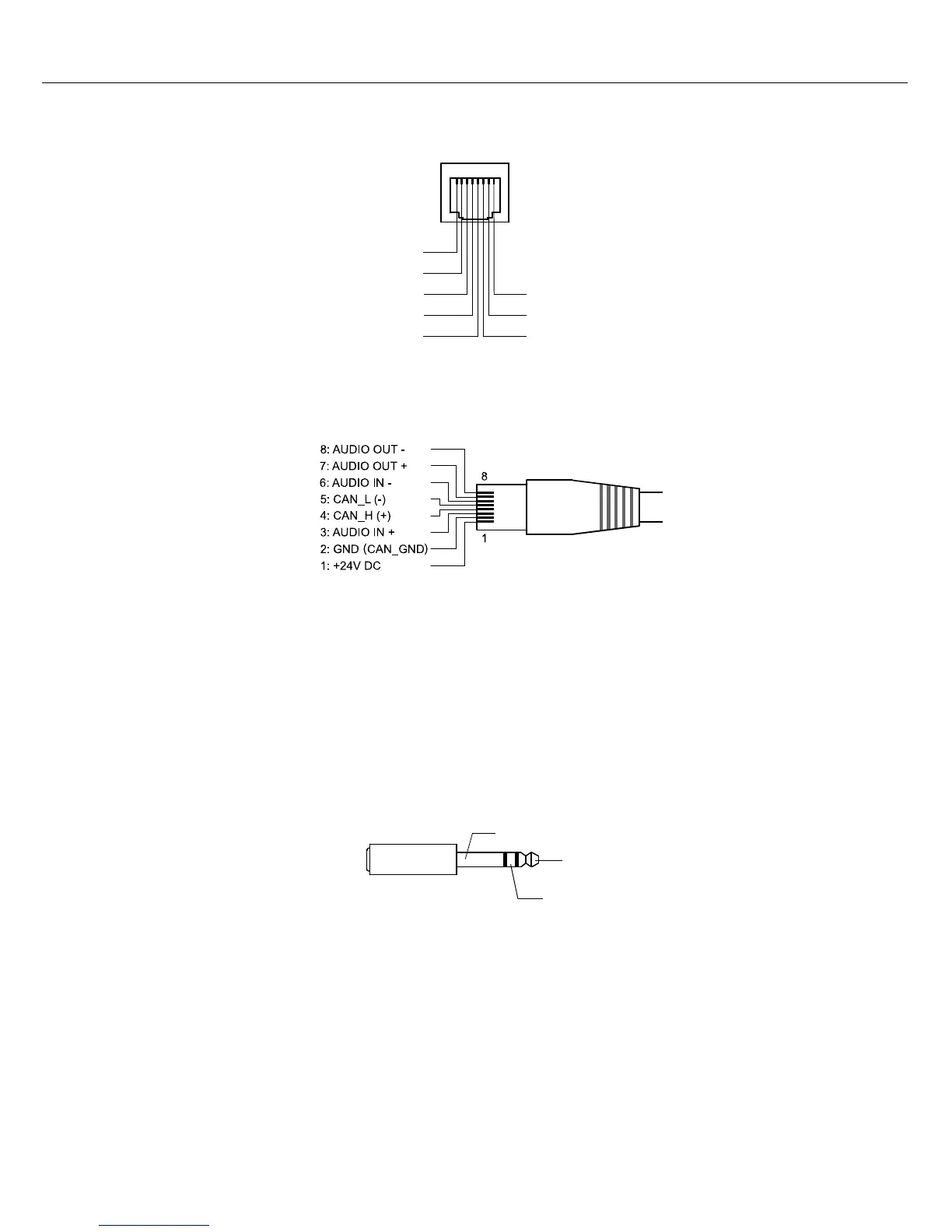
Illustration 4.1: Assignment of PCA bus port
Illustration 4.2: Assignment of PCA bus jack
Illustration 4.3: Assignment of LINE interface as audio input
8: AUDIO OUT -
2: CAN_GND
4: CAN_H (+)
5: CAN_L (-)
18
7: AUDIO OUT +
1: +24V DC
3: AUDIO IN +
6: AUDIO IN -
LINE_LEFT
LINE_RIGHT
LINE_GND


 To Next Page