P16
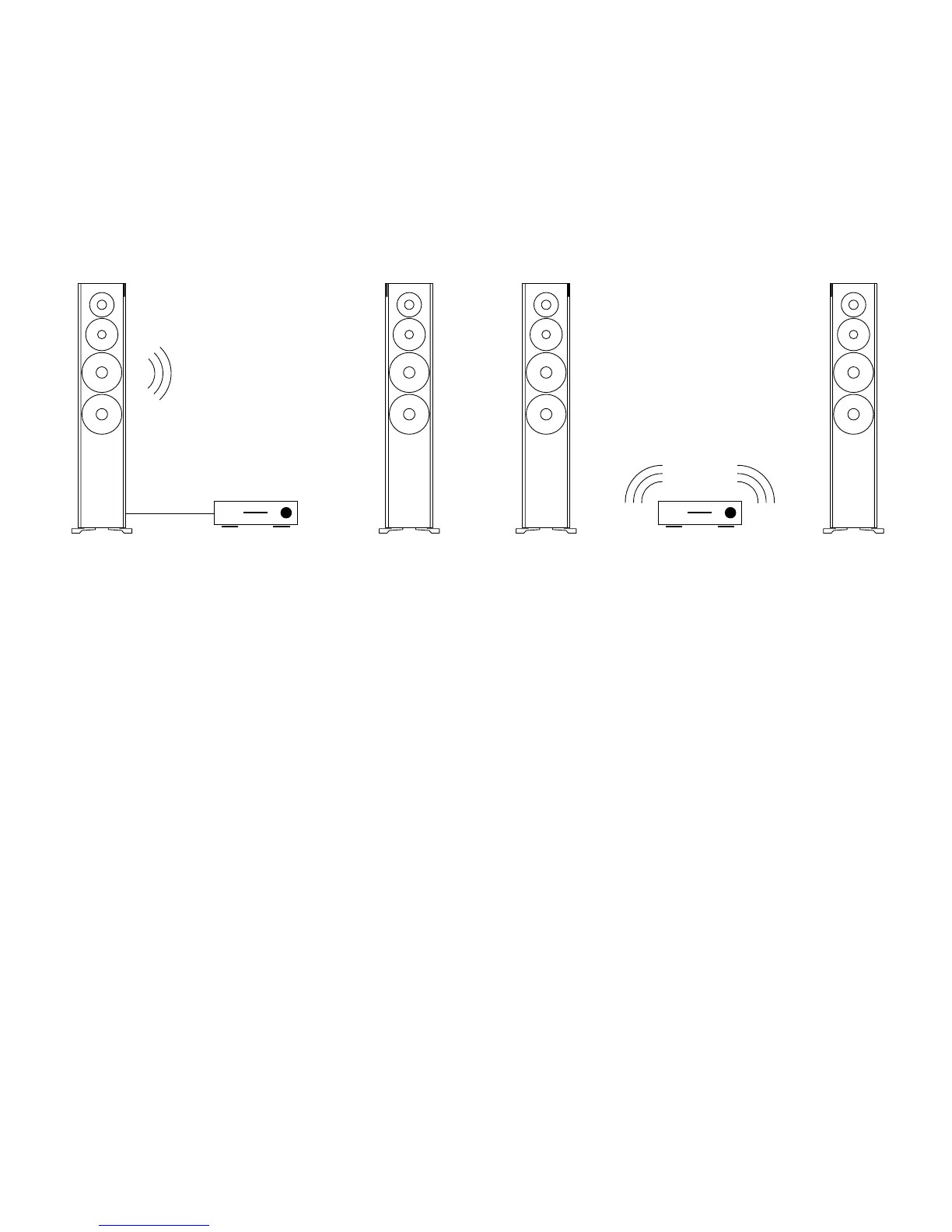
Connecting only one
loudspeaker with a cable
1. Connect the digital output for the
signal source to the digital input
(Digital Audio IN) on one loudspeaker.
You can choose whether to use the
right or left loudspeaker.
2. Operate the connected loudspeaker as
master by setting the Channel Mode
switch on the rear side of the housing
to Master.
3. Operate the other loudspeaker as slave
by setting the Channel Mode switch
on the rear side of the housing to
Slave.
Operating the loudspeakers
via a Hub or Connect
Dynaudio’s innovative Connect system
offers the option to operate the loud-
speakers completely wirelessly. The
connection to the loudspeakers is
established by either a Dynaudio Hub or
Connect box to which the analog and/
or digital souces can be connected. For
more details, please refer to the Connect
Owner’s Manual or learn more at http://
www.dynaudio.com/home-audio/connect/
1. Install and congure the Connect
system according to the Connect
owner’s manual.
2. On the rear side of the housing,
select the red, green, or blue
zone. Loudspeakers that belong to
a common zone can be operated
together using the remote control.
3. Operate one loudspeaker as master
and the other as slave by setting the
respective switch (Channel Mode)
correspondingly on the rear side of the
housing. The assignment of master and
slave is irrelevant.
Operating via Hub or Connect.Operating with a cable.
Connecting The Digital Signal Source



 To Next Page