Remote Control / Connection The Loudspeakers
To connect the loudspeakers, switch all components off.
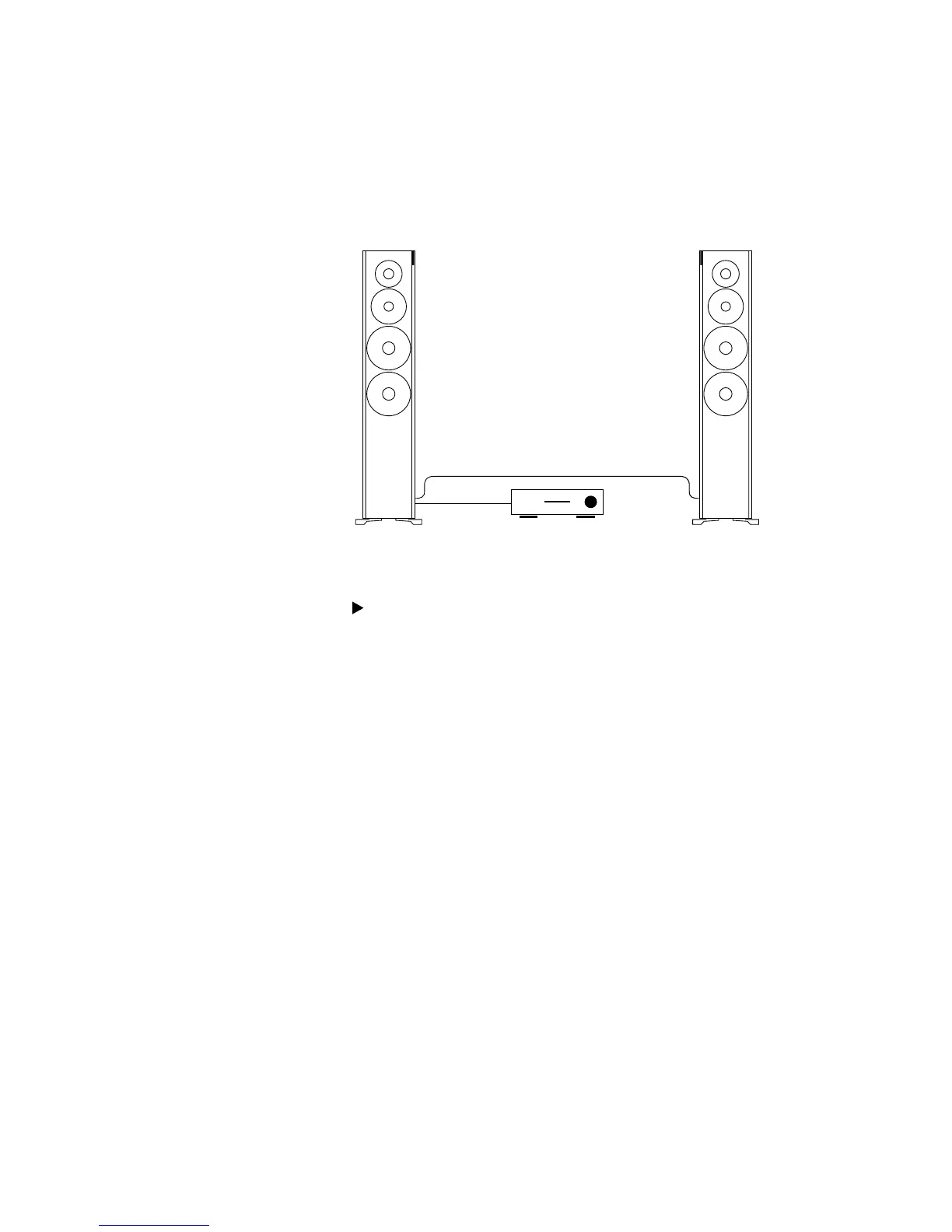
Connecting the digital signal source
You can connect your loudspeakers as follows:
• Both loudspeakers are connected using cables. This requires two digital cables but
the systems benets from signal processing of 24 bits/192 kHz.
• You only connect one loudspeaker using a cable; the connection between the
loudspeakers is wireless. This requires one digital cable and provides signal processing
capabilities of 24 bits/96 kHz.
• Both loudspeakers are operated wirelessly via a Dynaudio Hub or Connect box with
signal processing of 24 bits/96kHz.
Connecting both loudspeakers with cables
1. Connect the digital output for the signal source to the digital input (Digital Audio IN)
on one loudspeaker. You can choose whether to use the right or left loudspeaker.
2. Operate the connected loudspeaker as master by setting the Channel Mode switch
on the rear side of the housing to Master.
3. Connect the digital output on the master loudspeaker to the digital input
(Digital Audio IN) on the other loudspeaker.
4. Operate the loudspeaker connected in this step as slave by setting the
Channel Mode switch on the rear side of the housing to Slave.
Connecting the digital signal source.
Connecting
the
loudspeakers



 To Next Page