Connecting and Switching On Your
Focus Speakers
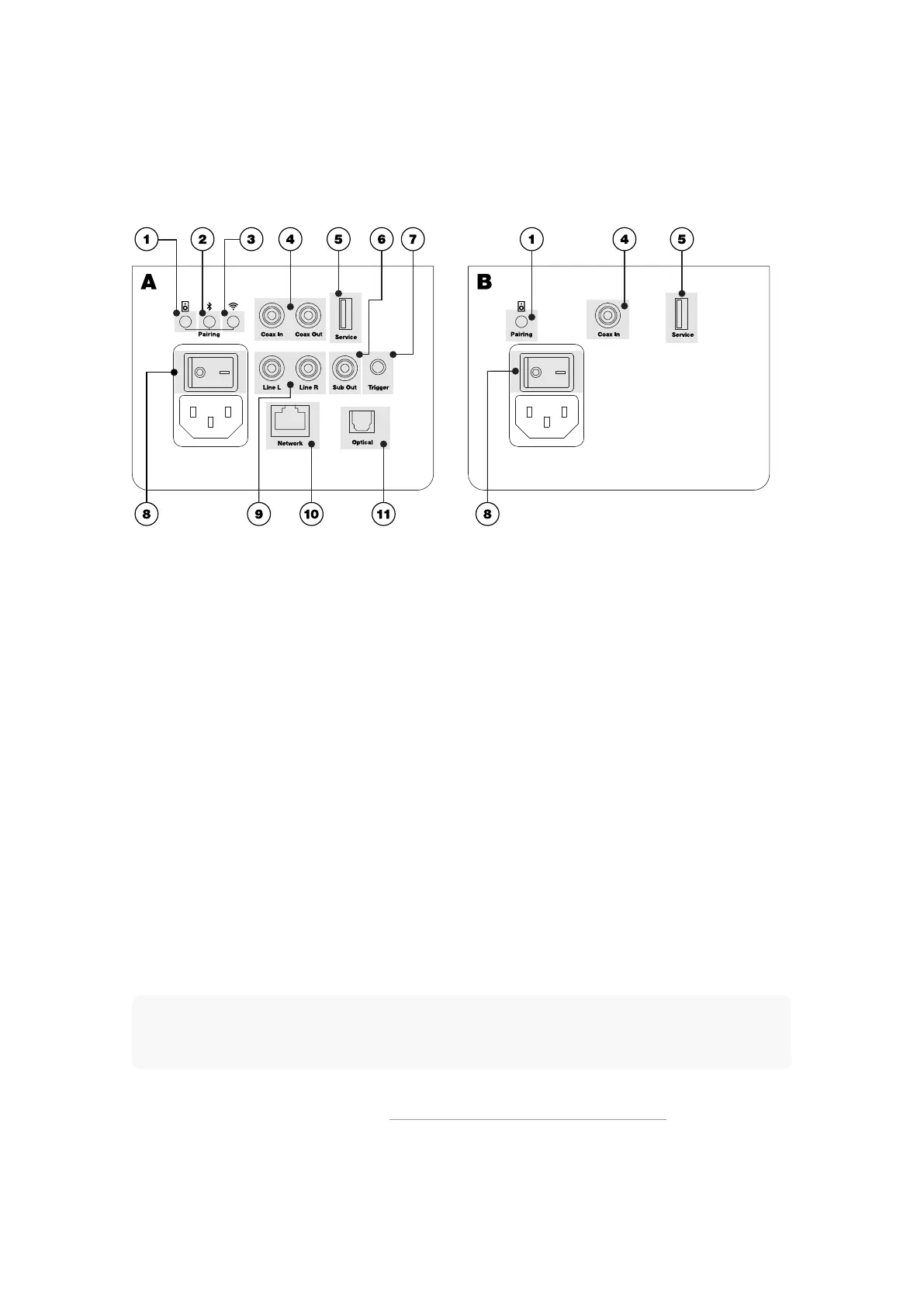
Illustration: Focus Speaker Sockets
▪ A: Primary Speaker
▪ B: Client Speaker
▪ 1: Speaker Pairing button
▪ 2: Bluetooth button
▪ 3: Wi-Fi button
▪ 4: Digital coaxial input and output
▪ 5: Service port
▪ 6: Subwoofer audio output
▪ 8: Power switch
▪ 9: Analogue line inputs
▪ 10: Ethernet socket
▪ 11: Digital optical input
Note
Before switching on your Focus speakers, download and install the Dynaudio Set-up and Control app on your
iOS or Android device. Your iOS or Android device should be connected to the Wi-Fi network you wish to use
with your Focus speakers.
▪ With your Focus speakers installed and in position, they can be connected to mains power using the supplied mains
cables and switched-on (A-8 and B-8). See Illustration: Focus Speaker Sockets and Buttons. Both the Primary (A) and
Client speakers (B) must be switched on.
16 Focus User manual











 To Next Page