Installation-25
B4850
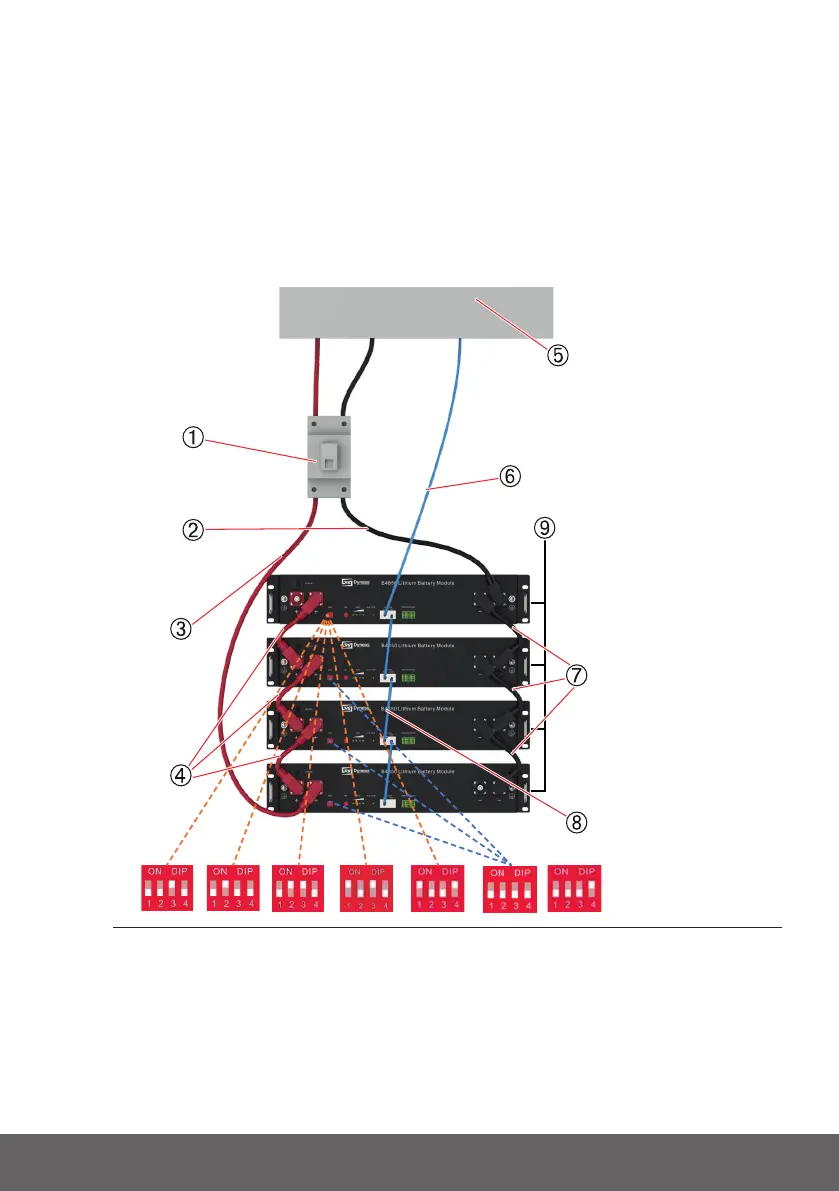
Connecting inverter
1. Connecttotalpositive&totalnegativecableofthebatterysystemtotheinverter
2. Batterymoduletotalpositivecableinstallation
3. Batterymoduletotalnegativecableinstallation
4. ConnectthecommunicationcablefromthemasterCANINtotheinverter
5. TurnonthePowerswitchandwakeupsystembySWbutton
6. ClosetheDCbreakerbetweeninverterandbattery
7. Turnontheinverterandcheckthecommunicationbetweeninverterandbattery
system
MASTER 1 MASTER 2 MASTER 3 MASTER 4 MASTER 5 SLAVE 1 SLAVE 2
Fig.3.4-Thecircuitbreaker(1)isinstalledbetweenthebatterymoduleandtheinverter
1)Circuitbreaker,2)Powercablenegative,3)Powercablepositive,(4)Parallel
cablepositive,5)inverter,6)Communicationcable-toinverter,7)Parallelcable
negative,8)Communicationparallelcable,9)battery.


 To Next Page