Introduction-15
B4850
2.4.1 DIPswitchdenitionanddescription
Whenthebatteriesareconnectedinparallel,themastercommunicateswiththe
slavesthroughtheCANinterface.Themastersummarizestheinformationofthe
entirebatterysystemandcommunicateswiththeinverterthroughCANor485..
Nota: DIPswitchfrom(1)to(3)denedifferentprotocolsanddistinguishbetween
masterandslave.DIPswitch(4)forBaudrateselection.
•
DIPswitch(4)OFF:settheRS485baudrateto9600andtheCANto500k
•
DIPswitch(4)ON:settheRS485baudrateto115200andtheCANto250k
ThecommunicationcablefromthemasterCANINtotheinvertercommportshould
bethecorrectone.
IfthemasteristhelatestB4850batterywithDIPswitch.
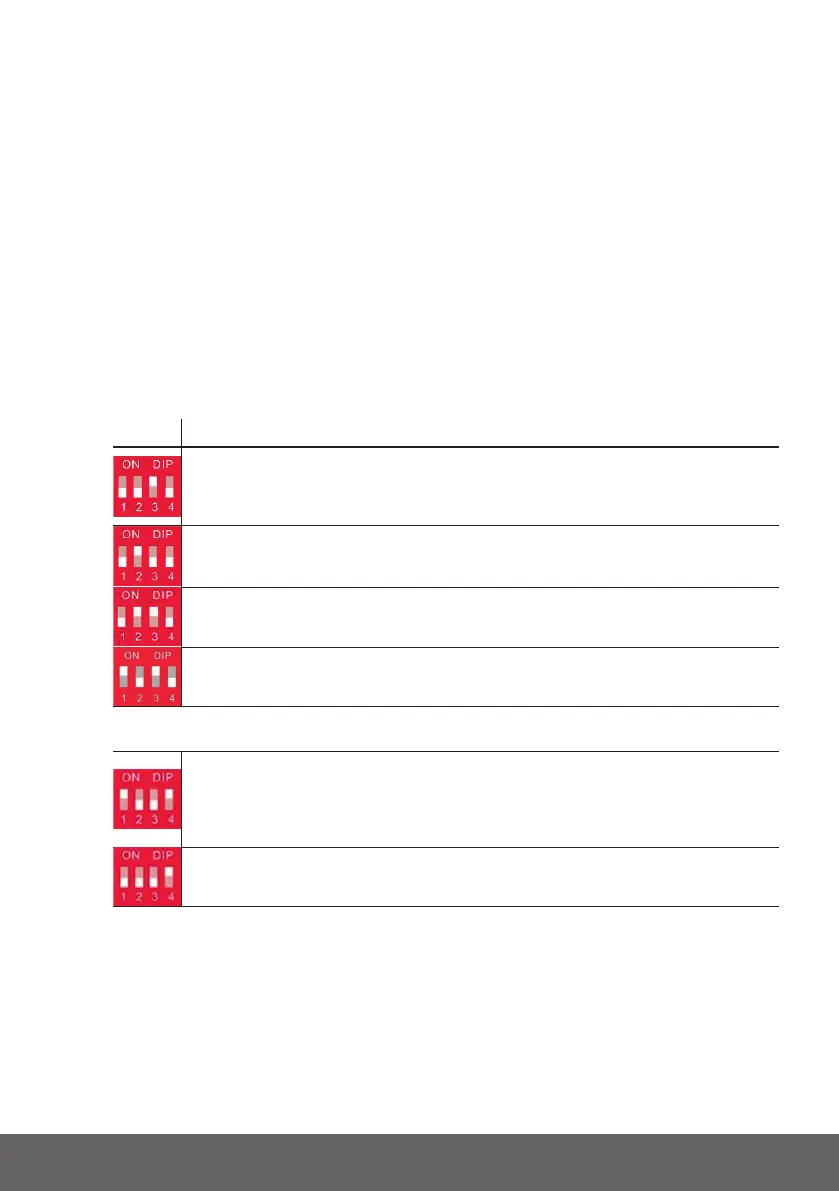
SETT. DESCRIPTION
Master Set1.WhenthebatteryworkswithGOODWE,Solis,LUX,Sofar,DEYE,
VICTRON,IMEON,Sungrow,SMA,RENAC,DELIOS,SAJ(CANComm),before
startingthebattery,youneedputthemasterDIPswitch“#3”tothe“ON”position
(tothetop),thenturnonthebatteries.
Master Set2.IfthebatterycommunicateswiththeAxpert-king/VMIII/MAX,
Innisolar,GrowattSPH/SPA(CANcomm),GMDE,turnthemasterDIPswitch
“#2”to“ON”position.
Master Set3.IfthebatterycommunicateswiththeGrowattSPFHVM-P/ES/WPV
byRS485communication,turnthemasterDIPswitch“#2”and“#3”to“ON”.
Master Set4.IfthebatterycommunicateswiththeSchneiderConextSeries,turn
themasterDIPswitch“#1”and“#3”to“ON”(MASTER4)
SlaveSet1.WhenyousetupthemasterDIPassetting1~4,
alltheslaveskeeptheDIP0000,noneedchange.
Master Set5.IfthebatterymoduleisincommunicationwiththeICCby485
communication,turnthemasterDIPswitch“#1”and“#4”to“ON”.Thisisonlyfor
ICC(aspecialcommunicationdeviceofsomeno-communicationinverter),it’sa
specialrmwareinBMS,differentfromgeneralrmware,soifcustomerswantto
usethat,pleasecontactdynesstoconrm.
Slave Set2.TheDIPswitchofslavesneedtoturnthe“#4”to“ON”atthesame
timewhilethemasterissetting5.
IftheenergystoragesystemhasonlyoneB4850,itisthemasteritself,andstillfollowthe
abovesteps.


 To Next Page