30-Use,maintenanceandtroubleshooting
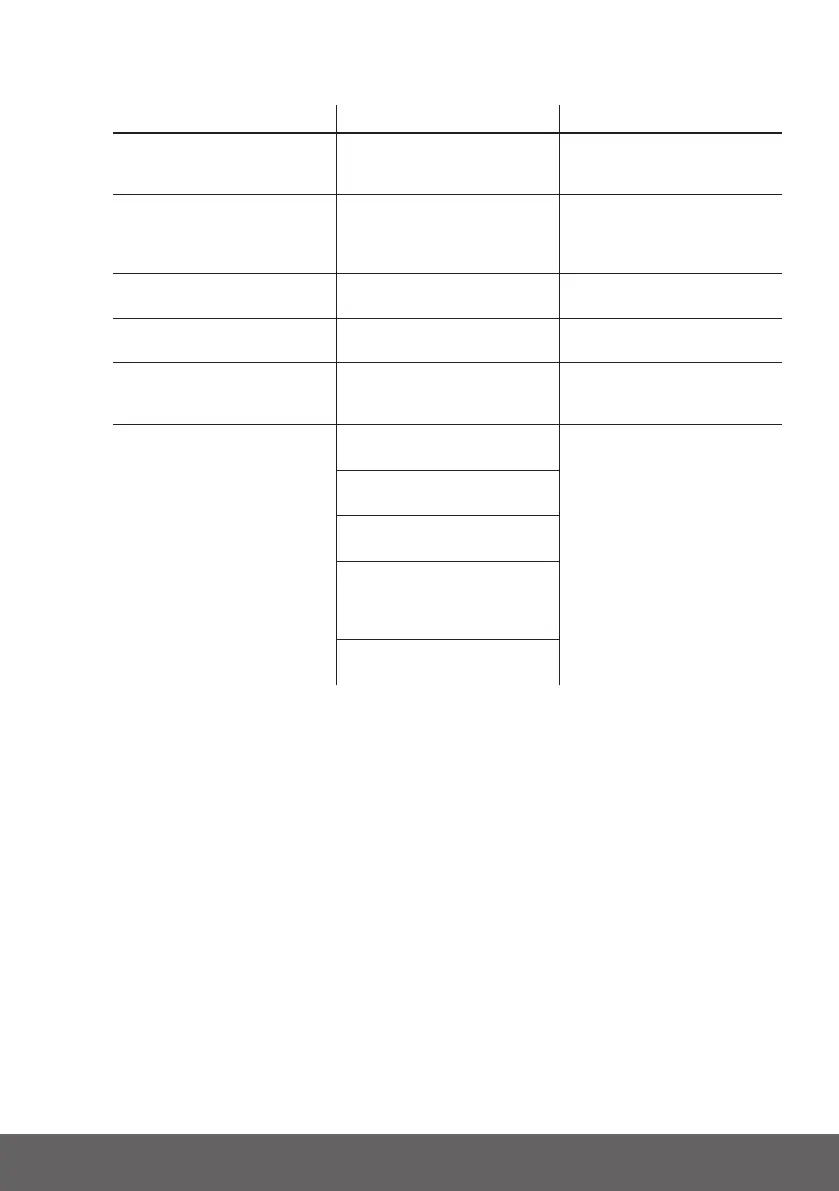
4.3 Analysis and treatment of common faults
FAULT PHENOMENON REASON ANALYSIS SOLUTION
Theindicatordoesnot
respondafterthepower
on
Totalvoltage
lowerthan35V
Checkthetotalvoltage
NoDCoutput Batterydatastatus
isabnormal.
Batterygetsintoover-
dischargedprotection
Readthebatteryinformation
onthemonitor
TheDCpowersupply
timeistooshort
Batterycapacitybecome
smaller
Storagebatteryreplacement
oraddmoremodules
Thebatterycan’tbefully
chargedto100%
Chargingvoltageis
toolow
Adjustchargingvoltageat
53.5Vor54V
Thepowercablesparks
oncepoweronandALM
lightRED
Powerconnection
short-circuit
Turnoffthebattery,check
thecauseoftheshortcircuit
Communicationfault TheDIPsettingofhemaster
iswrong
Checkthesepossiblecause
onebyone
thebatterytypeofthe
inverteriswrong
Communicationcableused
incorrectly
Communicationcableis
incorrectlyconnectedatthe
batterycommportorthe
invertercommport
Thebatteryrmwareversion
isnotsupporttheinverter
Ifyouneedanytechnicalhelporhaveanyquestion,pleasecontactthesellerin
time.


 To Next Page