Use,maintenanceandtroubleshooting-27
B4850
4.0 USE, MAINTENANCE AND TROUBLESHOOTING
4.1 Battery system usage and operation instructions
•
Aftercompletingtheelectricalinstallation,followthesestepstostartthebattery
system.
•
RefertothedescriptionoftheDIPswitchof2.3.1topreparethebatterymodule
beforestartingup,thenpresstheON/OFFbuttontotheONposition,nextpress
andholdtheSWbuttonfor3seconds.
•
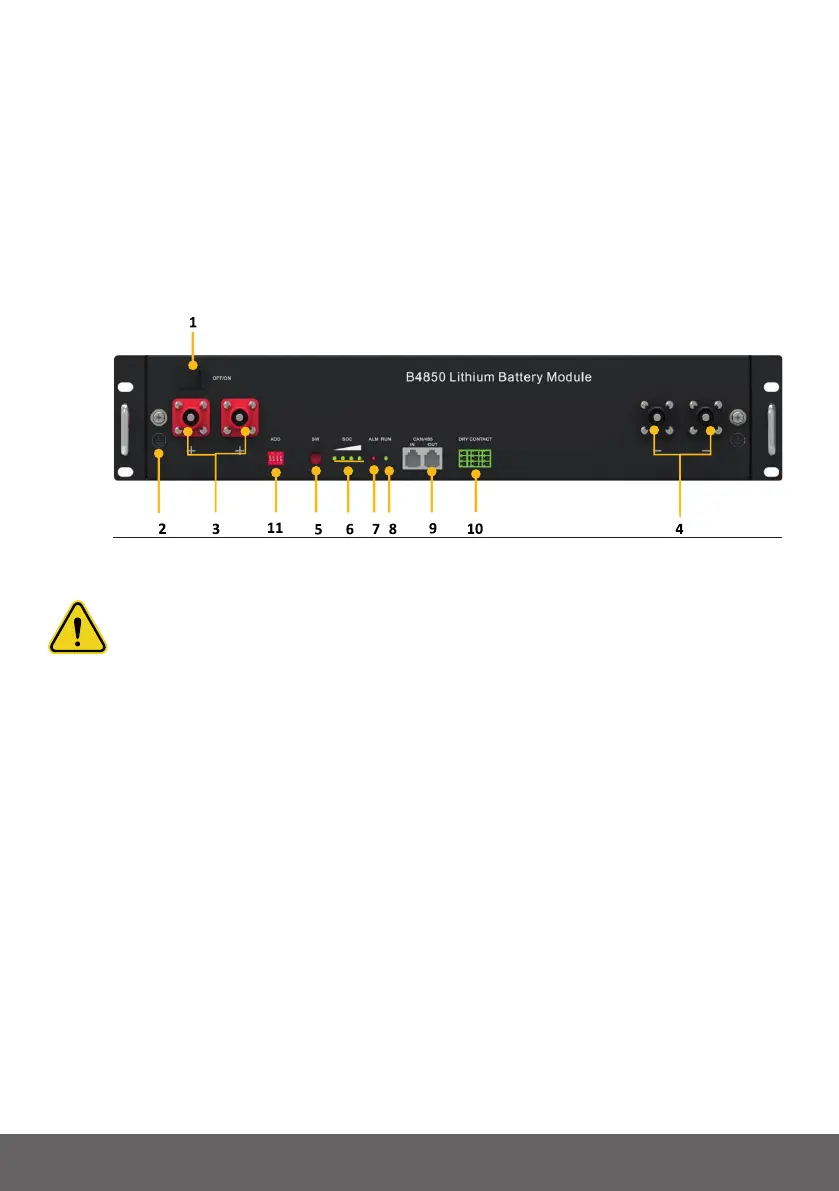
Aftertheindicatorself-test,theRUNindicatorwilllightandtheSOCindicatorwillbe
on(100%SOCstatusintheFigure4-1).
Fig.4.1-B4850
Caution: Afterpressingthepowerbutton,ifthebatterystatusindicatoronthe
frontpanelcontinuestobered,pleaserefertothe“4.2Alarmdescriptionand
processing”.Ifthefailurecannotbeeliminated,pleasecontactthedealertimely.
•
Useavoltmetertomeasurewhetherthevoltageofthecircuitbreakerbattery
accessterminalishigherthan42V,andcheckwhetherthevoltagepolarityis
consistentwiththeinverterinputpolarity.Ifthecircuitbreakerbatteryinputterminal
hasavoltageoutputandisgreaterthan42V,thenthebatterybegintowork
normally.
•
Afterconrmingthatthebatteryoutputvoltageandpolarityarecorrect,turnonthe
inverter,closethecircuitbreaker.
•
Checkiftheindicatoroftheinverterandbatteryconnection(communication
indicatorandbatteryaccessstatusindicator)isnormal.Ifitisnormal,successfully
completetheconnectionbetweenthebatteryandtheinverter.Iftheindicatorlightis
abnormal,pleaserefertotheinvertermanualforthecauseorcontactthedealer.
•
Batterymodulescanbeconnectedinparallelupto40units.


 To Next Page