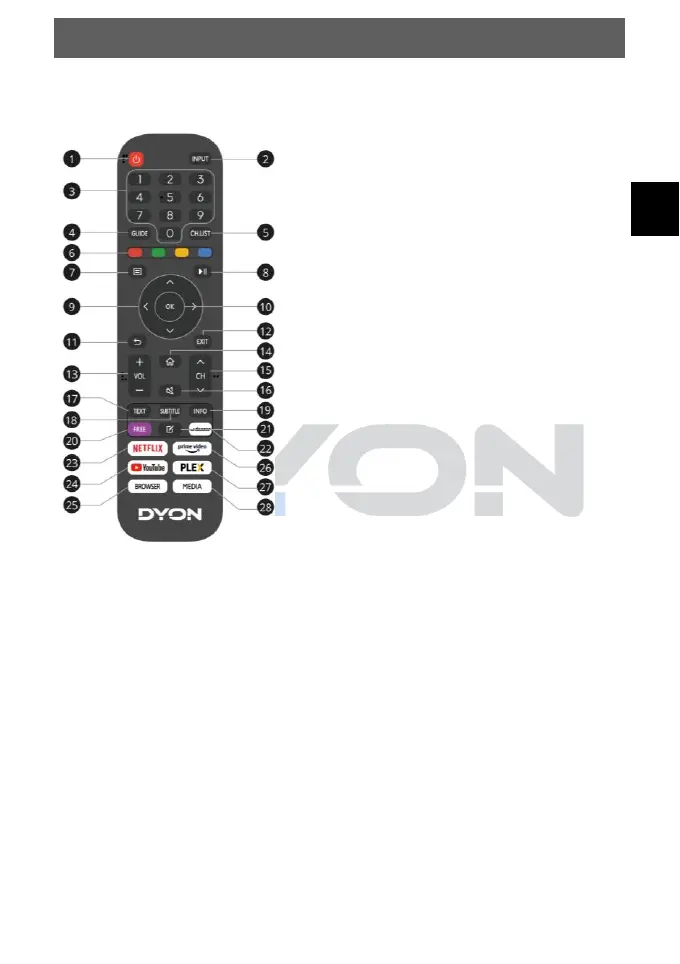
1. POWER: Switch stand-by on/off
2. INPUT: Select input source
3. ZIFFERNTASTEN: Direct station selection
4. GUIDE: Display programme information of the
current programme and subsequent programmes
5. CH.LIST: In TV mode: Open channel list
6. COLOUR BUTTONS:
In the menu: Menu functions as shown.
In TV Teletext mode: Teletext functions as
displayed.
7. MENU: Open on-screen menu
8. : Playback control during media playback
(without function in TV mode)
9. ARROW KEYS: Move in the menus
10. OK: Confirm selection
11. BACK: Back to the previous menu.
12. EXIT: To exit the menu or a SMART function Exit.
13. VOL+/-: To adjust the volume
14. HOME: Open Internet functions
15. CH/: To change the programmes
16. MUTE: Mute Sound
17. TEXT: In TV mode: Open Teletext
18. SUBTITLE: To switch between different subtitles
19. INFO: Shows information about the current
programme
20. FREE: Open VIDAA Free Portal
21. BEARBEITEN: Open editing menu
22. DEEZER: Open Deezer
23. NETFLIX: Open Netflix
24. YouTube: Open YouTube
25. BROWSER: Open Internet Browser
26. Prime Video: Open Prime Video
27. PLEX: Open Plex
28. MEDIA: Open all units



 To Next Page