EC5000
- 76 - - 77 -
Description of Functional Parameter
5
less
more
big
small
CARRIER WAVE
(KHZ)
METAL NOISE
FROM MOTOR
SET
DISTURB NOISE AND
LEAKAGE CURRENT
12 Fout
24 Fout
36 Fout
2.5
5.0
8.0
10.0
12.5
15.0
7
8
9
1
2
3
4
5
6
C02 instant stop running setting limit:0~2 factory default:0
0: Don't continue running.
1: Resume power during instant power off compensation time(C06), AC
drive continue running.
2: AC drive continue running when power is resume to normal value
in control logic time,and there is no Uul fault.
fc=Carrier frequency
C01=7 Situation
fout= Output Frequency
C01=8 Situation
fc=Carrier frequency
fout=Output Frequency
fout=Output Frequency
fc=Carrier frequency
C01=9 Situation
frequency=12 fout
frequency=24 fout
frequency=36 fout
1.0KHz
2.5KHz
83.3Hz
208.3Hz
1.0KHz
2.5KHz
41.8Hz
104.1Hz
1.0KHz
2.5KHz
27.7Hz
69.4Hz
Notice!
EC5000
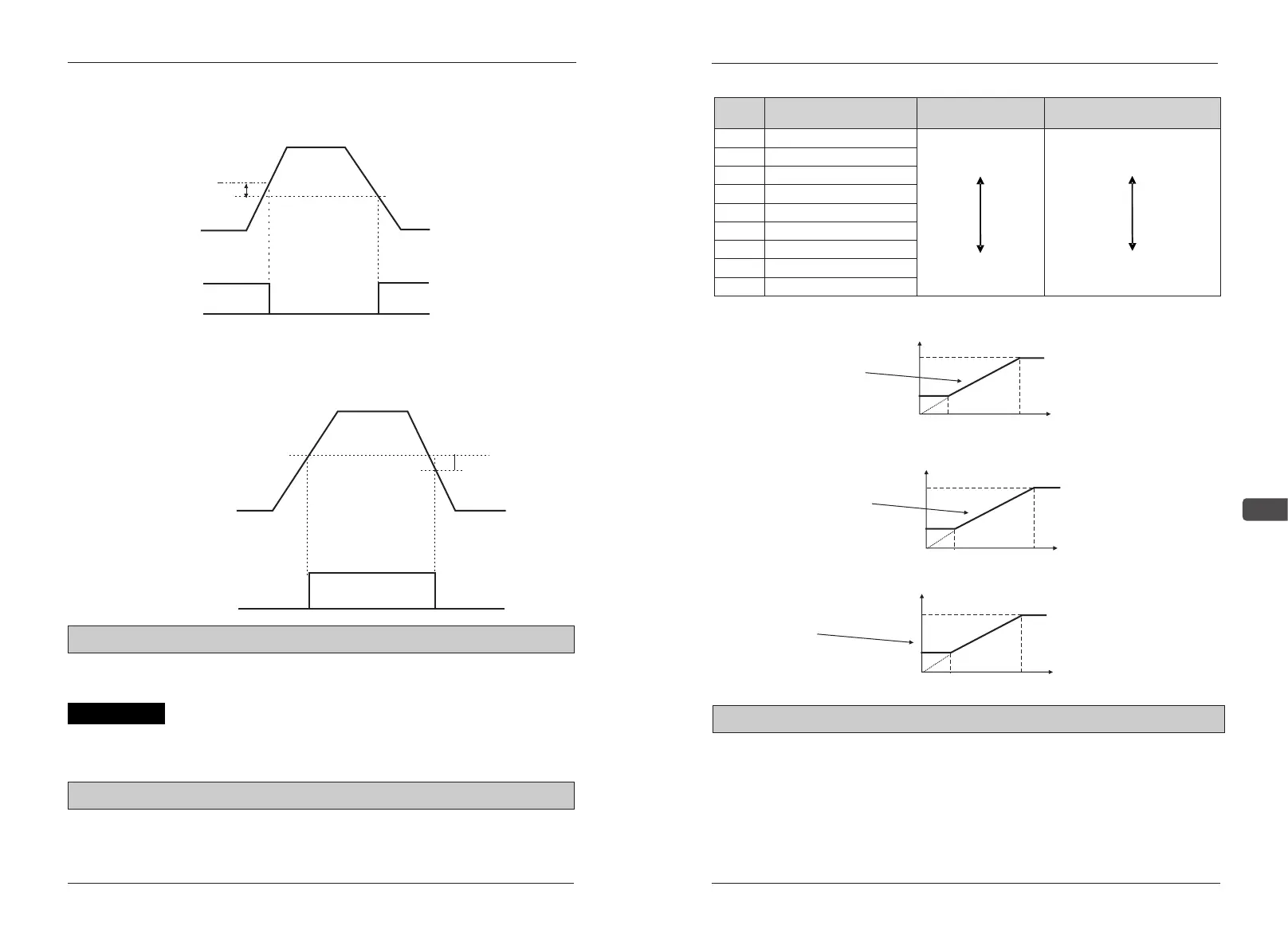
(B22)
-2Hz
ONON
Discharge rate
Output frequency
Frequency
detection signal
Detection result of frequency
0:constant torque of G,the coefficient of over load is 150%1min
1:fan-type pumps of P,the coefficient of over load is120%1min
When change this parameters, C18 will change following this. When 0
change to 1 the power of AC drive more bigger.
C01 carrier wave frequency setting limits:1~9 factory default:*3
Set AC drive output transistor ON/OFF frequency carrier wave
Detection result of frequency
Output frequency
Frequency detection signal
Discharge rate
-2Hz
ON
(B22)
B24 G/P choose setting limits:0~1 factory default:*3
Description of Functional Parameter
Frequency test mulit-function joint input set to be “4”(Frequency output≤
Frequency test standard)
■ Frequency test multi-function joint input set to be“5”
(Frequencyoutpu≥Frequency test standard)
(B23)
(B23)


 To Next Page