EC5000
- 74 - - 75 -
Description of Functional Parameter
5
In order to monitor,send the output Frequency and the output current to the
simulate output terminal FMA-FC
■F M A function:
1:current output(10V AC drive rated current)
2:power output(10V AC drive rated current)
3:DC(10V/400V(200V grade),10V/800V(400V grade)
Frequency meter
3V/1aMFor the full-scale
B21
+
-
FM
Maximum output Frequency
(AC drives Rated current)
Output of analog
B21=0.30
100%
0
3V 10V
B21=1.00
■F M A increase:correct Fre. meter and galvanometer(B21) to adjust
simulate output increase
Set simulate output voltage in 100% Fre. output. Fre. meter shows 0-50HZ
in 0-3V
10VX
Output Fre.is 100% in 3V
=3V
0.3
B21
SET VALUE
B22 frequency test setting limit:0.00Hz~400.00Hz factory default:0Hz
B23 FAR value setting limit:0.00Hz~25.00Hz factory default:2Hz
It is valid when multi-function joint input set to be “Fre.test”(set value: 4 OR 5)
■Frequency test:“frequency test” is functioning when output frequency is
over or lower than frequency test standard B22.
■FAR value:frequency test release width
■ Examples
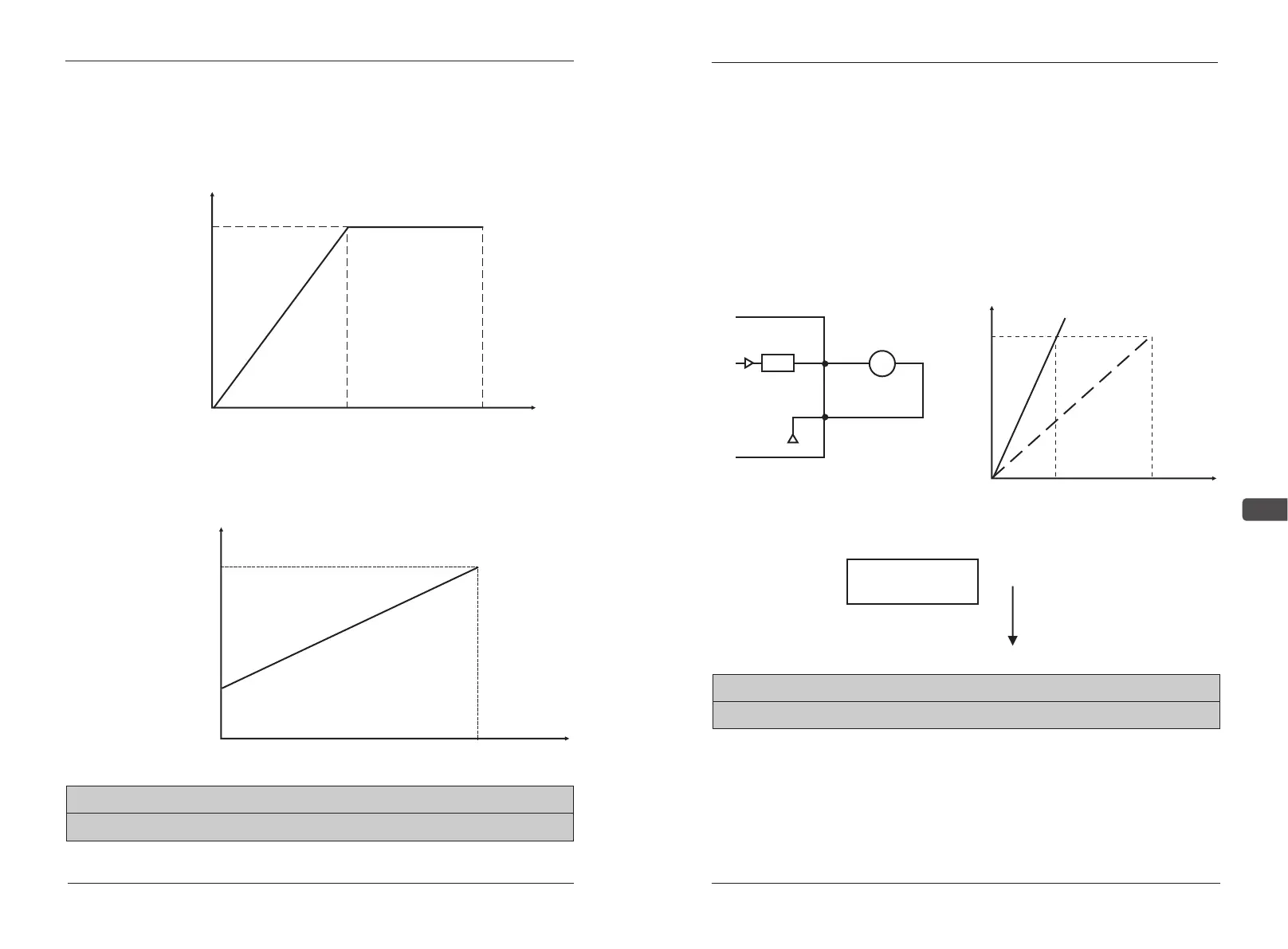
AC drive runs in 0%-100% frequency order when the input voltage is 0-5V.
Increase: B18=200,deviation:B19=0
AC drive runs in 50%-100% frequency order when the input
voltage is 0-10,Increase:B18=10,deviation:B19=50
EC5000
(100%)
0%
0V
5V
10V
Maximum output
frequency
B20 F M A function setting limits:0~3 factory default:0
B21 F M A function setting limits:0.01~2.00 factory default:1.00
Maximum output
0V
10V
50%
0%
100%
Description of Functional Parameter


 To Next Page