EC5000
- 72 - - 73 -
Description of Functional Parameter
5
Notice!
When B16 is 0, frequency is kept although AC drive power is off.
B17 frequency lost setting limits:0~1 factory value:0
Select running way on circumstance that control circuit terminal frequency redu-
ces quickly
0:don't treat
1:treat if AC drive order reduces 90% with 400ms, AC drive continue running
in 80% of the pre-set value
B18 Fre.increase setting limit:0%~200% factory default:100%
B19 Fre.deviation setting limit:-100%~100% factory default:0%
When frequency is input by simulate value through control circuit terminal
FV and FI, appointed deviation and increase can be set related to the simulated
input frequency.
Frequency ouder increase:frequency order set by 1% unit simulate input ■
value 10V(20mA) max.frequency output: 100%.
Frequency order deviation:frequency order set by 1% unit simulate input ■
value 0V(4mA) max.frequency output: 100%.
Maximum output
frequency×Gain/100
Maximum output
frequency×Deviation/100
( ) Represents the selection of given current input
0V
(4mA)
10V
(20mA)
■ Setting: 3,setting example of “any frequency unamious signal”
EC5000
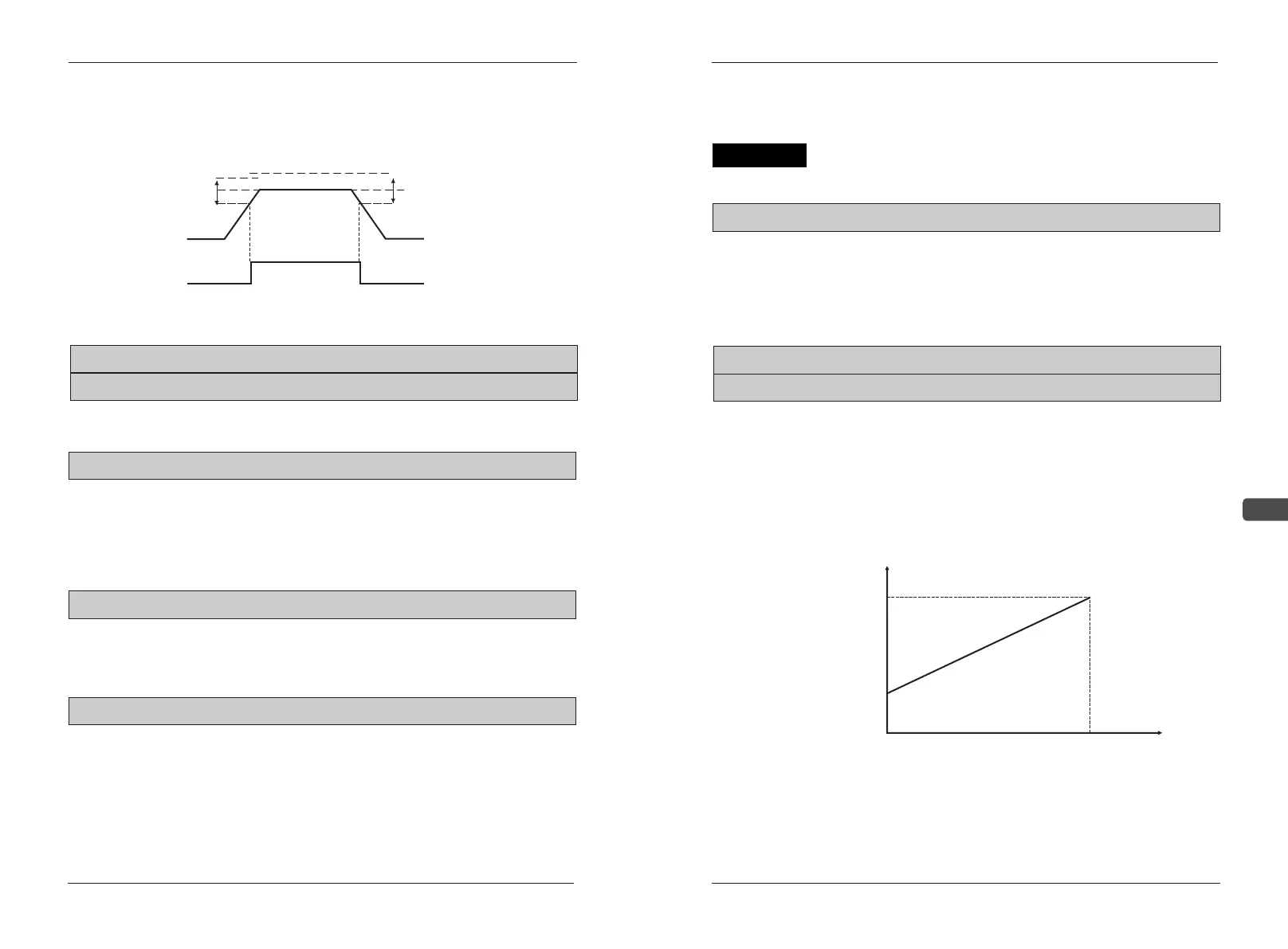
Detection width
output frequency
Expected consistent
frequency signal
Released width
Detection result of
expected frequency
ON
2HZ
+
-
B26
B12 ON delay setting limits:0S~25.5S factory default:0.0S
B13 OFF delay setting limits:0S~25.5S factory default:0
B14 main simulate value setting limits:0~1 factory default:0
B15 supplementary simulate value setting limits:0~1 factory default:1
Time delay function: Set the delay time from the input contact to the
output contact.
Main frequency order input way (B14): to input main frequency from control
circuit terminal, it can select voltage(0-10V) or current(4-20MA) through setting
constant B14.
0: FV,0~10V input
1: FI,4~20mA input
Setting constant B15 to chang input current of control circuit terminal FI
0: 0~10V input
1: 4~20mA input
B16 Fre.keep setting limits:0~1 factory default:0
This function is valid when select UP/DOWN order for muti-function joint input.
Set constant B16 to be “0”when UP/DOWN order is used to keep frequency
Description of Functional Parameter
0:keep the given value in frequency(constant A27)
1:don't keep


 To Next Page