Slide Gate Operators / Eagle-2000 Series / Eagle-1000 Series
____________________
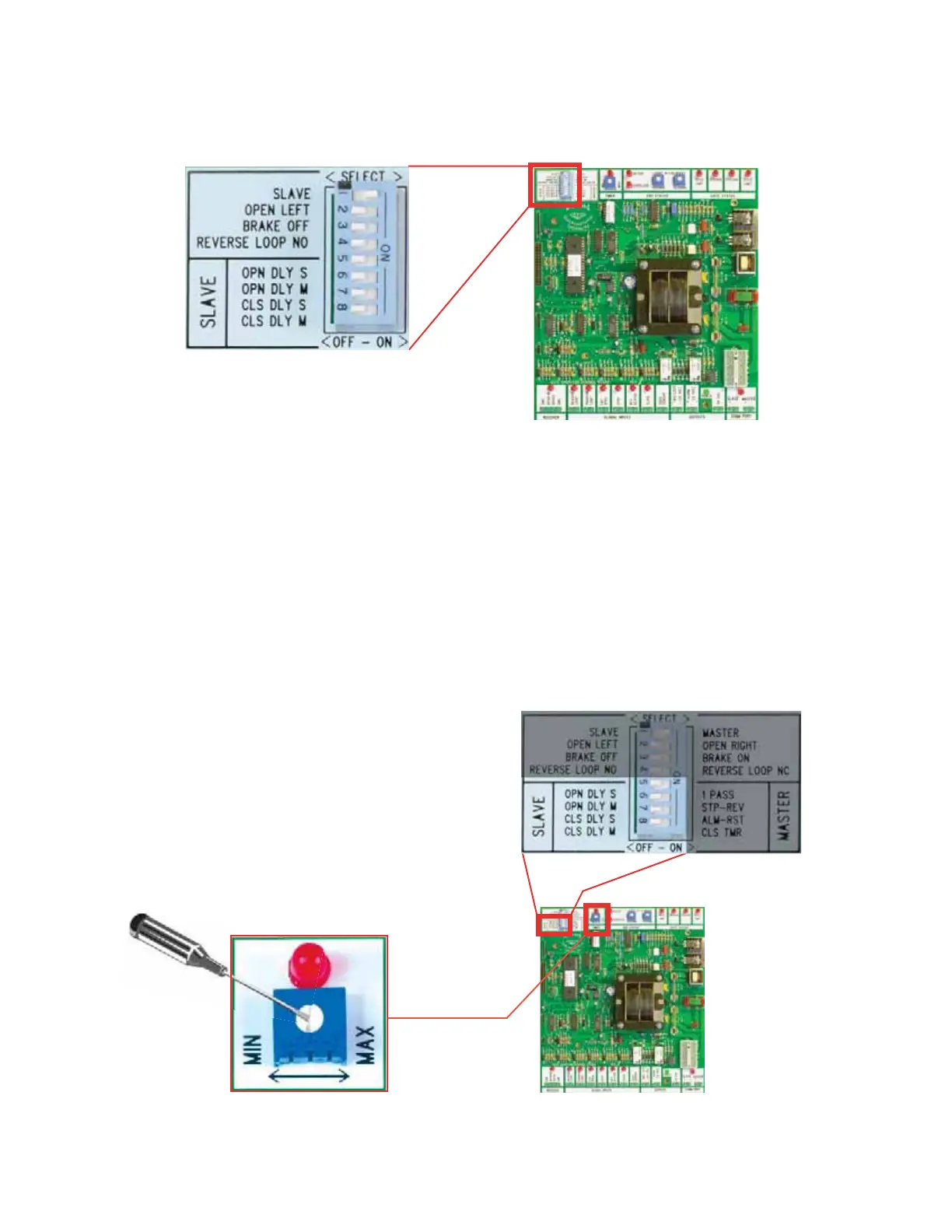
Slave Control Options
____________________
Selectin
The Dela
Function
The Ea
le "Diamond" Control board was uniquel
desi
ned to allow the slave control to
communicate to the master board all of the "Open-Dela
" and "Close Dela
" functions.
If no dela
functions are needed, switches 5 throu
h 8
must be in the off
osition.
Settin
The Open Dela
Function
witches 5
6:
pen Dela
lave
n
-
electin
th
switch to the "on" position dela
s the Slave
Sw. 5
or Maste
Sw. 6
operator b
1 1/2 seconds on the open c
cle. This
is useful with ma
netic lock applications.
Settin
The Close Dela
Function
Switches 7 & 8: Close Dela
Master
On/Off
- Selectin
th
switch to the "on" position dela
s the Slave
Sw. 7
o
Master
Sw. 8
operator b
1 - 6 seconds on the close c
cle
ad
ustable b
the Slave Timer shown below
.
LAVE TIME
Diamond Control Board
Distributed by AFW Access Systems • www.AnchorMiami.com/afwas
(14)
wi
h #
must be set to the
lave
or to the "off" position.
Switch #2 must be set to the "open
left" or to the "open right" position.
Switch #3 brake on / off.
Switch #4 Not in use.


 To Next Page