- 19 -
3.4 Navigating LCD Screens
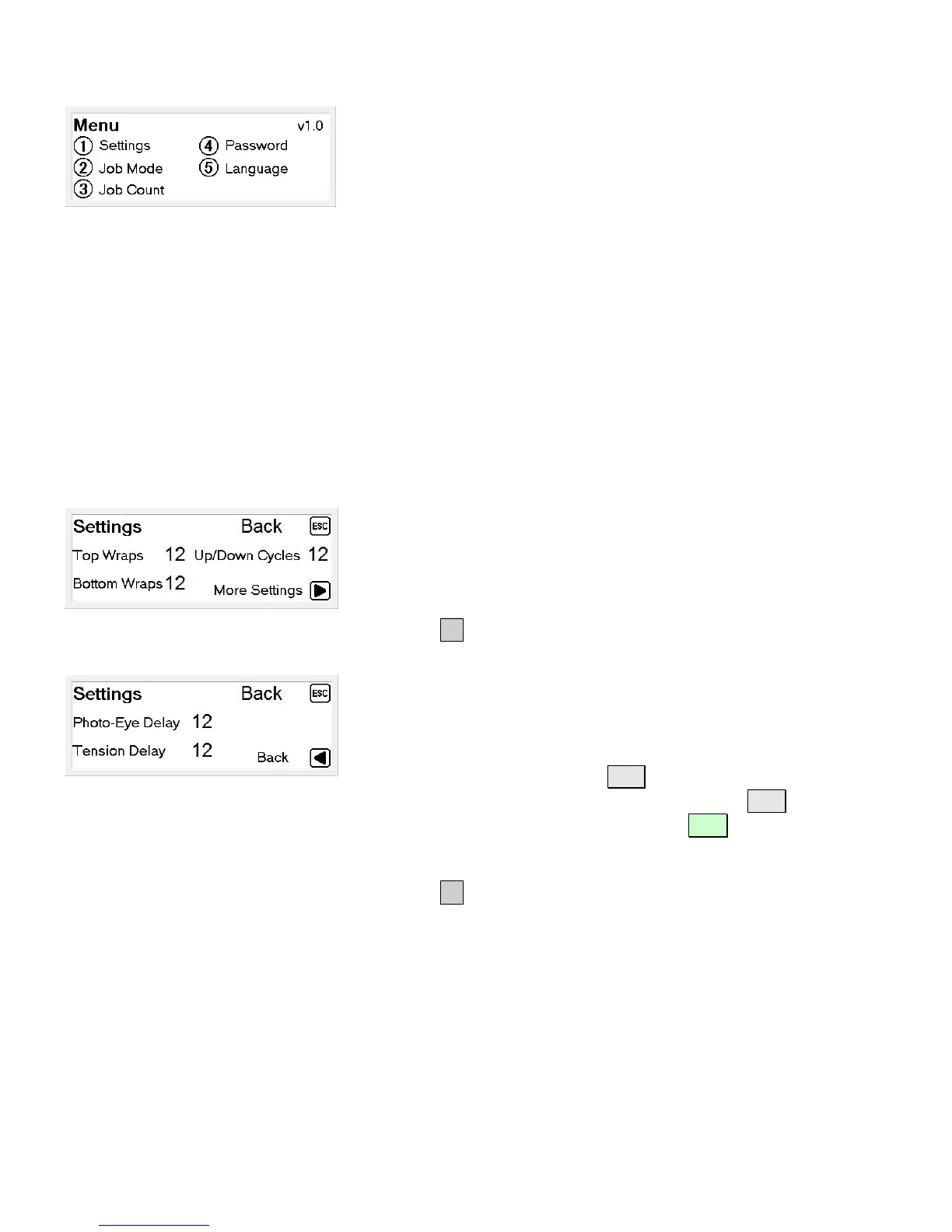
Menu
From this screen, you can navigate to;
① Settings
Machine settings and delay timers
② Job Mode
Auto, Manual, Single Wrap, Top Wait, Slow Wrap
③ Job Count
View number of completed job cycles have been run for the
shift and cumulative total.
④ Password
Set machine password.
⑤ Language
Change menu language.
Settings – page 1
From this screen, you can set the number of wraps to complete
at the top and bottom of the load. Additionally, the number of
up/down cycles can be set from this screen.
Press the ► button to view page 2.
Settings – page 2
From this screen, you can change how far past the top of the
package the film will be applied.
To change the settings, press SET, enter the amount of time in
tenths of a second (ie; 15=1.5 seconds). Press SET , enter a
value for the highlighted item and press ENT to save and move
the cursor to the next field.
Press the ◄ button to view page 1.


 To Next Page