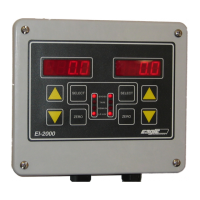
EI-1000 & 2000: Setup, Calibration and Troubleshooting.
Page 11 of 19
Changing configuration parameters:
EI-1000: Press and hold [SELECT] + [RIGHT ARROW] for greater than three seconds.
EI-2000: Press and hold [LEFT SELECT] + [RIGHT SELECT] for greater than three seconds.
The display will show “CFG” (EI1000) or “SEL CFG” (EI2000). Press SELECT
(1000) or the right SELECT (2000). The display will alternate showing P001
and a number.
Faster! If the cover is open close dip switch #1 to enter the configuration mode. Open it when
done to save any changes and return to the weight reading.
EI-1000 only:
• Use the UP/DOWN arrows to select the parameter. When you stop
using the arrows the display will alternate between the parameter and
its value.
• Press SELECT. The value will flash. Use the UP/DOWN arrows to
change it to the new value.
• Press SELECT to save the change. The display will go back to
alternating between the parameter and its’ value.
• Use the UP/DOWN arrows to go to another parameter if needed.
• When done press the arrow that points to the right twice. The display
will return to the weight reading.
EI-2000 only:
• Use the left UP/DOWN arrows to select the parameter number in the left
display.
• Use the right UP/DOWN arrows to change the value in the right display.
• When done, press the left SELECT twice to return to the weigh readings.
Turning off auto zeroing:
• Enter the configuration as shown above.
• Use the UP arrow to get to P113.
• EI-1000 - Press SELECT and use the down arrow to change the value to
OFF. Press SELECT again.
• EI-2000 - Use the right DOWN arrow to change the value to OFF.
• Exit the configuration as shown above.



 To Next Page