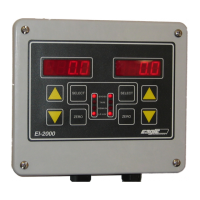
DIP SWITCH FUNCTION SUMMARY
S1-1 S1-2 OPERATION/SETUP
OFF OFF Normal operation (this is the normal setting of these switches)
ON OFF Access configuration mode
OFF ON Access analog output (4-20mA) test and calibration
ON ON Access scale diagnostic and advanced calibration parameters
Note: The calibration DIP switch will override the OPERATION/SETUP switches.
S1-3 WEIGH UNITS
OFF Pound (lb) scaling
ON Kilogram (kg) scaling
S1-4 CALIBRATION
OFF Normal operation (this is the normal setting for this switch)
ON Calibrate scale w/ dead zero
MESSAGES
DISPLAY
EI-1000
DISPLAY
EI-2000
DESCRIPTION
nO O nO O
No zero – The scale cannot be zeroed since the weight exceeds
the value set by the “Push to Zero/Auto-zero PTZ/AZ maximum
range” parameter (Px14).
FACTRY FACTORY
Loading factory default, which is initiated by the user
AUtO.Ld AUtO.LOAd
Automatically loading default configuration & calibration
Add Lb
Add KG
Add
Add more weight to the scale before trying to adjust gross weight
A OL A OL
Scale input positive overload
-A OL -A OL
Scale input negative overload
FAIL.AD FAIL.AD
*Channel 1 & 2 A/D hardware failure.
IIC.Err IIC.Err
*IIC bus error
EE.Err EE.Err
*EEPROM device was not found
* Hardware failure: Return the EI-1000/EI-2000 to factory for service.



 To Next Page