22
mode
8 Faults mode
Working mode displays
FAULT, numerical
value area displays the
corresponding error
Long
beep
Flash
always
/
Flash
always
Note:
End user need to provide below information when require to maintain the UPS.
UPS Model No. & Serial No.
Date of fault occurrence.
Fault details (LCD status, noise, AC power situation, load capacity, battery capacity
configuration ect.)
Table 3: Alarm code display
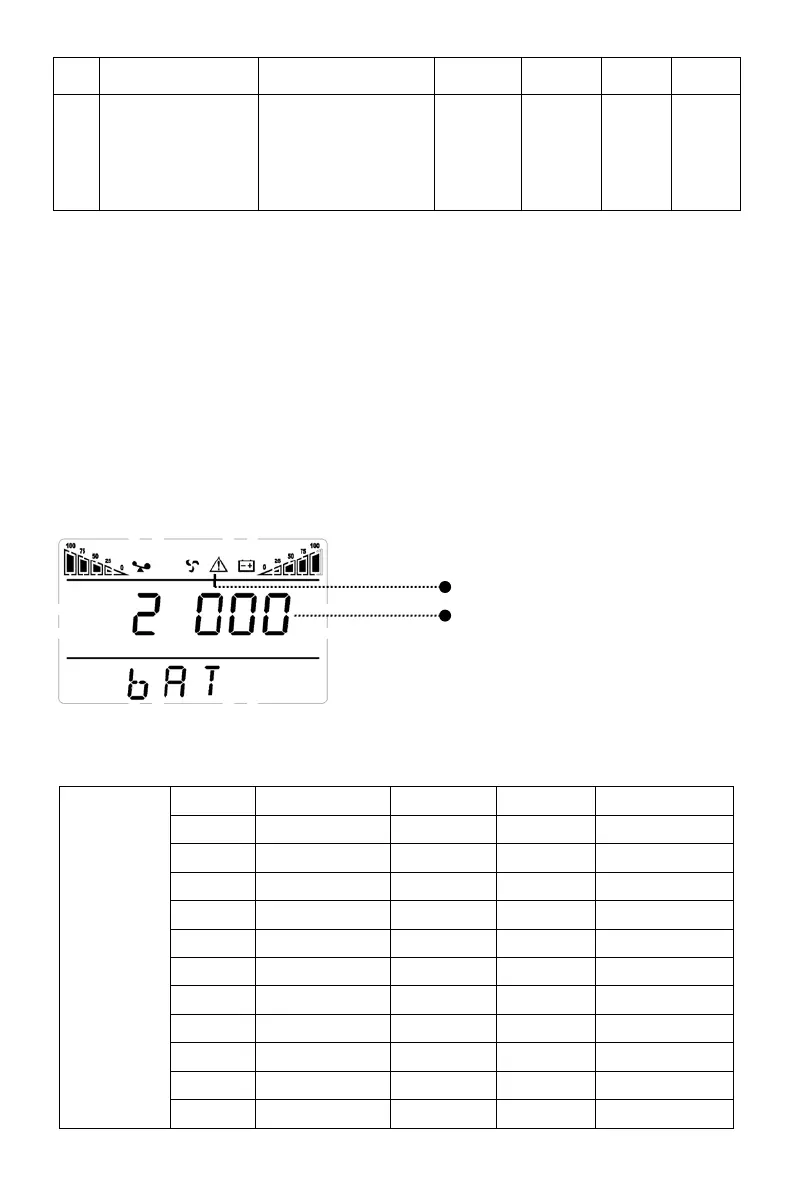
The alarm code will be displayed in four digital tubes on the right of the numerical part
of the LCD screen (red mark), as shown below:
The alarm truth table during operations is shown as below:
‘●’ signifies the alarm occurs, blank signifies no alarm appears
The first
digital tube
from right to
left
Display
Bypass lost
Remote
overload
Battery
0
1 ●
4 ●
5 ● ●
6 ● ●
7 ● ● ●
9 ● ●
A ● ●
Alarm code
Alarm icon



 To Next Page