EasyManua.ls Logo

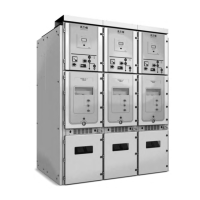
Eaton Power Xpert UX 24 - User Manual

Eaton Power Xpert UX 24
65 pages
Print Icon
To Next Page IconTo Next Page
Loading...
User manual Power Xpert
®
UX
Power Xpert
®
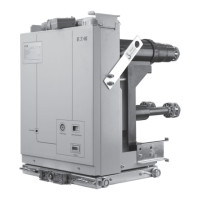
UX with W-VACi circuit breaker (up to 24 kV)
Air Insulated Medium-voltage switchgear

Table of Contents

Questions and Answers

  • A
    Angela KimAug 19, 2025
    What to do if the circuit breaker won't rack in or out on my Eaton Industrial Electrical?
    • J
      John SmithAug 20, 2025
      If the circuit breaker won't rack in or out of the panel and the racking handle seems jammed, it could be due to the carriage electro-mechanical interlock being fitted without the 58-pin socket being plugged in, or the absence of control voltage. Connect the 58-pin socket and apply the appropriate control voltage to resolve this.
  • T
    Taylor BryantAug 21, 2025
    What to do if the circuit breaker won't open or close on my Eaton Power Xpert UX 24?
    • L
      Lisa KingAug 21, 2025
      If the circuit breaker fails to open or close when given an electrical command or when the mechanical buttons on the door are pushed, it might be because the breaker mechanism electro-mechanical interlock is fitted but the 58-pin socket isn't plugged in, or there's no control voltage present. To fix this, connect the 58-pin socket and apply the necessary control voltage.
  • M
    Matthew SmithAug 23, 2025
    Why is there high temperature at cable connections in my Eaton Industrial Electrical?
    • M
      Madison CummingsAug 25, 2025
      If you find high temperature at cable connections, it's likely due to a loose bolted joint at the cable connection. Check the bolted joint to ensure it's tightened to the correct torque. Clean any connections that seem suspect, and then securely tighten the bolt.
  • M
    Mr. Zachary RobertsAug 26, 2025
    Why is auxiliary voltage often interrupted in my Eaton Power Xpert UX 24 Industrial Electrical?
    • A
      Amy ScottAug 26, 2025
      If the auxiliary voltage is often interrupted by the protection device, it's likely due to poor insulation. In this case, you should check the insulation.
  • E
    Elizabeth HansonAug 27, 2025
    What to do if the withdrawable unit won't move from ‘TEST’ to ‘Service/Connected’ position in my Eaton Industrial Electrical?
    • R
      Richard OliverAug 27, 2025
      If the withdrawable unit will not move from the ‘TEST’ to ‘Service/Connected’ position, it could be because the earthing switch is in the ‘On’ position, or the withdrawable unit itself is ‘On’/’Closed’. To resolve this, turn the earthing switch ‘Off’ and also turn the withdrawable unit ‘Off’/’Open’.
  • D
    Donald StephensAug 29, 2025
    What to do if the withdrawable unit will not move from ’Service/Connected’ to ‘Test’ position in my Eaton Power Xpert UX 24?
    • A
      Angela BowmanAug 29, 2025
      If the withdrawable unit will not move from the 'Service/Connected' to 'Test' position, it's likely because the unit is in the ‘On’/’Closed’ position. To fix this, turn the unit ‘Off’/’Open’.
  • N
    Nicole FranklinAug 31, 2025
    What to do if the withdrawable unit cannot be inserted into the panel of my Eaton Industrial Electrical?
    • A
      Andrea PatelSep 1, 2025
      If the withdrawable unit cannot be (completely) inserted into the panel, it could be due to the height of the truck not being properly set or the unit being turned On/Closed Drive in the wrong position. Make sure to properly set the height of the transport trolley and turn the unit Off/Open Put drive in the correct position.
  • T
    Timothy MaddenSep 2, 2025
    What to do if the withdrawable unit will not move from ‘Test’ to ‘Insert/Withdrawn’ position in my Eaton Industrial Electrical?
    • T
      tiffany68Sep 2, 2025
      If the withdrawable unit will not move from ‘Test’ to ‘Insert/Withdrawn’ position, it’s because the unit is ‘On’. Turn the unit ‘Off’/’Open’ to solve this.
  • T
    Teresa AdamsSep 5, 2025
    What to do if the switch cannot be operated on my Eaton Industrial Electrical?
    • B
      Brian GuerraSep 5, 2025
      If the switch cannot be operated, it may be because the switch is not in the ‘TEST’ or ‘Service/Connected’ position, or the hand crank has not been removed. Put the switch into the correct position and remove the hand crank.
  • P
    peter09Sep 6, 2025
    What causes a fault during electrical switching on or off in my Eaton Industrial Electrical?
    • H
      hcampbellSep 7, 2025
      If you're experiencing a fault during electrical switching on or off, it might be due to auxiliary voltage being too low, a fault in the closing circuit (auxiliary contact), a burnt-out make coil or break coil, or the rotary spring not being charged or the spring-tensioning motor being faulty. Check the auxiliary voltage to begin troubleshooting.

Summary

Introduction

Safety Instructions

Provides essential safety guidelines for operating the switchgear.

What to Do in the Event of a Fire

Outlines procedures to follow in case of a fire incident.

Product Description

Equipment Safety

Covers safety provisions and directions for dealing with them.

Safe Operation

Discusses competence and conditions for safe operation.

Safety Features

Lists safety features provided with the switchgear.

Execution of Work

Provides safety precautions for carrying out work on the equipment.

System Assembly

System Assembly

Instructions for assembling the switchgear system.

Preparations

Steps to prepare the switchgear for installation.

Installation of the Switchgear

Provides instructions for installing the switchgear sections.

Main Busbar

Explains the coupling procedure for main busbars.

Connecting a Main Cable

Procedure for connecting a main power cable.

System Operation

Mechanical Operation Door Closed

Manual operation of the circuit breaker with the door closed.

Electrical Operation

Procedures for electrical operation from the LV control panel.

Unit Insertion and Withdrawal

Instructions for inserting and withdrawing withdrawable units.

Standard Interlocking

Explains the three interlocked positions for a unit.

Inserting a Unit

Step-by-step guide to inserting a unit into the panel.

Door Interlock Mechanism

Details the mechanism that interlocks the door and unit.

Withdrawing a Unit

Instructions for withdrawing a unit from the panel.

Locking the Shutters

Procedure for locking shutters for safety.

Earthing

General instructions for fitting a safety earth.

Cable Door Interlock Mechanism

Describes the interlock between the cable door and earthing switch.

Switching On;Off the Earthing Switch

Procedures for switching the earthing switch ON and OFF.

Earthing Busbar;Cable Using Withdrawable Earthing Unit

Instructions for earthing using a withdrawable unit.

Shutter Lifter Truck

Instructions for using the shutter lifter truck.

System Commissioning and Decommissioning

Acceptance Testing

Details the steps involved in acceptance testing.

Dismantling

Instructions for safely dismantling the switchgear.

System Inspection, Maintenance and Repair

Periodic Check

Details the steps for performing periodic checks.

Maintenance

Describes maintenance procedures.

Fault Diagnosis

Provides guidance on diagnosing faults.

What to Do in the Event of a Fault

Steps to take when a fault occurs in the system.

Troubleshooting Table

A table listing common symptoms, causes, and solutions for faults.

Eaton Power Xpert UX 24 Specifications

General IconGeneral
ModelPower Xpert UX 24
Frequency50/60 Hz
Operating Temperature-5°C to +40°C
HumidityUp to 95% non-condensing
DimensionsVaries by configuration
WeightVaries by configuration
Cooling MethodNatural convection

Related product manuals