(Figure 10.4).
NOTE: Each alarm only lasts for approx one minute, all the above functions for motion detection triggered
only.
REC Automatically and Save to PC
When you enable motion detect and open the camera monitoring page on the PC, if there is an alarm
triggered, REC will start automatically for several seconds and save to the PC.
New Feature: Start the motion detection compensation and Alarm notification by Http.
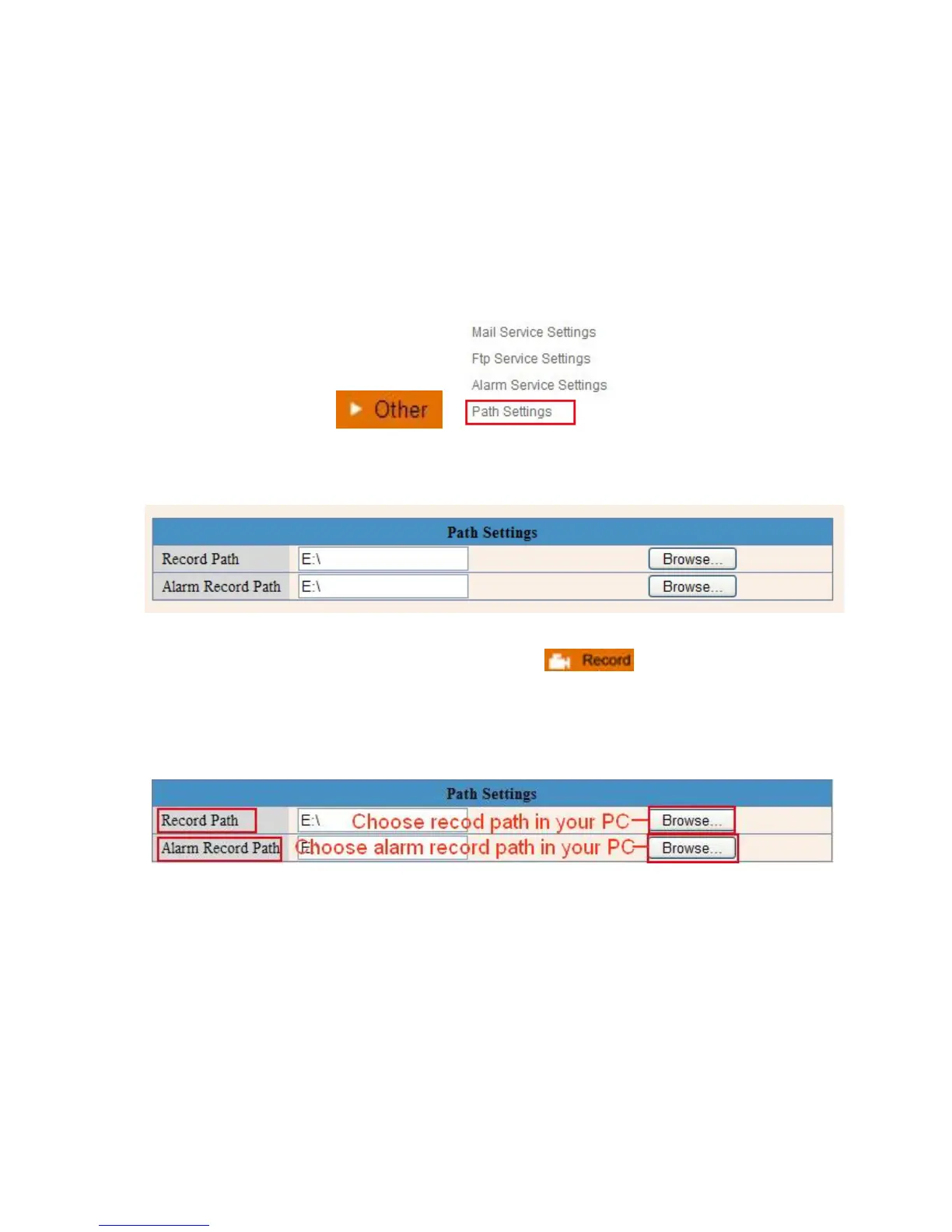
3.20 Path Settings
Figure 10.8
Here you can set record path and alarm record path for the camera.
Figure 10.9
Record Path: Here you can set the manually record path. Click then start manual recording,
the record file will be saved to the specified path you set here.
Alarm Record Path: Here you can set the alarm record path. When motion is detected, and record enabled,
it will start alarm record automatically, the record file will be saved to the specified path you set here.
Figure 11.0
NOTE: If you couldn’t set the path here in Windows 7 or Vista, please do it as below:
Windows 7 or Vista’s security level is higher than Windows XP, for “Path Settings”
1. User could add the Device IP address to the IE’s ‘Trusted sites’ first. The step is:
“IE browser→Tool→Internet Proper→Security→Trusted sites→Sites→Add”.
2. You can also run the IE as administrator, input the IP address of the camera manually. (Figure 11.1).



 To Next Page