March 2013 20 IPV58
Figure 3.1
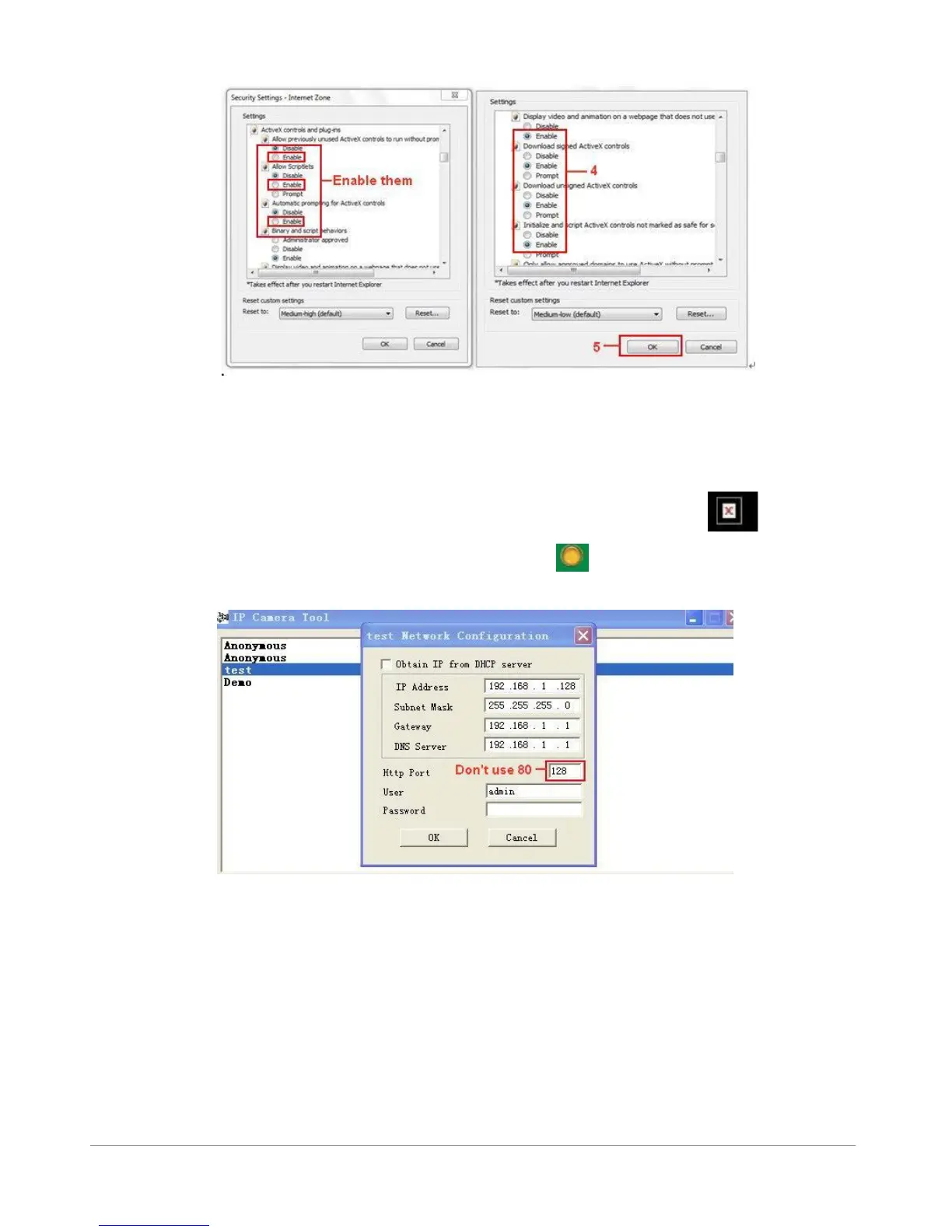
In addition: you can also click “Start” menu->“Internet Explorer”, choose “Internet attributes “ to
enter, or via “Control Panel” ->“Internet Explorer”, enter to Security setting.
If you allowed the ActiveX running, but still could not see live video, only a Red Cross in the center
of the video, and the device status light change to yellow color , not green, please change another
port number to try. Don’t use port 80, use other port such as 128, 1008 etc.
Figure 3.2
NOTE: Make sure that the firewall or anti-virus software doesn’t block the software or ActiveX. If you
couldn’t see live video, please close your firewall or anti-virus software, and try again.
1.8.2 For Safari, Firefox, Google Browser
Choose Server Push Mode (For Safari, Firefox, Google Browser), and sign in.
Server Push Mode doesn’t support ActiveX, so some functions are not available, such as Play, Stop,
Record, etc. if you want to use these functions, please use IE browser.



 To Next Page